Sierra Wireless Halts Production After Ransomware Attack

Sierra Wireless Halts Production After Ransomware Attack

A leading IoT manufacturer has been forced to halt production of devices after suffering a major ransomware attack.

In a statement issued yesterday, Sierra Wireless claimed the attack struck over the weekend, on March 20.

“The company’s website and other internal operations have also been disrupted by the attack. The company believes it will restart production at these facilities and resume normal operations soon,” it said.

“In the meantime, Sierra Wireless asks its customers and partners for their patience as it seeks to remediate the situation.”

At the time of writing, the firm’s website was indeed down ‘for maintenance.’

The British Columbia-based manufacturer, which claims to be the world’s leading IoT solutions provider, said its IT team reacted quickly to contain the attack.

In partnership with third-party experts, they are currently working to bring internal systems back online, which would indicate that the firm isn’t paying a ransom.

“At this time, Sierra Wireless believes the impact of the attack was limited to Sierra Wireless systems, as the company maintains a clear separation between its internal IT systems and customer facing products and services,” the firm noted.

There’s no information as yet as to whether the attackers sought to steal data during their raid.

However, in a sign of the financial impact ransomware can have on victim organizations, the wireless equipment-maker said it was withdrawing the first quarter financial guidance it provided last month.

In fact, the list of firms suffering multimillion-dollar losses from ransomware continues to grow. Earlier this month, US healthcare provider Universal Health Services (UHS) revealed that an attack last autumn may end up costing the company as much as $67m in lost revenue, operational disruption and IT overtime.

Other ransomware victims to have suffered major losses include Cognizant ($70m), Sopra Steria ($60m) and Norsk Hydro ($41m).

Premium Domain Names – transcom.uk
Transcom ISP – The UK’s Best Business ISP
DoubleCheck any website at doublecheck.uk

Determining Key Shape from Sound

It’s not yet very accurate or practical, but under ideal conditions it is possible to figure out the shape of a house key by listening to it being used.

Listen to Your Key: Towards Acoustics-based Physical Key Inference

Abstract: Physical locks are one of the most prevalent mechanisms for securing objects such as doors. While many of these locks are vulnerable to lock-picking, they are still widely used as lock-picking requires specific training with tailored instruments, and easily raises suspicion. In this paper, we propose SpiKey, a novel attack that significantly lowers the bar for an attacker as opposed to the lock-picking attack, by requiring only the use of a smartphone microphone to infer the shape of victim’s key, namely bittings(or cut depths) which form the secret of a key. When a victim inserts his/her key into the lock, the emitted sound is captured by the attacker’s microphone.SpiKey leverages the time difference between audible clicks to ultimately infer the bitting information, i.e., shape of the physical key. As a proof-of-concept, we provide a simulation, based on real-world recordings, and demonstrate a significant reduction in search spacefrom a pool of more than 330 thousand keys to three candidate keys for the most frequent case.

Scientific American podcast:

The strategy is a long way from being viable in the real world. For one thing, the method relies on the key being inserted at a constant speed. And the audio element also poses challenges like background noise.

Boing Boing post.

Premium Domain Names – transcom.uk
Transcom ISP – The UK’s Best Business ISP
DoubleCheck any website at doublecheck.uk

Tax Season is Here: Avoid These Common Scams Targeting Canadians  

Tax Season is Here: Avoid These Common Scams Targeting Canadians

Tax return preparation might be a little more complicated this year than usual for many Canadians with millions receiving Canada Emergency Response Benefit (CERB) payments and about 40% of the Canadian labor force turned to self-employment options to help them financially weather the pandemic storm.

Where there’s money and uncertainty, you’re likely to find scammers. After all, scammers tend to capitalize on uncertainty and use it as the entry point for their attacks. Whether it’s through a phishing email with a phony notice of reassessment, a text message threatening arrest, or a fake phone call from the Canada Revenue Agency (CRA), hackers often employ elements of fear in their attacks. McAfee’s 2021 Consumer Security Mindset study revealed that roughly 2 out of 3 Canadians (65%) plan to do their taxes online in 2021, with 12% of them doing so for the first time. With the increase in activities online, consumers are potentially exposed to more digital risks and threats, and knowing how these hackers tend to work doesn’t mean you have to live in fear. To help you identify and avoid potential threats, let’s take a look at some of the most common scams that hackers use during tax season.

Phone scams

Phone scams take one of two primary forms:

  • Robocalls – Pre-recorded message by a person or a voice-to-speech app that allows scammers to reach thousands of potential victims. The message may direct the recipient to call a number or visit a site that will attempt to steal their personal or financial information. In some cases, it may direct them to a phony call center that will try to collect payment for a bogus debt.
  • Imposter calls – This occurs when a person posing as a CRA representative falsely claims that you owe money and demands that you make immediate payment. Scammers can take various approaches here, such as threatening arrest or license revocation. It’s important to note that the CRA will never resort to these tactics even if there is an issue with your tax return.

Some sophisticated scammers will weave stolen personal or financial data that they purchased on the dark web into their calls, such as bank or social insurance information. They intend to make their phony claims sound legitimate, hoping that an unsuspecting user will hand over their data or make a fraudulent payment.

So, what does a real call from the CRA entail? The CRA clearly outlines the reasons they’d be calling on their 2020 Tax Tips page and ways that you can follow up with the CRA to determine if a call is legitimate.

Email phishing scams

There are two instances where the CRA may contact you by email. One is during a telephone call or meeting with a legitimate CRA agent. The second is to send you a notification that you have a message or document for your review on a secure CRA site such as My Account, My Business Account, or Represent a Client. Anything else is likely a scam.

The one time where the CRA will send you an email containing links is if you have a call or meeting with an agent, as outlined above. Otherwise, you can be confident that an email with links is a scam.

Text and instant message scams

This one is relatively straightforward: the CRA will never contact you via text, instant messaging, Facebook, WhatsApp, or any similar messaging service. If you receive such a message, delete it, and don’t click on any links embedded within it.

Tax payment scams

In many cases, hackers will aim to separate you from your money by demanding immediate payment in some form or other. They may request payment in pre-loaded debit cards, gift cards, e-transfer, or even bitcoin. Know that the CRA will never request payment in any of those forms.

When in doubt, ask yourself why this email or phone caller is demanding that you act immediately. Have you filed on time? Have you received written notice from the CRA already? Do you owe an installment payment?  If the person contacting you leaves you unsure, you can confirm that the contact was legitimate by calling the CRA.

Stay protected from fraud and theft this tax season

While recognizing the signs of tax-related fraud can help ease the burdens associated with these schemes, there are multiple steps you can take to prevent becoming a victim of tax scams in the first place. Follow these tips to stay on top of your tax return while securing your digital life:

Use password protection as a first line of defense

Devices benefit from physical security. This is as simple as locking your smartphones, tablets, and computers with a PIN or password. Should one of those devices get lost or stolen, a lock provides a barrier for those who might try to access your personal and financial information on them.

Use a holistic  security solution

Protecting your devices with comprehensive security software can help block the phishing emails and suspicious links that make up many of these tax attacks. Likewise, it can further protect you from ransomware attacks, another type of tax scam on the rise, where crooks hold your data hostage for a price. All in all, security software is always a smart move—tax time or any time.

Dispose of your old technology and data securely

Consider what’s on your old computer hard drive or stored away on your phone. Old devices tend to contain loads of precious personal and financial information. Look into the e-waste disposal options in your community that will recycle your old technology and do so securely.

Look after your physical security as well

While so many of our finances are handled electronically today (taxes included), we’d be remiss if we didn’t talk about physical security as well. Mail and porch theft still occur, which is one more way a thief can steal your personal and financial information to use in a scam. A locking mailbox is a purchase you may want to consider if you don’t have one already.

Think you’ve been a victim of a tax scam or identity theft?

Recognizing the signs of tax-related fraud could allow you to take action and significantly suppress the repercussions. If you suspect you’ve fallen victim to fraud or believe that you’ve been tricked into giving away personal information as part of a scam, contact your local police service and make a report.

By staying proactive and vigilant, you’ll be in a better position to protect your identity and your data—and live your digital life with safety at the forefront.

Stay Updated 

To stay updated on all things McAfee and on top of the latest consumer and mobile security threats, follow @McAfee_Home  on Twitter, subscribe to our email, listen to our podcast Hackable?, and ‘Like’ us on Facebook.


The post Tax Season is Here: Avoid These Common Scams Targeting Canadians   appeared first on McAfee Blogs.

Premium Domain Names – transcom.uk
Transcom ISP – The UK’s Best Business ISP
DoubleCheck any website at doublecheck.uk

How to Stay Connected and Protected in a Remote Work Environment

How to Stay Connected and Protected in a Remote Work Environment  

Advancements in cloud solutions and collaboration tools in recent years, coupled with the necessity of going remote due to the pandemic, have empowered today’s workforce to choose where they want to work. While the ability to work from anywhere—home, the library, coffee shops or even the beach– gives employees increased flexibility, the shift from the traditional office setting has exposed security and logistical concerns. Remote workers often access sensitive information from unsecured devices and networks, which can result in compromised data and failed privacy compliance.

Canada’s federal government introduced a bill in November 2020 that proposed stringent privacy protection laws after realizing the security threats of a distributed workforce. It’s essential for remote workers to abide by these laws and practice online safety to minimize the cybersecurity risks to their organizations.

It’s undeniable that the freedom to work from anywhere is an employee perk that organizations must adapt to. Here’s a breakdown of some of the risks of working remotely and what companies can do keep their sensitive information secure, even when outside the safety of their four walls:

Know the Risks of Online Connectivity and Collaboration

Office closures and working-from-home mandates due to COVID-19 permanently changed the way we look at workplace connectivity.  A recent Fenwick poll among HR, privacy, and security professionals across industries noted that approximately 90% of employees now handle intellectual property, confidential, and personal information on their in-home Wi-Fi as opposed to in-office networks. Additionally, many are accessing this information on personal and mobile devices that often do not have the same protections as company-owned devices. The elevated number of unprotected devices connected to unsecured networks creates weak areas in a company’s infrastructure, making it harder to protect against hackers.

One technology your organization should be especially diligent about is video conferencing software. Hackers can infiltrate video conferencing software to eavesdrop on private discussions and steal vital information. Many disrupt video calls via brute force, where they scan a list of possible meeting IDs to try and connect to a meeting. Others seek more complex infiltration methods through vulnerabilities in the actual software. Up until recently, Agora’s video conferencing software exhibited these same vulnerabilities.

Hackers will usually try to gain access to these network vulnerabilities by targeting unsuspecting employees through phishing scams which can lead to even greater consequences if they manage to insert malware or hold your data for ransom.  Without proper training on how to avoid these threats, many employees wouldn’t know how to handle the impact should they become the target.

Take Greater Care When Working Remotely

Whether you’re connecting from home or from another remote location, it’s critical to practice the same level of care as you would in the office. Here are some quick and essential security safety habits every remote employee should practice.

Don’t Go Phishing

Phishing is one of the most common methods hackers will deploy to target unsuspecting employees to access sensitive data. In fact, over 63% of Canadian IT executives in a recent poll indicated that ransomware and phishing were the top security concerns for their organizations. Here are some ways you can spot a phishing scam:

  • If you receive an email, text, or phone call prompting you to take immediate action and log in to an account, make a payment, confirm personal information, click on a suspicious link
  • If the link doesn’t match the actual text in an email (hover over it with your cursor to check)
  • The message is poorly written or the company logo looks odd
  • The name of the sender doesn’t match the email domain or the email domain contains errors

Adhere to company policy and standards

Ensure you understand your company’s policies and confidentiality agreements when it comes to sharing files, storing documents, and other online communications. Use company-approved cloud applications that follow strict security standards to avoid inadvertently exposing sensitive company information through unsecured means. This measure can also apply when using video conferencing software. Limit the amount of sensitive information shared via video conferencing platforms and through messaging features just in case uninvited hackers are eavesdropping.

Separate personal and business devices 

We may have brought work home with us, but nonetheless, we must strive to maintain a work/life balance and set boundaries between our personal and work life. Setting these boundaries makes it easier to separate the technology we use in our life as well. Avoid sharing your company’s devices with family members who are not aware of the best security practices, especially children. Also, keep personal accounts separate from company accounts to prevent sharing information through personal channels.

Leverage security software tools

Given the flexibility to truly work from anywhere, ensure you are connected to a secure network when not connected to your home’s password-protected Wi-Fi. When connecting to an unfamiliar network, always use a VPN to encrypt data and safely share files across the internet. Take preemptive measures to mitigate exposure by installing antivirus software and firewall protection to scan files and systems and protect against harmful viruses regularly.

Make Security a Priority When Working Remotely 

While the COVID pandemic has sparked a remote work movement that has changed the way we look at the conventional workplace—introducing greater flexibility and the opportunity to work from anywhere—remote work is well on its way to becoming a permanent fixture in the lives of many. However, the number of employees dispersed across cities and even countries have made it more difficult to secure endpoint devices such as laptops and mobile devices. Moreover, the risk posed by unsecured networks only increases the vulnerabilities of remote workplaces. As more workplaces embrace the benefits of a fully remote workforce, we will need to give more thought to how we can facilitate a secure workplace that is collaborative yet protected. By increasing awareness of potential cyber threats and enhancing security standards for devices and home networks, we can begin to create a safer and more efficient workplace.

To stay updated on all things McAfee and on top of the latest consumer and mobile security threats, follow @McAfee_Home on Twitter, subscribe to our email, listen to our podcast Hackable?, and ‘Like’ us on Facebook.


The post How to Stay Connected and Protected in a Remote Work Environment appeared first on McAfee Blogs.

Premium Domain Names – transcom.uk
Transcom ISP – The UK’s Best Business ISP
DoubleCheck any website at doublecheck.uk

Phish Leads to Breach at Calif. State Controller

A phishing attack last week gave attackers access to email and files at the California State Controller’s Office (SCO), an agency responsible for handling more than $100 billion in public funds each year. The phishers had access for more than 24 hours, and sources tell KrebsOnSecurity the intruders used that time to steal Social Security numbers and sensitive files on thousands of state workers, and to send targeted phishing messages to at least 9,000 other workers and their contacts.

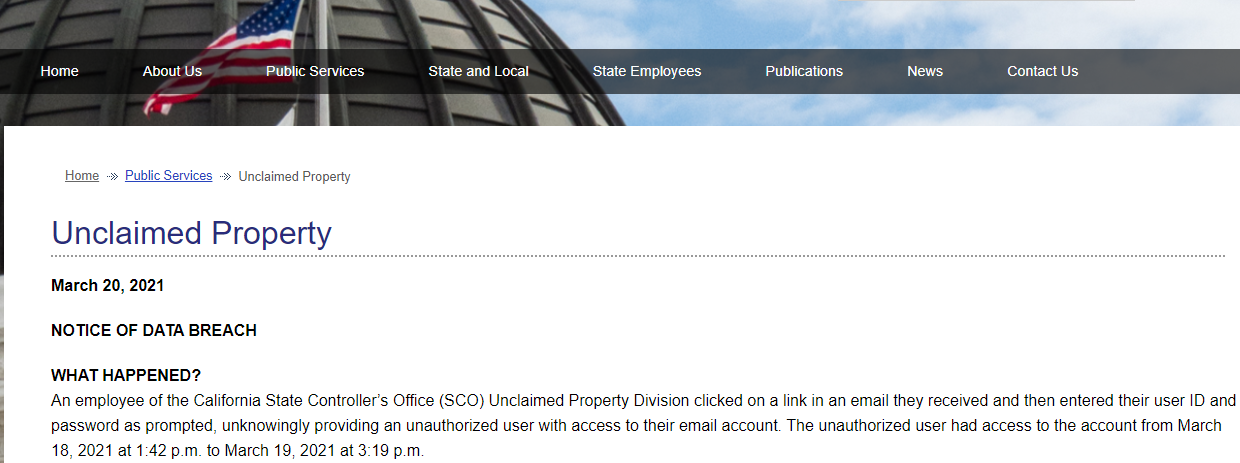
A notice of breach posted by the California State Controller’s Office.

In a “Notice of Data Breach” message posted on Saturday, Mar. 20, the Controller’s Office said that for more than 24 hours starting on the afternoon of March 18 attackers had access to the email records of an employee in its Unclaimed Property Division after the employee clicked a phishing link and then entered their email ID and password.

“The SCO has reason to believe the compromised email account had personal identifying information contained in Unclaimed Property Holder Reports,” the agency said, urging state employees contacted by the agency to place fraud alerts on their credit files with the major consumer bureaus.  “The unauthorized user also sent potentially malicious emails to some of the SCO employee’s contacts.”

The SCO responded in an email that no state employee data was compromised.

“A single employee email account was briefly compromised by a spear phishing attack and promptly disabled,” SCO spokesperson Jennifer Hanson said. “SCO has notified the employee’s contacts who may have received a potentially malicious email from the unauthorized user. SCO team members have identified all personal information included in the compromised email account and begun the process of notifying affected parties. The Controller is going over and beyond the notification requirements in law by providing both actual mailed notification and substitute notification in an effort to ensure the broadest possible notification.”

A source in an adjacent California state agency who’s been tracking the incident internally with other employees says the SCO forgot to mention the intruders also had access to the phished employee’s Microsoft Office 365 files — and potentially any files shared with that account across the state network.

“This isn’t even the full extent of the breach,” said the California state employee, who spoke on condition of anonymity.

The source claims the intruders stole several documents with personal and financial data on thousands of state employees, and then used the phished employee’s inbox to send targeted phishing emails to at least 9,000 California state workers and their contacts. In a follow-up response to those claims, the SCO said its “IT security staff were able to determine — based on the same logs that identified the intrusion — that no access was made to any Office 365 files other than the employee’s mailbox.”

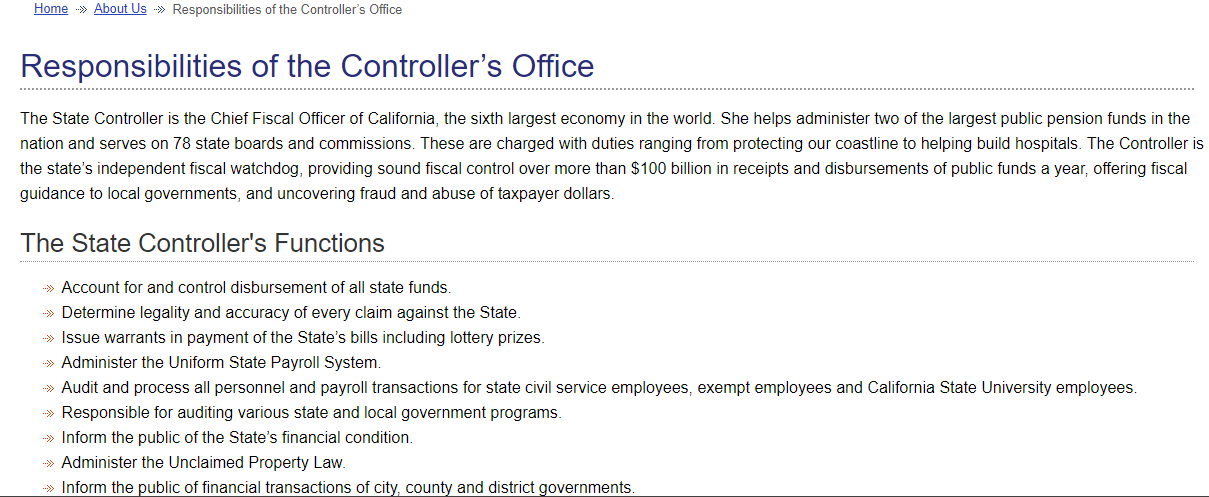
The State Controller is the Chief Fiscal Officer of California, the sixth largest economy in the world. Source: sco.ca.gov.

Many attackers can do a great deal of damage with 24 hours of access to a user’s account. And spear-phishing others that frequently interact with the SCO via email could land the bad guys even more access to state systems. The SCO holds an enormous amount of personal and financial information on millions of people and companies that do business with or in the state.

Organizations hoping to improve internal security often turn to companies that help employees learn how to detect and dodge email phishing attacks — by sending them simulated phishing emails and then grading employees on their responses. The employee said that until very recently California was using one such company to help them conduct regular employee training on phishing.

Then in October 2020, the California Department of Technology (CDT) issued a new set of guidelines that effectively require all executives, managers and supervisors to know all of the details of a phishing exercise before it occurs. Which suggests plenty of people who definitely should get phish tested along with everyone else won’t get the same ongoing training.

“Meaning, such people will not be tested ever again,” the state agency source said. “It’s utterly absurd and no one at CDT is taking ownership of this kludge. The standard was also written in such a way to effectively ban dynamic testing like you see in KnowBe4, where even an administrator won’t know what phishing template they might receive.” [Full disclosure: KnowBe4 is an advertiser on this site].

The CDT issued the following statement in response: “SCO informed CDT they have contained the phishing attack. The characterization of the CDT phishing exercise standard is incorrect. Before phishing tests in any state agency are performed, internal business units are advised to coordinate to avoid disruption or operational impact to public services. Supervisors and managers are routinely tested without advance notice to ensure employees at every level are aware of security hazards and can learn how to avoid them.”

Update, 3:44 p.m. ET: Added comment and response from the California SCO.

Update, 5:38 p.m.  ET: Added additional comment from SCO about cloud access.

Update, 6:58 p.m. ET: Added response from CDT.

Premium Domain Names – transcom.uk
Transcom ISP – The UK’s Best Business ISP
DoubleCheck any website at doublecheck.uk