Safeguarding Those Who Served: Cybersecurity Challenges for Veterans

As we honor Veterans Day, it’s crucial to recognize not only the sacrifices made by those who served but also the unique cybersecurity challenges they face in today’s digital age. Veterans, with their deep ties to sensitive military information and benefits, are increasingly being targeted by cybercriminals seeking to exploit their personal data. Seven in 10 military vets and active-duty service members have been a victim of at least one digital crime.

From phishing scams impersonating official VA communications to the risk of military identity theft, veterans encounter specific threats that require tailored cybersecurity awareness and precautions. By taking proactive steps, veterans can implement strong security practices to better protect their identities and enjoy a safer online experience.

Understanding the Risks

Veterans possess a wealth of sensitive information tied to their military service. This includes not only Social Security numbers, medical records, and details about deployments and benefits, but also personal histories that can include addresses, family information, and even details about combat experiences. Such comprehensive information is highly valuable to cybercriminals for various malicious activities, including identity theft and financial fraud.

Cybercriminals can exploit this data to impersonate veterans, gain unauthorized access to financial accounts, file false claims for VA benefits, or sell the information on the dark web. The repercussions of such breaches extend beyond financial loss, impacting veterans’ reputations, access to essential services, and overall peace of mind. Safeguarding this sensitive data is critical to ensuring veterans’ security and well-being in the digital age.

Common Threats Faced by Veterans

One of the primary threats that veterans encounter is phishing scams. These scams often impersonate official communications from the Department of Veterans Affairs (VA) or other military organizations. Cybercriminals use deceptive emails, text messages, or phone calls to trick veterans into revealing personal information or clicking malicious links that can compromise their devices.

Another prevalent danger is military identity theft, where criminals use stolen or fabricated military credentials to access benefits, obtain loans, or commit fraud in the veteran’s name. This type of identity theft can be particularly devastating, affecting not only financial stability but also the veteran’s reputation and access to crucial services.

Cybersecurity Awareness and Security Tips

In 2023, military consumers filed more than 93,000 fraud complaints, with imposter scams alone accounting for 42,766 cases, resulting in reported losses exceeding $178 million. To combat these threats, veterans must be equipped with robust cybersecurity awareness and practices:

  1. Social Media Caution: Avoid sharing specific details about military service, deployments, or personal schedules on social media. Cybercriminals can use this information to impersonate you or guess security questions for account access. Adjust privacy settings on social media platforms to restrict who can view your posts and personal information. Social Privacy Manager can help you adjust more than 100 privacy settings across your social media accounts in just a few clicks.
  2. Recognizing Phishing Attempts: Always verify the authenticity of emails or messages claiming to be from the VA or other military organizations before clicking on links or providing information. Official organizations typically do not request sensitive information via email or text.
  3. Use Multi-Factor Authentication: Secure online accounts by enabling multi-factor authentication (MFA) whenever possible. MFA adds an extra layer of security by requiring a second form of verification, such as a code sent to your phone or email, in addition to your password.
  4. Embrace Password Complexity: Create passwords that are at least 12 characters long and include a mix of uppercase letters, lowercase letters, numbers, and special characters. Avoid using easily guessable information like birthdates or common words. Use a reputable password manager to generate and store complex passwords securely.
  5. Regularly Monitoring Financial Accounts: Keep a close eye on bank statements, credit reports, and VA benefits statements for any unauthorized activity. Early detection can minimize the damage caused by identity theft. Setting up credit monitoring can also help you keep an eye out for unusual activity on your accounts.
  6. Automatic Updates: Enable automatic updates for operating systems, software applications, and antivirus programs to ensure you have the latest security patches and protections against vulnerabilities.
  7. Educating Family Members: Inform family members about the importance of cybersecurity practices, including recognizing phishing attempts and safeguarding personal information. Encourage family members to review and adjust privacy settings on their own social media accounts to limit exposure of personal information that could indirectly impact your security.
  8. Consider Identity Theft Protection: For increased peace of mind, consider investing in a McAfee+ Family plan which protects up to 6 members with identity and privacy protection, including 24/7 monitoring of your personal info with alerts if something requires your attention and award-winning antivirus security for all your devices​​.

What to do if you may have been exposed

If you think you have been the victim of identity theft, immediately take steps to protect yourself and your family:

  1. Place a Fraud Alert and Get Your Credit Reports: Contact a major credit bureau (Equifax, Experian, or TransUnion) to place a fraud alert on your credit report. This alert notifies creditors to take extra steps to verify your identity before opening new accounts in your name. Request and review your credit reports from all three bureaus to check for any unauthorized accounts or transactions.
  2. Notify Your Commanding Officer: If you are an active-duty service member, inform your commanding officer immediately. This step is crucial to prevent unexpected calls or actions related to fraudulent debts or activities that could impact your military status or security clearance. Your commanding officer can provide guidance and support in handling the situation within military protocols.
  3. File a Police Report: Contact your local law enforcement agency to file a report about the identity theft. Provide them with a copy of your Identity Theft Report from IdentityTheft.gov. A police report can support your claims of identity theft and may be required by creditors or financial institutions as part of the recovery process.
  4. Monitor Your Accounts: Regularly monitor all financial accounts, including bank accounts, credit cards, and investment accounts, for any suspicious activity. Report any unauthorized transactions immediately to the respective financial institution.
  5. Consider Placing a Credit Freeze: A credit freeze restricts access to your credit report, making it more difficult for identity thieves to open new accounts in your name. Contact each of the credit bureaus to request a credit freeze. You can temporarily lift or permanently remove the freeze when needed.
  6. Report identity theft to the FTC: Visit identitytheft.gov, the Federal Trade Commission’s dedicated website for identity theft victims. Follow the step-by-step instructions to report the theft and provide as many details as possible about the fraudulent activity. IdentityTheft.gov will help you create an Identity Theft Report, which is essential for disputing fraudulent charges and repairing your credit.
  7. Seek Support and Counseling: Identity theft can be a stressful and emotionally draining experience. Consider seeking support from military support services, such as Military OneSource, which offers resources and counseling to service members and their families facing financial challenges and identity theft.

As veterans continue to navigate the complexities of modern life, safeguarding their personal information online is paramount. By staying informed about cybersecurity best practices and leveraging available resources, veterans can significantly reduce their risk of falling victim to cyber threats.

The post Safeguarding Those Who Served: Cybersecurity Challenges for Veterans appeared first on McAfee Blog.

—————
Free Secure Email – Transcom Sigma
Boost Inflight Internet
Transcom Hosting
Transcom Premium Domains
FBI: Spike in Hacked Police Emails, Fake Subpoenas

The Federal Bureau of Investigation (FBI) is urging police departments and governments worldwide to beef up security around their email systems, citing a recent increase in cybercriminal services that use hacked police email accounts to send unauthorized subpoenas and customer data requests to U.S.-based technology companies.

In an alert (PDF) published this week, the FBI said it has seen un uptick in postings on criminal forums regarding the process of emergency data requests (EDRs) and the sale of email credentials stolen from police departments and government agencies.

“Cybercriminals are likely gaining access to compromised US and foreign government email addresses and using them to conduct fraudulent emergency data requests to US based companies, exposing the personal information of customers to further use for criminal purposes,” the FBI warned.

In the United States, when federal, state or local law enforcement agencies wish to obtain information about an account at a technology provider — such as the account’s email address, or what Internet addresses a specific cell phone account has used in the past — they must submit an official court-ordered warrant or subpoena.

Virtually all major technology companies serving large numbers of users online have departments that routinely review and process such requests, which are typically granted (eventually, and at least in part) as long as the proper documents are provided and the request appears to come from an email address connected to an actual police department domain name.

In some cases, a cybercriminal will offer to forge a court-approved subpoena and send that through a hacked police or government email account. But increasingly, thieves are relying on fake EDRs, which allow investigators to attest that people will be bodily harmed or killed unless a request for account data is granted expeditiously.

The trouble is, these EDRs largely bypass any official review and do not require the requester to supply any court-approved documents. Also, it is difficult for a company that receives one of these EDRs to immediately determine whether it is legitimate.

In this scenario, the receiving company finds itself caught between two unsavory outcomes: Failing to immediately comply with an EDR — and potentially having someone’s blood on their hands — or possibly leaking a customer record to the wrong person.

Perhaps unsurprisingly, compliance with such requests tends to be extremely high. For example, in its most recent transparency report (PDF) Verizon said it received more than 127,000 law enforcement demands for customer data in the second half of 2023 — including more than 36,000 EDRs — and that the company provided records in response to approximately 90 percent of requests.

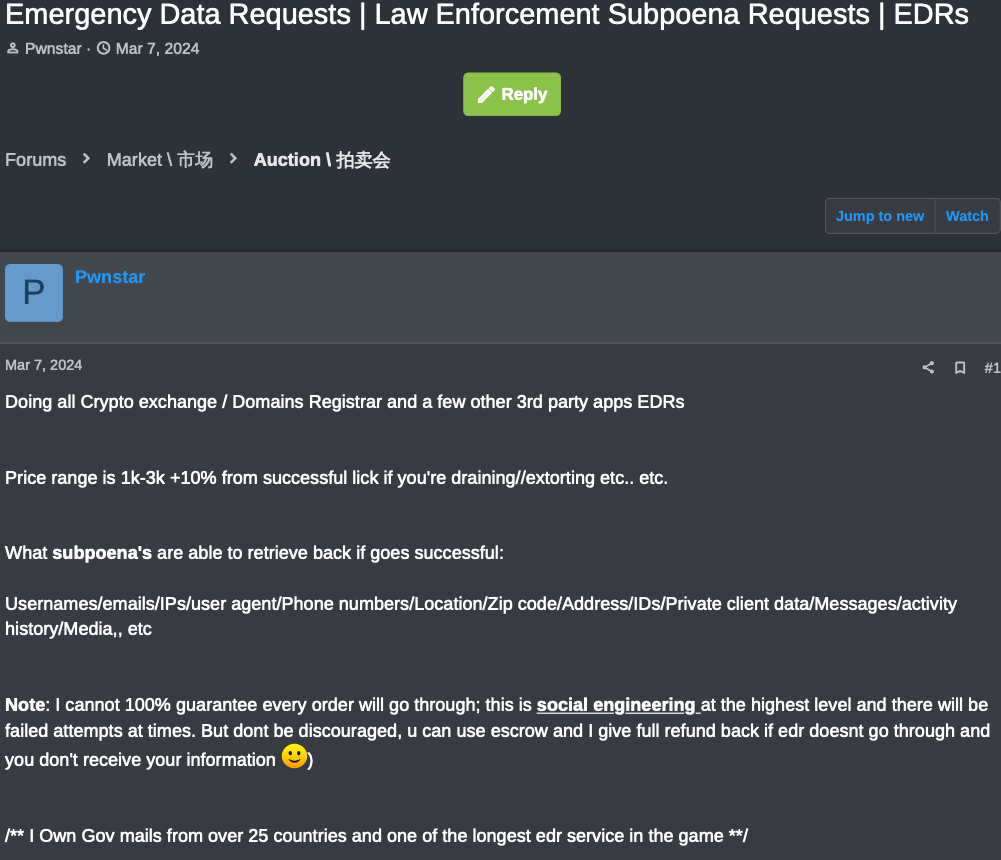
One English-speaking cybercriminal who goes by the nicknames “Pwnstar” and “Pwnipotent” has been selling fake EDR services on both Russian-language and English cybercrime forums. Their prices range from $1,000 to $3,000 per successful request, and they claim to control “gov emails from over 25 countries,” including Argentina, Bangladesh, Brazil, Bolivia, Dominican Republic, Hungary, India, Kenya, Jordan, Lebanon, Laos, Malaysia, Mexico, Morocco, Nigeria, Oman, Pakistan, Panama, Paraguay, Peru, Philippines, Tunisia, Turkey, United Arab Emirates (UAE), and Vietnam.

“I cannot 100% guarantee every order will go through,” Pwnstar explained. “This is social engineering at the highest level and there will be failed attempts at times. Don’t be discouraged. You can use escrow and I give full refund back if EDR doesn’t go through and you don’t receive your information.”

An ad from Pwnstar for fake EDR services.

A review of EDR vendors across many cybercrime forums shows that some fake EDR vendors sell the ability to send phony police requests to specific social media platforms, including forged court-approved documents. Others simply sell access to hacked government or police email accounts, and leave it up to the buyer to forge any needed documents.

“When you get account, it’s yours, your account, your liability,” reads an ad in October on BreachForums. “Unlimited Emergency Data Requests. Once Paid, the Logins are completely Yours. Reset as you please. You would need to Forge Documents to Successfully Emergency Data Request.”

Still other fake EDR service vendors claim to sell hacked or fraudulently created accounts on Kodex, a startup that aims to help tech companies do a better job screening out phony law enforcement data requests. Kodex is trying to tackle the problem of fake EDRs by working directly with the data providers to pool information about police or government officials submitting these requests, with an eye toward making it easier for everyone to spot an unauthorized EDR.

If police or government officials wish to request records regarding Coinbase customers, for example, they must first register an account on Kodexglobal.com. Kodex’s systems then assign that requestor a score or credit rating, wherein officials who have a long history of sending valid legal requests will have a higher rating than someone sending an EDR for the first time.

It is not uncommon to see fake EDR vendors claim the ability to send data requests through Kodex, with some even sharing redacted screenshots of police accounts at Kodex.

Matt Donahue is the former FBI agent who founded Kodex in 2021. Donahue said just because someone can use a legitimate police department or government email to create a Kodex account doesn’t mean that user will be able to send anything. Donahue said even if one customer gets a fake request, Kodex is able to prevent the same thing from happening to another.

Kodex told KrebsOnSecurity that over the past 12 months it has processed a total of 1,597 EDRs, and that 485 of those requests (~30 percent) failed a second-level verification. Kodex reports it has suspended nearly 4,000 law enforcement users in the past year, including:

-1,521 from the Asia-Pacific region;
-1,290 requests from Europe, the Middle East and Asia;
-460 from police departments and agencies in the United States;
-385 from entities in Latin America, and;
-285 from Brazil.

Donahue said 60 technology companies are now routing all law enforcement data requests through Kodex, including an increasing number of financial institutions and cryptocurrency platforms. He said one concern shared by recent prospective customers is that crooks are seeking to use phony law enforcement requests to freeze and in some cases seize funds in specific accounts.

“What’s being conflated [with EDRs] is anything that doesn’t involve a formal judge’s signature or legal process,” Donahue said. “That can include control over data, like an account freeze or preservation request.”

In a hypothetical example, a scammer uses a hacked government email account to request that a service provider place a hold on a specific bank or crypto account that is allegedly subject to a garnishment order, or party to crime that is globally sanctioned, such as terrorist financing or child exploitation.

A few days or weeks later, the same impersonator returns with a request to seize funds in the account, or to divert the funds to a custodial wallet supposedly controlled by government investigators.

“In terms of overall social engineering attacks, the more you have a relationship with someone the more they’re going to trust you,” Donahue said. “If you send them a freeze order, that’s a way to establish trust, because [the first time] they’re not asking for information. They’re just saying, ‘Hey can you do me a favor?’ And that makes the [recipient] feel valued.”

Echoing the FBI’s warning, Donahue said far too many police departments in the United States and other countries have poor account security hygiene, and often do not enforce basic account security precautions — such as requiring phishing-resistant multifactor authentication.

How are cybercriminals typically gaining access to police and government email accounts? Donahue said it’s still mostly email-based phishing, and credentials that are stolen by opportunistic malware infections and sold on the dark web. But as bad as things are internationally, he said, many law enforcement entities in the United States still have much room for improvement in account security.

“Unfortunately, a lot of this is phishing or malware campaigns,” Donahue said. “A lot of global police agencies don’t have stringent cybersecurity hygiene, but even U.S. dot-gov emails get hacked. Over the last nine months, I’ve reached out to CISA (the Cybersecurity and Infrastructure Security Agency) over a dozen times about .gov email addresses that were compromised and that CISA was unaware of.”

—————
Free Secure Email – Transcom Sigma
Boost Inflight Internet
Transcom Hosting
Transcom Premium Domains

VEEAM exploit seen used again with a new ransomware: “Frag”

Last month, Sophos X-Ops reported several MDR cases where threat actors exploited a vulnerability in Veeam backup servers. We continue to track the activities of this threat cluster, which recently included deployment of a new ransomware. The vulnerability, CVE-2024-40711, was used as part of a threat activity cluster we named STAC 5881. Attacks leveraged compromised […]

—————
Free Secure Email – Transcom Sigma
Boost Inflight Internet
Transcom Hosting
Transcom Premium Domains

Friday Squid Blogging: Squid-A-Rama in Des Moines

Squid-A-Rama will be in Des Moines at the end of the month.

Visitors will be able to dissect squid, explore fascinating facts about the species, and witness a live squid release conducted by local divers.

How are they doing a live squid release? Simple: this is Des Moines, Washington; not Des Moines, Iowa.

Blog moderation policy.

—————
Free Secure Email – Transcom Sigma
Boost Inflight Internet
Transcom Hosting
Transcom Premium Domains

AI Industry is Trying to Subvert the Definition of “Open Source AI”

The Open Source Initiative has published (news article here) its definition of “open source AI,” and it’s terrible. It allows for secret training data and mechanisms. It allows for development to be done in secret. Since for a neural network, the training data is the source code—it’s how the model gets programmed—the definition makes no sense.

And it’s confusing; most “open source” AI models—like LLAMA—are open source in name only. But the OSI seems to have been co-opted by industry players that want both corporate secrecy and the “open source” label. (Here’s one rebuttal to the definition.)

This is worth fighting for. We need a public AI option, and open source—real open source—is a necessary component of that.

But while open source should mean open source, there are some partially open models that need some sort of definition. There is a big research field of privacy-preserving, federated methods of ML model training and I think that is a good thing. And OSI has a point here:

Why do you allow the exclusion of some training data?

Because we want Open Source AI to exist also in fields where data cannot be legally shared, for example medical AI. Laws that permit training on data often limit the resharing of that same data to protect copyright or other interests. Privacy rules also give a person the rightful ability to control their most sensitive information ­ like decisions about their health. Similarly, much of the world’s Indigenous knowledge is protected through mechanisms that are not compatible with later-developed frameworks for rights exclusivity and sharing.

How about we call this “open weights” and not open source?

—————
Free Secure Email – Transcom Sigma
Boost Inflight Internet
Transcom Hosting
Transcom Premium Domains

Every Step You Take, Every Call You Make: Is Your Phone Tracking You?

So, what does your phone know about you? Taken all together it knows plenty — sometimes in ways that feel like your phone is watching you.

It all comes down to the data that courses through your phone and your apps, along with a phone’s built-in tracking capabilities. Indeed, your phone certainly knows plenty about you. And companies keep tabs on that. Here’s how…

The apps on our phones entertain us, inform us, and help us shop. Many of them also track our activities and location — and then sell or share that info with third parties. From there, that info can end up with data brokers who sell that info to anyone who’ll pay. That includes advertisers, spammers, insurance companies, hackers, law enforcement, private investigators, and so on. It’s all legal, and it’s all part of a multi-billion-dollar industry worldwide.

Still, you can take charge of your privacy amidst all this data and info gathering. Several steps can reduce what your phone collects and shares with others.

For starters, though, let’s look at several of the things your phone knows about you.

It likely knows where you are and where you’ve been

Unless you’ve turned it off completely, your phone can track you in several ways with several degrees of accuracy:

GPS: The Global Positioning System, or GPS as many of us know it, is a system of satellites run by the U.S. government for navigation purposes. First designed for national defense, the system became available for public use in the 1980s. It’s highly accurate, to anywhere between nine to 30 feet depending on conditions and technology used, making it one of the strongest tools for determining a phone’s location. This is what powers location services on cell phones, and thus can help an app recommend a great burger joint nearby.

Cell towers: Cell phone providers can track a phone’s location by the distance it is to various cell phone towers and by the strength of its signal. The location info this method provides is a bit coarser than GPS, providing results that can place a phone within 150 feet. It’s most accurate in urban areas with high densities of cell phone towers, although it does not always work well indoors as some buildings can weaken or block cell phone signals.

One of the most significant public benefits of this method is that it automatically routes emergency service calls (like 911 in the U.S.) to the proper local authorities without any guesswork from the caller.

Public Wi-Fi: Larger tech companies and internet providers will sometimes provide free public Wi-Fi hotspots that people can tap into at airports, restaurants, coffeehouses, and such. It’s a nice convenience, but connecting to their Wi-Fi might share a phone’s MAC address, a unique identifier for connected devices, along with other identifiers on the smartphone.

Taken together, this can allow the Wi-Fi hosting company to gather location and behavioral data while you use your phone on their Wi-Fi network.

Bluetooth: Like with public Wi-Fi, companies can use strategically placed Bluetooth devices to gather location info as well. If Bluetooth is enabled on a phone, it will periodically seek out Bluetooth-enabled devices to connect to while the phone is awake. This way, a Bluetooth receiver can then capture that phone’s unique MAC address. This provides highly exact location info to within just a few feet because of Bluetooth’s short broadcast range.

In the past, we’ve seen retailers use this method to track customers in their physical stores to better understand their shopping habits. However, newer phones often create dummy MAC addresses when they seek out Bluetooth connections, which helps thwart this practice.

Now, here’s where all that tracking gets tricky

Certain apps pair location info with other info they collect while you use that app. In some cases, an app shares that precise combination of info with third parties. (It all depends on the terms in the user agreement you accepted once you installed it.)

What does that look like in the real world? Third parties might know:

  • Where you live, based on when your phone is at rest during the evening.
  • Where you work, by seeing where you commute to on a regular basis.
  • Where your children go to school, by tracking your weekday pickup and drop-off routine.
  • Your religion, by pinpointing the location of the place where you worship regularly.
  • Where you had dinner and who you had it with, when you split the tab with a payment app.

Those are just a few examples of many.

Just to emphasize what we said above, not every app sells shares or sells your info to third parties. However, that gets into the complicated nature of user agreements. The language that covers what’s collected, for what reasons, what’s done with it, and who it’s shared can be tough to tease out because it’s often written in some form of legalese.

Broadly though, apps need to request permission to access location tracking services. In the past, we’ve seen some sketchy apps request location permissions even though they have no reason to. Examples include coupon apps, wallpaper apps, productivity apps, and plenty of games too. When apps like those ask for permission to access location tracking services, raises a red flag that your privacy is in jeopardy.

It might know about your health

Depending on what apps and services you use, your phone might know a lot about your health. That can include range of info, as apps can track things like step counts, vital signs, and menstrual cycles. Other apps manage health conditions or work as symptom checkers. In all, this data can get very private. Unfortunately, sometimes that data winds up in the hands of third parties.

With that, we’ve seen cases where people’s medical info was shared without their knowledge by medical apps and services.

In April 2024, The U.S. Federal Trade Commission (FTC) ruled against an online mental health service that “disclosed consumers’ sensitive personal health information and other sensitive data to third parties for advertising purposes…”[i] Also according to the complaint, the company gave third parties personal data about its users including names, medical and prescription histories, pharmacy and health insurance info, and other health info.

Also in April 2024, U.S. healthcare provider Kaiser Permanente disclosed that more than 13 million people had some of their personal data shared by third parties via tracking technologies on its websites and apps. Companies such as Microsoft (Bing), Google, and X (Twitter) were all named.[ii] That info possibly included how people interacted with and navigated through their website or mobile app, along with search terms used in Kaiser’s health encyclopedia.

It might know what you’ve told Siri or Google Assistant

So, is someone on the other end of your smartphone listening to your recordings when you use Siri or Google Assistant? Possibly, yes. Companies make constant improvements to their devices and services, which may include the review of commands from users to make sure they are interpreted correctly. There are typically two types of review — machine and human. As the names suggest, a machine review is a digital analysis. Human reviews entail someone listening to and evaluating a recorded command or reading and evaluating a transcript of a written command.

However, several manufacturers let you opt out of those reviews. In fact, you’ll find that they post a fair share of articles about this collection and review process, along with your choices for opting in or out as you wish:

Ways to limit tracking on your smartphone

Turn off your phone or switch to Airplane Mode. Disconnect. Without a Wi-Fi or data connection, you can’t get tracked. While this makes you unreachable, it also makes you untraceable, which you might want to consider if you’d rather keep your whereabouts and travels to yourself for periods of time.

Turn off location services altogether. As noted above, your smartphone can get tracked by other means, yet disabling location services in your phone settings shuts down a primary avenue of location data collection. Note that your maps apps won’t offer directions, and your restaurant app won’t point you toward that tasty burger when location services are off, but you’ll be more private than with them turned on.

Provide permissions on an app-by-app basis. Another option is to go into your phone settings and enable location services for specific apps in specific cases. For example, you can set your map app to enable location services only while in use. For other apps, you can disable location services entirely. Yet another option is to have the app ask for permissions each time. Note that this is a great way to discover if apps have defaulted to using location services without your knowledge when you installed them.

On an iPhone, you can find this in Settings -> Privacy & Security -> Location Services. On an Android, go to Settings -> Locations -> App Locations Permissions.

Turn off app tracking. As you’ve seen, some apps will ask to track your activity and potentially share it with data brokers and other third parties. You can halt this by turning off app tracking. On an iPhone, go to Settings -> Privacy & Security -> Tracking and disable “Allow Apps to Request to Track.” On an Android phone, go to Settings -> Privacy and Security, then turn on “Do Not Track.”

And just as you can with location services, you can set apps to make tracking requests on an app-by-app basis. You’ll see it on the same screen that has the global “Do Not Track” option.

Opt yourself out of cell phone carrier ad programs. Different cell phone carriers have different user agreements, yet some might allow the carrier to share insights about you with third parties based on browsing and usage history. Opting out of these programs might not stop your cell phone carrier from collecting data about you, but it might prevent it from sharing insights about you with others.

To see if you take part in one of these programs, log into your account portal or app. Look for settings around “relevant advertising,” “custom experience,” or even “advertising,” and then figure out if these programs are worth it.

Delete old apps. And be choosy about new ones. Fewer apps mean fewer avenues of potential data collection. If you have old, unused apps, consider deleting them, along with the accounts and data associated with them. Our Online Account Cleanup Online Account Cleanup can make quick work of it. It scans for accounts you no longer use, shows how risky they are, and helps you delete them, along with your personal info. In all, breaches and leaks are a numbers game. The fewer you keep, the better, when it comes to protecting your personal info.

Remove your info from data broker sites. As we’ve seen, the personal info on your smartphone can wind up on data broker sites. And they’ll sell it to practically anyone. Our Personal Data Cleanup can help you remove your personal info from several of the sketchiest brokers out there. Running it periodically can help keep your info off those sites if it crops up again.

[i] https://www.ftc.gov/news-events/news/press-releases/2024/04/proposed-ftc-order-will-prohibit-telehealth-firm-cerebral-using-or-disclosing-sensitive-data?utm_source=govdelivery

[ii] https://www.hipaajournal.com/kaiser-permanente-website-tracker-breach-affects-13-4-million-individuals/


The post Every Step You Take, Every Call You Make: Is Your Phone Tracking You? appeared first on McAfee Blog.

—————
Free Secure Email – Transcom Sigma
Boost Inflight Internet
Transcom Hosting
Transcom Premium Domains