
Three Reasons You Need a VPN

You know what a VPN is, but the question remains—why do you need a VPN? 

There’s one good reason. Your privacy. Because it’s a commodity on today’s internet. 

For starters, you have advertisers and internet service providers (ISPs) that want to know what you’re doing, when you’re doing it, where you’re doing it, and even for how long you’re doing it. They gather and use this information to create targeted ad profiles. And sometimes, they sell that information to third parties. 

Next, there are the hackers and identity thieves out there. They take an even greater interest in what you’re doing online—like your shopping, banking, and finances. Even your insurance and medical matters. Primarily they want that information so they can turn a buck by hijacking your accounts or impersonating you to get medical care. In more extreme cases, they might use stolen information to impersonate you in other ways. That might include opening entirely new lines of credit or getting a driver’s license in your name. 

A VPN can prevent this kind of snooping from happening. 

VPNs and privacy—blocking ads and data collection 

As for data collection and ads, that activity should come as no surprise. Particularly for anyone who’s seen uncannily targeted ads follow them around on the internet. Search for “summer cargo pants” one time and suddenly the sites you visit are full of ads for pants, pants, and more pants.  

Aside from gathering your online activity for advertising purposes, ISPs might also sell the data they gather to third parties. They can gather that data while you’re on your home network, and they might gather it while you’re using public Wi-Fi. (Some ISPs provide free Wi-Fi in public places that allows them to collect data from people who aren’t their regular customers.) 

This practice varies by region and the data privacy laws that are in place in each one.  

For example, the European Union has strict data privacy laws that prevent this type of sale. (Thanks to the enactment of the GDPR, General Data Protection Regulation.) However, there are few such protections in the U.S. There, an ISP can sell the browsing history of an internet user to a third party—provided the data has been anonymized. 

“Anonymized” is a key term here. It refers to the process of stripping away personal identifiers that connect a person to a set of stored data. It might also include adding “noise” to the data, which obscures personal identifiers. For example, that might remove an exact birthdate and replace it with a broad range of dates. So, “March 31, 1957” becomes “January – June 1957.” 

At issue is that this anonymized data can get de-anonymized rather easily.  

Researchers in 2019 found that “99.98% of Americans would be correctly re-identified in any dataset using 15 demographic attributes.” And when you consider how much data is collected about you, 15 attributes are only drops in the ocean. 

Marketing and analytics companies collect hundreds and hundreds of data points on people and their households. That might include information about their mortgage, if they are allergy sufferers, whether they own cats or dogs, where they do most of their grocery shopping, and more—in addition to other information like their age and address.  

What happens when that information gets breached, or published accidentally, as it did when 123 million records of U.S. households were made public back in 2017? It gives bad actors plenty of data that can potentially harm others.  

Internet browsing activity doesn’t account for all the data points that these companies collect. However, the thought of your ISP tracking your time online and selling it to others might leave you feeling uncomfortable. Whether that data gets anonymized or not. 

VPNs, privacy, and identity theft 

The other threat to your privacy online comes from bad actors—like hackers and identity thieves. By targeting insecure networks, lurking on unsecured public Wi-Fi, or setting up phony public Wi-Fi hotspots themselves, they’ll snoop on the people using it.  

On insecure networks, bad actors can watch as you log into your bank account, read your email, and see what you’re doing on the internet in general. They can steal any passwords and logins you’re using along the way, giving them access to those accounts. 

In truth, this kind of snooping is more than a threat to your privacy. It enters the realm of identity theft, making the risk to your data and personal information that much greater.  

Three reasons to use a VPN 

With your privacy and personal identity in mind, here are three specific examples that make the case for using a VPN: 

1. You value your privacy.

As outlined above, the internet has increasingly become less private. Advertisers and ISPs will track you when and where they can. When you use a VPN, you can hide several things from your ISP, like the websites and apps you use, the time spent on them, your search history, and downloads. As for websites and apps, a VPN can hide your IP address and your location, all of which can thwart ad tracking on those sites and apps. 

2. You work remotely.

Many larger businesses and organizations offer (and sometimes require) a VPN for their employees who work outside the office. Smaller businesses use them less so, which makes them subject to attacks like data breaches. According to FBI reports, the average cost of a data breach for a business in 2022 was well over $150,000. Moreover, cybercriminals increasingly wage these attacks against businesses with revenues of $500,000 or less, which makes the thought of a six-figure loss even more devastating. 

A VPN encrypts and protects company data in transit, whether you’re connecting from home, the airport, or anywhere outside the office. Using one protects you and the business or organization you work for. 

3. You want extra protection while you bank, shop, or handle any sensitive matters online.

A strong VPN service like ours uses bank-grade encryption to keep your data and information secure. With a VPN, a snoop bad actor would only see garbled content thanks to your VPN’s encryption functionality.    

Another popular reason for a VPN—streaming shows and content 

If you’re traveling, you can access the sites and services you typically use at home. For example, some video streaming services aren’t available in foreign locations. By using a VPN, you can still access content by connecting through the proxy servers that VPNs use. These are servers in other locations that can make requests on your behalf. So, even if you are out of the country, you can connect to a proxy server in the U.S. and access your services as usual. 

Where can I get a VPN? 

If you have online protection with us, like our McAfee+ plans, you have a VPN ready to go. If not, McAfee+ offers a great way to get one.  

It’s completely private and independently audited to ensure your sensitive info stays secure. We don’t log or track what you do online, so your online activity remains private.  

By design, we made it simple to use. You can set it to automatically turn on if you’re on an unprotected network. Or you can also choose to keep it on all the time for an even safer online experience. With nearly 50 server locations worldwide, you can get a fast and stable VPN connection wherever you go. 

And because it comes with our online protection software, you get other identity, privacy, and device security features that can keep you even safer online. 

Bottom line, a VPN makes you more private and secure. 

And that kind of protection is called for nowadays. Ad trackers, data collectors, hackers, and thieves—they all want to know what you’re doing online. And with a VPN, you can keep all that to yourself, making your time online more private and secure than before. 

The post Three Reasons You Need a VPN appeared first on McAfee Blog.

—————
Free Secure Email – Transcom Sigma
Boost Inflight Internet
Transcom Hosting
Transcom Premium Domains

Anyone Can Try ChatGPT for Free—Don’t Fall for Sketchy Apps That Charge You

Anyone can try ChatGPT for free. Yet that hasn’t stopped scammers from trying to cash in on it.  

A rash of sketchy apps have cropped up in Apple’s App Store and Google Play. They pose as Chat GPT apps and try to fleece smartphone owners with phony subscriptions.  

Yet you can spot them quickly when you know what to look for. 

What is ChatGPT, and what are people doing with it? 

ChatGPT is an AI-driven chatbot service created by OpenAI. It lets you have uncannily human conversations with an AI that’s been programmed and fed with information over several generations of development. Provide it with an instruction or ask it a question, and the AI provides a detailed response. 

Unsurprisingly, it has millions of people clamoring to use it. All it takes is a single prompt, and the prompts range far and wide.  

People ask ChatGPT to help them write cover letters for job interviews, make travel recommendations, and explain complex scientific topics in plain language. One person highlighted how they used ChatGPT to run a tabletop game of Dungeons & Dragons for them. (If you’ve ever played, you know that’s a complex task that calls for a fair share of cleverness to keep the game entertaining.)  

That’s just a handful of examples. As for myself, I’ve been using ChatGPT in the kitchen. My family and I have been digging into all kinds of new recipes thanks to its AI. 

Sketchy ChatGPT apps in the App Store and Google Play 

So, where do the scammers come in? 

Scammers, have recently started posting copycat apps that look like they are powered by ChatGPT but aren’t. What’s more, they charge people a fee to use them—a prime example of fleeceware. OpenAI, the makers of ChatGPT, have just officially launched their iOS app for U.S. iPhone users and can be downloaded from the Apple App Store here. The official Android version is still yet to be released.  

Fleeceware mimics a pre-existing service that’s free or low-cost and then charges an excessive fee to use it. Basically, it’s a copycat. An expensive one at that.  

Fleeceware scammers often lure in their victims with “a free trial” that quickly converts into a subscription. However, with fleeceware, the terms of the subscription are steep. They might bill the user weekly, and at rates much higher than the going rate. 

The result is that the fleeceware app might cost the victim a few bucks before they can cancel it. Worse yet, the victim might forget about the app entirely and run up hundreds of dollars before they realize what’s happening. Again, all for a simple app that’s free or practically free elsewhere. 

What makes fleeceware so tricky to spot is that it can look legit at first glance. Plenty of smartphone apps offer subscriptions and other in-app purchases. In effect, fleeceware hides in plain sight among the thousands of other legitimate apps in the hopes you’ll download it. 

With that, any app that charges a fee to use ChatGPT is fleeceware. ChatGPT offers basic functionality that anyone can use for free.  

There is one case where you might pay a fee to use ChatGPT. It has its own subscription-level offering, ChatGPT Plus. With a subscription, ChatGPT responds more quickly to prompts and offers access during peak hours when free users might be shut out. That’s the one legitimate case where you might pay to use it. 

In all, more and more people want to take ChatGPT for a spin. However, they might not realize it’s free. Scammers bank on that, and so we’ve seen a glut of phony ChatGPT apps that aim to install fleeceware onto people’s phones. 

How do you keep fleeceware and other bad apps off your phone?  

Read the fine print. 

Read the description of the app and see what the developer is really offering. If the app charges you to use ChatGPT, it’s fleeceware. Anyone can use ChatGPT for free by setting up an account at its official website, https://chat.openai.com. 

Look at the reviews. 

Reviews can tell you quite a bit about an app. They can also tell you the company that created it handles customer feedback.  

In the case of fleeceware, you’ll likely see reviews that complain about sketchy payment terms. They might mention three-day trials that automatically convert to pricey monthly or weekly subscriptions. Moreover, they might describe how payment terms have changed and become more costly as a result.  

In the case of legitimate apps, billing issues can arise from time to time, so see how the company handles complaints. Companies in good standing will typically provide links to customer service where people can resolve any issues they have. Company responses that are vague, or a lack of responses at all, should raise a red flag. 

Be skeptical about overwhelmingly positive reviews. 

Scammers are smart. They’ll count on you to look at an overall good review of 4/5 stars or more and think that’s good enough. They know this, so they’ll pack their app landing page with dozens and dozens of phony and fawning reviews to make the app look legitimate. This tactic serves another purpose: it hides the true reviews written by actual users, which might be negative because the app is a scam. 

Filter the app’s reviews for the one-star reviews and see what concerns people have. Do they mention overly aggressive billing practices, like the wickedly high prices and weekly billing cycles mentioned above? That might be a sign of fleeceware. Again, see if the app developer responded to the concerns and note the quality of the response. A legitimate company will honestly want to help a frustrated user and provide clear next steps to resolve the issue. 

Steer clear of third-party app stores. 

Google Play does its part to keep its virtual shelves free of malware-laden apps with a thorough submission process, as reported by Google. It further keeps things safer through its App Defense Alliance that shares intelligence across a network of partners, of which we’re a proud member. Further, users also have the option of running Play Protect to check apps for safety before they’re downloaded. Apple’s App Store has its own rigorous submission process for submitting apps. Likewise, Apple deletes hundreds of thousands of malicious apps from its store each year. 

Third-party app stores might not have protections like these in place. Moreover, some of them might be fronts for illegal activity. Organized cybercrime organizations deliberately populate their third-party stores with apps that steal funds or personal information. Stick with the official app stores for the most complete protection possible.  

Cancel unwanted subscriptions from your phone. 

Many fleeceware apps deliberately make it tough to cancel them. You’ll often see complaints about that in reviews, “I don’t see where I can cancel my subscription!” Deleting the app from your phone is not enough. Your subscription will remain active unless you cancel your payment method.  

Luckily, your phone makes it easy to cancel subscriptions right from your settings menu. Canceling makes sure your credit or debit card won’t get charged when the next billing cycle comes up. 

Be wary. Many fleeceware apps have aggressive billing cycles. Sometimes weekly.  

The safest and best way to enjoy ChatGPT: Go directly to the source. 

ChatGPT is free. Anyone can use it by setting up a free account with OpenAI at https://chat.openai.com. Smartphone apps that charge you to use it are a scam. 

How to download the official ChatGPT app 

You can download the official app, currently on iOS from the App Store 

The post Anyone Can Try ChatGPT for Free—Don’t Fall for Sketchy Apps That Charge You appeared first on McAfee Blog.

—————
Free Secure Email – Transcom Sigma
Boost Inflight Internet
Transcom Hosting
Transcom Premium Domains
Expeditionary Cyberspace Operations

Cyberspace operations now officially has a physical dimension, meaning that the United States has official military doctrine about cyberattacks that also involve an actual human gaining physical access to a piece of computing infrastructure.

A revised version of Joint Publication 3-12 Cyberspace Operations—published in December 2022 and while unclassified, is only available to those with DoD common access cards, according to a Joint Staff spokesperson—officially provides a definition for “expeditionary cyberspace operations,” which are “[c]yberspace operations that require the deployment of cyberspace forces within the physical domains.”

[…]

“Developing access to targets in or through cyberspace follows a process that can often take significant time. In some cases, remote access is not possible or preferable, and close proximity may be required, using expeditionary [cyber operations],” the joint publication states. “Such operations are key to addressing the challenge of closed networks and other systems that are virtually isolated. Expeditionary CO are often more regionally and tactically focused and can include units of the CMF or special operations forces … If direct access to the target is unavailable or undesired, sometimes a similar or partial effect can be created by indirect access using a related target that has higher-order effects on the desired target.”

[…]

“Allowing them to support [combatant commands] in this way permits faster adaptation to rapidly changing needs and allows threats that initially manifest only in one [area of responsibility] to be mitigated globally in near real time. Likewise, while synchronizing CO missions related to achieving [combatant commander] objectives, some cyberspace capabilities that support this activity may need to be forward-deployed; used in multiple AORs simultaneously; or, for speed in time-critical situations, made available via reachback,” it states. “This might involve augmentation or deployment of cyberspace capabilities to forces already forward or require expeditionary CO by deployment of a fully equipped team of personnel and capabilities.”

—————
Free Secure Email – Transcom Sigma
Boost Inflight Internet
Transcom Hosting
Transcom Premium Domains
Make Your Smart Home a Secure Home Too: Securing Your IoT Smart Home Devices

It’s only a smart lightbulb. Why would anyone want to hack that? 

Great question. Because it gets to the heart of security matters for your IoT smart home devices.  

Internet of Things (IoT) devices have certainly made themselves at home in recent years. Once a novelty, they’ve become far more commonplace. The numbers bear that out. Recent research indicates that the average U.S. household has 20.2 connected devices. Europe has 17.4 on average, while Japan trails at 10.3. 

Of course, those figures largely account for computers, tablets, phones, and internet-connected smart TVs. Yet the study uncovered a sizable jump in the presence of other smart devices.  

Comparing 2022 to 2021, smart homes worldwide had: 

  • 55% more cameras. 
  • 43% more smart doorbells. 
  • 38% more home hubs. 
  • 25% more smart light bulbs. 
  • 23% more smart plugs. 
  • 19% more smart thermostats. 

Consider that connected devices in the home rose just 10% globally during the same timeframe. It’s clear that IoT smart home device ownership is on the upswing. Yet has security kept up with all that growth? 

Poor security and consumer IoT smart home devices 

That security question brings us back to the lightbulb.  

An adage in security is this: if a device gets connected, it gets protected. And that protection has to be strong because a network is only as secure as its weakest link. Unfortunately, many IoT devices are indeed the weakest security links on home networks.  

Some recent research sheds light on what’s at stake. Cybersecurity teams at the Florida Institute of Technology found that companion apps for several big brand smart devices had security flaws. Of the 20 apps linked to connected doorbells, locks, security systems, televisions, and cameras they studied, 16 had “critical cryptographic flaws” that might allow attackers to intercept and modify their traffic. These flaws might lead to the theft of login credentials and spying, the compromise of the connected device, or the compromise of other devices and data on the network.  

Over the years, our research teams at McAfee Labs have uncovered similar security vulnerabilities in other IoT devices like smart coffee makers and smart wall plugs 

Vulnerabilities such as these have the potential to compromise other devices on the network. 

Let’s imagine a smart lightbulb with poor security measures. As part of your home network, a motivated hacker might target it, compromise it, and gain access to the other devices on your network. In that way, a lightbulb might lead to your laptop—and all the files and data on it. 

So yes, someone might be quite interested in hacking your lightbulb. 

Botnets: another reason why hackers target smart devices 

One Friday morning in 2016, great swathes of the American internet ground to a halt. 

Major websites and services became unresponsive as internet directory services got flooded with millions and millions of malicious requests. As such, millions and millions of people were affected, along with public agencies and private businesses alike. Behind it, a botnet. An internet drone army of compromised IOT devices like digital video recorders and webcams. 

Known as the Mirai botnet, its initial purpose was to target Minecraft game servers. Essentially to “grief” innocent players. Yet it later found its way into other hands. From there, it became among the first high-profile botnet attacks on the internet. 

Botnet attacks can be small and targeted, such as when bad actors want to target a certain business (or game servers). And they can get as large as Mirai did. Regardless of size, these attacks rely on compromised devices. Consumer IoT devices often get targeted for such purposes for the same reasons listed above. They can lack strong security features out of the box, making them easy to enlist in a botnet. 

In all, the threat of botnets makes another strong case for securing your devices. 

How to protect your smart home network and IoT devices 

To put a fine point on it, security in your smart home is an absolute must. And you can make your smart home far more secure with a few steps. 

Grab online protection for your smartphone. 

Many smart home devices use a smartphone as a sort of remote control, and to gather, store, and share data. So whether you’re an Android owner or an iOS owner, protect your smartphone so you can protect the things it accesses and controls—and the data stored on it too. 

Don’t use the default—Set a strong, unique password. 

One issue with many IoT devices is that they often come with a default username and password. This could mean that your device and thousands of others just like it share the same credentials. That makes it easy for a hacker to access to them because those default usernames and passwords are often published online.  

When you purchase any IoT device, set a fresh password using a strong method of password creation. Likewise, create an entirely new username for additional protection as well. 

Use multi-factor authentication. 

Banks and other online services commonly offer multi-factor authentication to help protect your accounts. In addition to using a username and password for login, it sends a security code to another device you own (often a mobile phone). It throws a big barrier in the way of hackers who try to force their way into your device with a password/username combination. If your IoT devices support multi-factor authentication, consider using it with them too.  

Secure your internet router too. 

Another device that needs good password protection is your internet router. Make sure you use a strong and unique password as well to help prevent hackers from breaking into your home network. Also consider changing the name of your home network so that it doesn’t personally identify you.  

Fun alternatives to using your name or address include everything from movie lines like “May the Wi-Fi be with you” to old sitcom references like “Central Perk.” Also check that your router is using an encryption method, like WPA2 or the newer WPA3, which will keep your signal secure. 

Upgrade to a newer internet router. 

Older routers might have outdated security measures, which might make them more prone to attacks. If you’re renting yours from your internet provider, contact them for an upgrade. If you’re using your own, visit a reputable news or review site such as Consumer Reports for a list of the best routers that combine speed, capacity, and security. 

Update your apps and devices regularly. 

In addition to fixing the odd bug or adding the occasional new feature, updates often fix security gaps. Out-of-date apps and devices might have flaws that hackers can exploit, so update regularly. If you can set your smart home apps and devices to receive automatic updates, select that option so that you’ll always have the latest. 

Set up a guest network specifically for your IoT devices. 

Just as you can offer your guests secure access that’s separate from your own devices, you can create an additional network on your router that keeps your computers and smartphones separate from IoT devices. This way, if an IoT device is compromised, a hacker will still have difficulty accessing your other devices on your primary network that hosts your computers and smartphones. 

Purchasing IoT smart home devices (with security in mind) 

You can take another strong security step before you even bring that new smart device home. Research.  

Unfortunately, there are few consumer standards for smart devices. That’s unlike other household appliances. They must comply with government regulations, industry standards, and consumer-friendly standards like Energy Star ratings. So, some of the research burden falls on the buyer when it comes to purchasing the most secure devices. 

Here are a few steps that can help: 

1) Check out trusted reviews and resources. 

A positive or high customer rating for a smart device is a good place to start, yet purchasing a safer device takes more than that. Impartial third-party reviewers like Consumer Reports will offer thorough reviews of smart devices and their security, as part of a paid subscription. 

Likewise, look for other resources that account for device and data security in their writeups, such as the “Privacy Not Included” website. Run by a nonprofit organization, it reviews a wealth of apps and smart devices based on the strength of their security and privacy measures. 

2) Look up the manufacturer’s track record. 

Whether you’re looking at a device made by a well-known company or one you haven’t heard of before, a web search can show you if they’ve had any reported privacy or security issues in the past. And just because you might be looking at a popular brand name doesn’t mean that you’ll make yourself more private or secure by choosing them. Companies of all sizes and years of operation have encountered problems with their smart home devices.  

What you should look for, though, is how quickly the company addresses any issues and if they consistently have problems with them. Again, you can turn to third-party reviewers or reputable news sources for information that can help shape your decision. 

3) Look into permissions.  

Some smart devices will provide you with options around what data they collect and then what they do with it after it’s collected. Hop online and see if you can download some instructions for manuals for the devices you’re considering. They might explain the settings and permissions that you can enable or disable.  

4) Make sure it uses multi-factor authentication.  

As mentioned above, multi-factor authentication provides an additional layer of protection. It makes things much more difficult for a hacker or bad actor to compromise your device, even if they know your password and username. Purchase devices that offer this as an option. It’s a terrific line of defense.  

5) Look for further privacy and security features. 

Some manufacturers are more security- and privacy-minded than others. Look for them. You might see a camera that has a physical shutter that caps the lens and blocks recording when it’s not in use. You might also find doorbell cameras that store video locally, instead of uploading it to the cloud where others can potentially access it. Also look for manufacturers that call out their use of encryption, which can further protect your data in transit. 

If a device gets connected, it gets protected 

Even the smallest of IoT smart home devices can lead to big issues if they’re not secured. 

It only takes one poorly secured device to compromise everything else on an otherwise secure network. And with manufacturers in a rush to capitalize on the popularity of smart home devices, sometimes security takes a back seat. They might not thoroughly design their products for security up front, and they might not regularly update them for security in the long term.  

Meanwhile, other manufacturers do a fine job. It takes a bit of research on the buyer’s part to find out which manufacturers handle security best. 

Aside from research, a few straightforward steps can keep your smart devices and your network safe. Just as with any other connected device, strong passwords, multi-factor authentication, and regular updates remain key security steps. 

For a secure smart home, just remember the adage: if a device gets connected, it gets protected. 

The post Make Your Smart Home a Secure Home Too: Securing Your IoT Smart Home Devices appeared first on McAfee Blog.

—————
Free Secure Email – Transcom Sigma
Boost Inflight Internet
Transcom Hosting
Transcom Premium Domains

Phishing Domains Tanked After Meta Sued Freenom

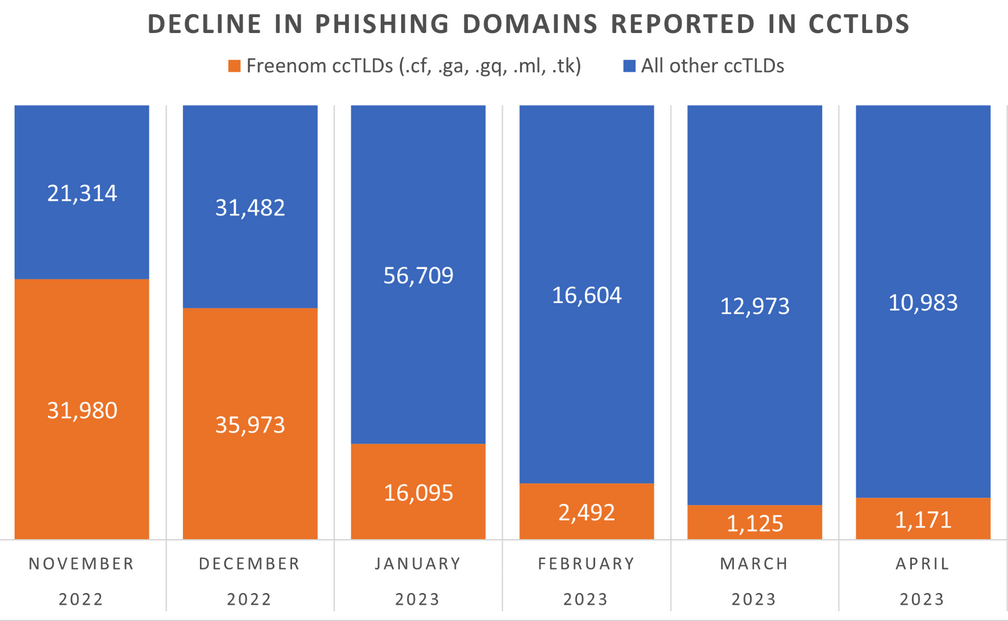
The number of phishing websites tied to domain name registrar Freenom dropped precipitously in the months surrounding a recent lawsuit from social networking giant Meta, which alleged the free domain name provider has a long history of ignoring abuse complaints about phishing websites while monetizing traffic to those abusive domains.

The volume of phishing websites registered through Freenom dropped considerably since the registrar was sued by Meta. Image: Interisle Consulting.

Freenom is the domain name registry service provider for five so-called “country code top level domains” (ccTLDs), including .cf for the Central African Republic; .ga for Gabon; .gq for Equatorial Guinea; .ml for Mali; and .tk for Tokelau.

Freenom has always waived the registration fees for domains in these country-code domains, but the registrar also reserves the right to take back free domains at any time, and to divert traffic to other sites — including adult websites. And there are countless reports from Freenom users who’ve seen free domains removed from their control and forwarded to other websites.

By the time Meta initially filed its lawsuit in December 2022, Freenom was the source of well more than half of all new phishing domains coming from country-code top-level domains. Meta initially asked a court to seal its case against Freenom, but that request was denied. Meta withdrew its December 2022 lawsuit and re-filed it in March 2023.

“The five ccTLDs to which Freenom provides its services are the TLDs of choice for cybercriminals because Freenom provides free domain name registration services and shields its customers’ identity, even after being presented with evidence that the domain names are being used for illegal purposes,” Meta’s complaint charged. “Even after receiving notices of infringement or phishing by its customers, Freenom continues to license new infringing domain names to those same customers.”

Meta pointed to research from Interisle Consulting Group, which discovered in 2021 and again last year that the five ccTLDs operated by Freenom made up half of the Top Ten TLDs most abused by phishers.

Interisle partner Dave Piscitello said something remarkable has happened in the months since the Meta lawsuit.

“We’ve observed a significant decline in phishing domains reported in the Freenom commercialized ccTLDs in months surrounding the lawsuit,” Piscitello wrote on Mastodon. “Responsible for over 60% of phishing domains reported in November 2022, Freenom’s percentage has dropped to under 15%.”

Interisle collects data from 12 major blocklists for spam, malware, and phishing, and it receives phishing-specific data from Spamhaus, Phishtank, OpenPhish and the APWG Ecrime Exchange. The company publishes historical data sets quarterly, both on malware and phishing.

Piscitello said it’s too soon to tell the full impact of the Freenom lawsuit, noting that Interisle’s sources of spam and phishing data all have different policies about when domains are removed from their block lists.

“One of the things we don’t have visibility into is how each of the blocklists determine to remove a URL from their lists,” he said. “Some of them time out [listed domains] after 14 days, some do it after 30, and some keep them forever.”

Freenom did not respond to requests for comment.

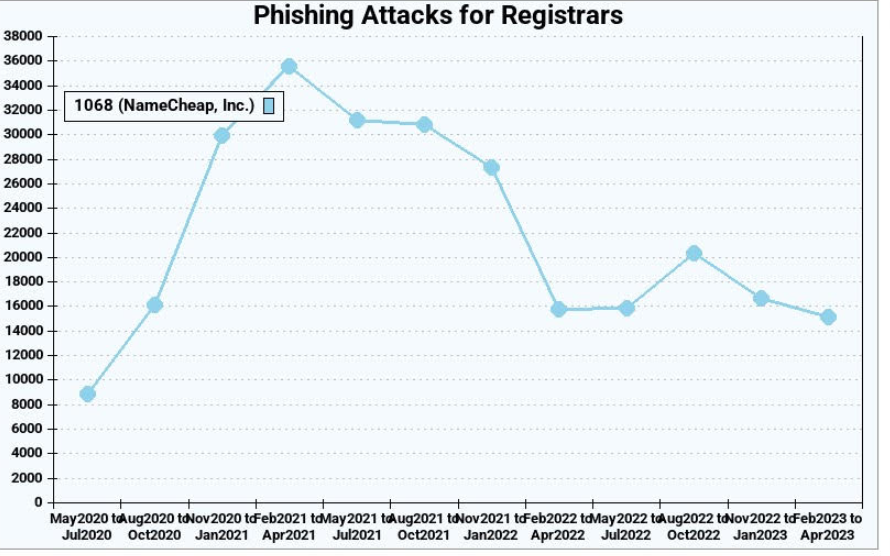
This is the second time in as many years that a lawsuit by Meta against a domain registrar has disrupted the phishing industry. In March 2020, Meta sued domain registrar giant Namecheap, alleging cybersquatting and trademark infringement.

The two parties settled the matter in April 2022. While the terms of that settlement have not been disclosed, new phishing domains registered through Namecheap declined more than 50 percent the following quarter, Interisle found.

Phishing attacks using websites registered through Namecheap, before and after the registrar settled a lawsuit with Meta. Image: Interisle Consulting.

Unfortunately, the lawsuits have had little effect on the overall number of phishing attacks and phishing-related domains, which have steadily increased in volume over the years.  Piscitello said the phishers tend to gravitate toward registrars that offer the least resistance and lowest price per domain. And with new top-level domains constantly being introduced, there is rarely a shortage of super low-priced domains.

“The abuse of a new top-level domain is largely the result of one registrar’s portfolio,” Piscitello told KrebsOnSecurity. “Alibaba or Namecheap or another registrar will run a promotion for a cheap domain, and then we’ll see flocking and migration of the phishers to that TLD. It’s like strip mining, where they’ll buy hundreds or thousands of domains, use those in a campaign, exhaust that TLD and then move on to another provider.”

Piscitello said despite the steep drop in phishing domains coming out of Freenom, the alternatives available to phishers are many. After all, there are more than 2,000 accredited domain registrars, not to mention dozens of services that let anyone set up a website for free without even owning a domain.

“There is no evidence that the trend line is even going to level off,” he said. “I think what the Meta lawsuit tells us is that litigation is like giving someone a standing eight count. It temporarily disrupts a process. And in that sense, litigation appears to be working.”

—————
Free Secure Email – Transcom Sigma
Boost Inflight Internet
Transcom Hosting
Transcom Premium Domains