Latest episode – listen now (or read if you prefer)…
—————
Free Secure Email – Transcom Sigma
Boost Inflight Internet
Transcom Hosting
Transcom Premium Domains
—————
Free Secure Email – Transcom Sigma
Boost Inflight Internet
Transcom Hosting
Transcom Premium Domains
—————
Free Secure Email – Transcom Sigma
Boost Inflight Internet
Transcom Hosting
Transcom Premium Domains
Even with the holidays in full swing, scammers won’t let up. In fact, it’s high time for some of their nastiest cons as people travel, donate to charities, and simply try to enjoy their time with friends and family.
Unfortunate as it is, scammers see this time of year as a tremendous opportunity to profit. While people focus giving to others, they focus on taking, propping up all manner of scams that use the holidays as a disguise. So as people move quickly about their day, perhaps with a touch of holiday stress in the mix, they hope to catch people off their guard with scams that wrap themselves in holiday trappings.
Yet once you know what to look for, they’re relatively easy to spot. The same scams roll out every year, sometimes changing in appearance yet remaining the same in substance. With a sharp eye, you can steer clear of them.
With Black Friday and Cyber Monday in the books, we can look forward to what’s next—a wave of post-holiday sales events that will likewise draw in millions of online shoppers. And just like those other big shopping days, bad actors will roll out a host of scams aimed at unsuspecting shoppers. Shopping scams take on several forms, which makes this a topic unto itself, one that we cover thoroughly in our Black Friday & Cyber Monday shopping scams blog. It’s worth a read if you haven’t done so already, as digs into the details of these scams and shows how you can avoid them.
However, the high-level advice for avoiding shopping scams is this: keep your eyes open. Deals that look too good to be true likely are, and shopping with retailers you haven’t heard of before requires a little bit of research to determine if their track record is clean. In the U.S., you can turn to the Better Business Bureau (BBB) for help with a listing of retailers you can search simply by typing in their names. You can also use https://whois.domaintools.com to look up the web address of the shopping site you want to research. There you can see its history and see when it was registered. A site that was registered only recently may be far less reputable than one that’s been registered for some time.
Plenty of new tech makes its way into our homes during the holiday season. And some of that tech can be a little challenging to set up. Be careful when you search for help online. Many scammers will establish phony tech support sites that aim to steal funds and credit card information. Go directly to the product manufacturer for help. Often, manufacturers will offer free support as part of the product warranty, so if you see a site advertising support for a fee, that could be a sign of a scam.
Likewise, scammers will reach out to you themselves. Whether through links from unsolicited emails, pop-up ads from risky sites, or by spammy phone calls, these scammers will pose as tech support from reputable brands. From there, they’ll falsely inform you that there’s something urgently wrong with your device and that you need to get it fixed right now—for a fee. Ignore these messages and don’t click on any links or attachments. Again, if you have concerns about your device, contact the manufacturer directly.
With the holidays comes travel, along with all the online booking and ticketing involved. Scammers will do their part to cash in here as well. Travel scams may include bogus emails that pose as reputable travel sites telling you something’s wrong with your booking. Clicking a link takes you to a similarly bogus site that asks for your credit card information to update the booking—which then passes it along to the scammer so they can rack up charges in your name. Other travel scams involve ads for cut-rate lodging, tours, airfare, and the like, all of which are served up on a phony website that only exists to steal credit card numbers and other personal information.
Some of these scams can look quite genuine, even though they’re not. They’ll use cleverly disguised web addresses that look legitimate, but aren’t, so don’t click any links. If you receive notice about an issue with your holiday travel, contact the company directly to follow up. Also, be wary of ads with unusually deep discounts or that promise availability in an otherwise busy season or time. These could be scams, so stick with reputable booking sites or with the websites maintained by hotels and travel providers themselves.
Donations to an organization or cause that’s close to someone’s heart make for a great holiday gift, just as they offer you a way to give back during the holiday season. And you guessed it, scammers will take advantage of this too. They’ll set up phony charities and apply tactics that pressure you into giving. As with so many scams out there, any time an email, text, direct message, or site urges you into immediate action—take pause. Research the charity. See how long they’ve been in operation, how they put their funds to work, and who truly benefits from them.
Likewise, note that there some charities pass along more money to their beneficiaries than others. As a general rule of thumb, most reputable organizations only keep 25% or less of their funds for operations, while some less-than-reputable organizations keep up to 95% of funds, leaving only 5% for advancing the cause they advocate. In the U.S., the Federal Trade Commission (FTC) has a site full of resources so that you can make your donation truly count. Resources like Charity Watch and Charity Navigator, along with the BBB’s Wise Giving Alliance can also help you identify the best charities.
The holidays also mean a flight of big-time sporting events, and with the advent of online betting in many regions scammers want to cash in. This scam works quite like shopping scams, where bad actors will set up online betting sites that look legitimate. They’ll take your bet, but if you win, they won’t pay out. Per the U.S. Better Business Bureau (BBB), the scam plays out like this:
“You place a bet, and, at first, everything seems normal. But as soon as you try to cash out your winnings, you find you can’t withdraw a cent. Scammers will make up various excuses. For example, they may claim technical issues or insist on additional identity verification. In other cases, they may require you to deposit even more money before you can withdraw your winnings. Whatever you do, you’ll never be able to get your money off the site. And any personal information you shared is now in the hands of scam artists.”
You can avoid these sites rather easily. Stick with the online betting sites that are approved by your regional gambling commission. Even so, be sure to read the fine print on any promo offers that these sites advertise because even legitimate betting sites can freeze accounts and the funds associated with them based on their terms and conditions.
A complete suite of online protection software, such as McAfee+ Ultimate can offer layers of extra security. In addition to more private and secure time online with a VPN, identity monitoring, and password management, it includes web browser protection that can block malicious and suspicious links that could lead you down the road to malware or a phishing scam—which antivirus protection can’t do alone. Additionally, we offer $1M identity theft coverage and support from a recovery pro, just in case.
And because scammers use personal information such as email addresses and cell phone numbers to wage their attacks, other features like our Personal Data Cleanup service can scan high-risk data broker sites for your personal information and then help you remove it, which can help reduce spam, phishing attacks, and deny bad actors the information they need to commit identity theft.
That’s why they enjoy the holidays so much. With all our giving, travel, and charity in play, it’s prime time for their scams. Yet a little insight into their cons, along with some knowledge as to how they play out, you can avoid them.
Remember that they’re playing into the hustle and bustle of the season and that they’re counting on you to lower your guard more than you might during other times of the year. Keep an eye open for the signs, do a little research when it’s called for, and stick with reputable stores, charities, and online services. With a thoughtful pause and a second look, you can spare yourself the grief of a scam and fully enjoy your holidays.
The post Unwrapping Some of the Holiday Season’s Biggest Scams appeared first on McAfee Blog.
—————
Free Secure Email – Transcom Sigma
Boost Inflight Internet
Transcom Hosting
Transcom Premium Domains
ConnectWise, which offers a self-hosted, remote desktop software application that is widely used by Managed Service Providers (MSPs), is warning about an unusually sophisticated phishing attack that can let attackers take remote control over user systems when recipients click the included link. The warning comes just weeks after the company quietly patched a vulnerability that makes it easier for phishers to launch these attacks.
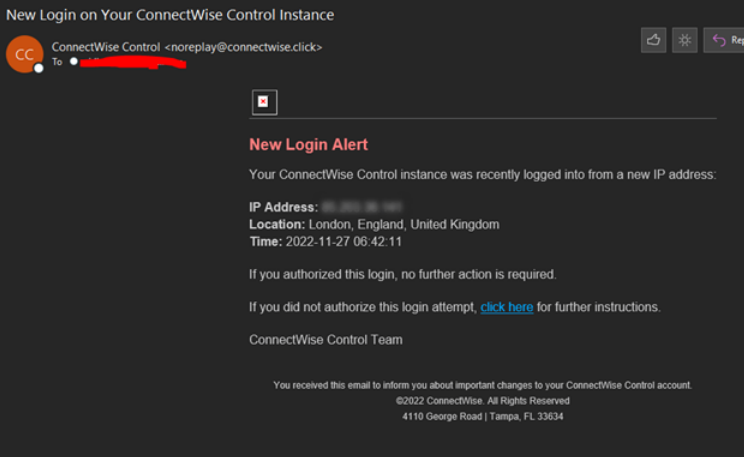
A phishing attack targeting MSP customers using ConnectWise.
ConnectWise Control is extremely popular among MSPs that manage, protect and service large numbers of computers remotely for client organizations. Their product provides a dynamic software client and hosted server that connects two or more computers together, and provides temporary or persistent remote access to those client systems.
When a support technician wants to use it to remotely administer a computer, the ConnectWise website generates an executable file that is digitally signed by ConnectWise and downloadable by the client via a hyperlink.
When the remote user in need of assistance clicks the link, their computer is then directly connected to the computer of the remote administrator, who can then control the client’s computer as if they were seated in front of it.
While modern Microsoft Windows operating systems by default will ask users whether they want to run a downloaded executable file, many systems set up for remote administration by MSPs disable that user account control feature for this particular application.
In October, security researcher Ken Pyle alerted ConnectWise that their client executable file gets generated based on client-controlled parameters. Meaning, an attacker could craft a ConnectWise Control client download link that would bounce or proxy the remote connection from the MSP’s servers to a server that the attacker controls.
This is dangerous because many organizations that rely on MSPs to manage their computers often set up their networks so that only remote assistance connections coming from their MSP’s networks are allowed.
Using a free ConnectWise trial account, Pyle showed the company how easy it was to create a client executable that is cryptographically signed by ConnectWise and can bypass those network restrictions by bouncing the connection through an attacker’s ConnectWise Control server.
“You as the attacker have full control over the link’s parameters, and that link gets injected into an executable file that is downloaded by the client through an unauthenticated Web interface,” said Pyle, a partner and exploit developer at the security firm Cybir. “I can send this link to a victim, they will click this link, and their workstation will connect back to my instance via a link on your site.”
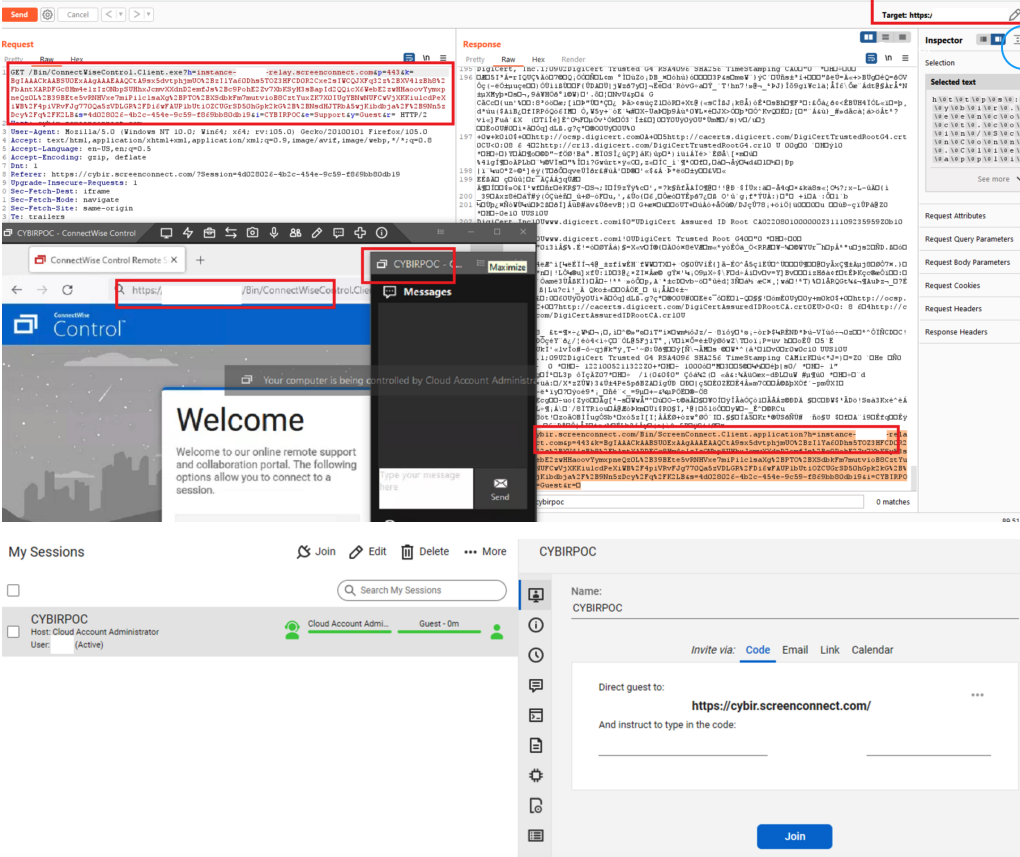
A composite of screenshots researcher Ken Pyle put together to illustrate the ScreenConnect vulnerability.
On Nov. 29, roughly the same time Pyle published a blog post about his findings, ConnectWise issued an advisory warning users to be on guard against a new round email phishing attempts that mimic legitimate email alerts the company sends when it detects unusual activity on a customer account.
“We are aware of a phishing campaign that mimics ConnectWise Control New Login Alert emails and has the potential to lead to unauthorized access to legitimate Control instances,” the company said.
ConnectWise said it released software updates last month that included new protections against the misdirection vulnerability that Pyle reported. But the company said there is no reason to believe the phishers they warned about are exploiting any of the issues reported by Pyle.
“Our team quickly triaged the report and determined the risk to partners to be minimal,” said Patrick Beggs, ConnectWise’s chief information security officer. “Nevertheless, the mitigation was simple and presented no risk to partner experience, so we put it into the then-stable 22.8 build and the then-canary 22.9 build, which were released as part of our normal release processes. Due to the low severity of the issue, we didn’t (and don’t plan to) issue a security advisory or alert, since we reserve those notifications for serious security issues.”
Beggs said the phishing attacks that sparked their advisory stemmed from an instance that was not hosted by ConnectWise.
“So we can confirm they are unrelated,” he said. “Unfortunately, phishing attacks happen far too regularly across a variety of industries and products. The timing of our advisory and Mr. Pyle’s blog were coincidental. That said, we’re all for raising more awareness of the seriousness of phishing attacks and the general importance of staying alert and aware of potentially dangerous content.”
The ConnectWise advisory warned users that before clicking any link that appears to come from their service, users should validate the content includes “domains owned by trusted sources,” and “links to go to places you recognize.”
But Pyle said this advice is not terribly useful for customers targeted in his attack scenario because the phishers can send emails directly from ConnectWise, and the short link that gets presented to the user is a wildcard domain that ends in ConnectWise Control’s own domain name — screenconnect.com. What’s more, examining the exceedingly long link generated by ConnectWise’s systems offers few insights to the average user.
“It’s signed by ConnectWise and comes from them, and if you sign up for a free trial instance, you can email people invites directly from them,” Pyle said.
ConnectWise’s warnings come amid breach reports from another major provider of remote support technologies: GoTo disclosed on Nov. 30 that it is investigating a security incident involving “unusual activity within our development environment and third-party cloud storage services. The third-party cloud storage service is currently shared by both GoTo and its affiliate, the password manager service LastPass.
In its own advisory on the incident, LastPass said they believe the intruders leveraged information stolen during a previous intrusion in August 2022 to gain access to “certain elements of our customers’ information.” However, LastPass maintains that its “customer passwords remain safely encrypted due to LastPass’s Zero Knowledge architecture.”
In short, that architecture means if you lose or forget your all-important master LastPass password — the one needed to unlock access to all of your other passwords stored with them — LastPass can’t help you with that, because they don’t store it. But that same architecture theoretically means that hackers who might break into LastPass’s networks can’t access that information either.
Update, 7:25 p.m. ET: Included statement from ConnectWise CISO.
—————
Free Secure Email – Transcom Sigma
Boost Inflight Internet
Transcom Hosting
Transcom Premium Domains
—————
Free Secure Email – Transcom Sigma
Boost Inflight Internet
Transcom Hosting
Transcom Premium Domains
—————
Free Secure Email – Transcom Sigma
Boost Inflight Internet
Transcom Hosting
Transcom Premium Domains
—————
Free Secure Email – Transcom Sigma
Boost Inflight Internet
Transcom Hosting
Transcom Premium Domains
—————
Free Secure Email – Transcom Sigma
Boost Inflight Internet
Transcom Hosting
Transcom Premium Domains
—————
Free Secure Email – Transcom Sigma
Boost Inflight Internet
Transcom Hosting
Transcom Premium Domains
—————
Free Secure Email – Transcom Sigma
Boost Inflight Internet
Transcom Hosting
Transcom Premium Domains