5 Things About Doxing You Should Know

Have you ever said something you wish you could take back? Maybe it was a comment muttered in the heat of the moment that hurt someone’s feelings. Or maybe you just had a night out full of silly antics that you wouldn’t want your boss or grandma to see.  

These are completely normal occurrences that happen all the time. We’re human! We make mistakes and letting loose every now and again is good for us. When these scenarios happen in person, we’re able to apologize or explain ourselves; however, the social media age complicates things. High-def cameras and video recorders are in everyone’s pocket, meaning that in-person slip-ups or lapses in judgement can come back to haunt you in a cyberscheme known as doxing. 

Doxing can be harmful to one’s reputation and can cost someone their job, their friends, or their privacy. Here are five things you should know about doxing, plus some tips on how to prevent it from happening to you. 

1. Doxing Defined

The term doxing originated from the phrase “dropping documents/docs.” It refers to a situation where an enemy or a rival seeks to tarnish the reputation of someone else by releasing documents (aka dropping docs) about them. These documents often contain personally identifiable information (PII) –  like full names, birthdates, addresses, employment details, financial information, phone numbers, email addresses – and private correspondences or embarrassing videos or photos. The doxer – or the person dropping the documents – will publish these private details online, whether that’s on a forum, on social media, or a blog. 

Doxing is considered cyberbullying because it is a form of online harassment. The doxer often does so with the intent of drumming up widespread hate about the victim and having the release of these private details negatively affect the victim’s life, such as getting them fired from their job or breaking up a relationship. 

2. Doxing Can Happen to Anyone

Doxing happens most frequently to public figures, such as celebrities, politicians, streamers, and journalists. It is also a prevalent practice in the hacking community, where hackers reveal the identities of the real people behind forum usernames. However, anyone is susceptible to having their PII or sensitive photos or videos widely released on the internet for the sake of reputation sabotage. All it takes is for one scorned partner, a disgruntled coworker, or a disagreement to set a doxer on a warpath.  

3. Doxing Isn’t Always Illegal

When the saboteur doesn’t have to dig into your past via the dark web or through hacking a personal device, doxing isn’t illegal. It’s malicious and can be emotionally damaging, but there is no law stopping a doxer from publishing the private details of someone else. Doxing crosses the line into a crime when it is accompanied by threats.  

So, if a doxer didn’t hack a personal device or buy the PII off the dark web, where did they find these details? Oftentimes, people incriminate themselves with their social media footprint. What seems like ancient history in your social media timeline is again front and center after just a few minutes of scrolling. 

4. Ways to Prevent Doxing From Happening to You

Check out these tips that can lessen the chances of doxing happening to you: 

  • Don’t goad people online. Doxing can happen to anyone. Sometimes the doxer is someone you know in real life, but other times it’s a stranger with whom you may or may not have crossed paths with online. One great rule of thumb is to not make enemies online. For example, if you disagree with someone online, be as respectful and polite to them as you would be if you were talking face to face. 
  • Don’t overshare. Remember, you can’t take back what you post online! Think long and hard before you hit publish on any social media post or comment. Never post online when you’re angry. You’ll likely say something that you’ll regret later.  
  • Delete old accounts. Periodically taking stock of all your online accounts and deactivating the ones you no longer use limits the number of opportunities a doxer has to lift your PII, such as your address, banking details, or contact information. Not every site prioritizes security as much as we’d all hope, so it’s best to create online accounts with trustworthy organizations. To track down all your accounts, especially the ones you haven’t used in a while, one technique is to go through your email and make note of all the sites from which you receive notifications. This will provide you with a robust list of companies that have your information. This might be tedious, so don’t be hard on yourself if you don’t find them all. Consider splitting up the work over a few weeks to make it less of a chore. 
  • Use one-time credit cards. One pro tip that may help you protect your information online is to use safe cards, or one-time credit cards. When you use a safe card, you don’t have to provide any identifying information when you make a purchase. Again, the aim here is to limit how many sites have access to your PII. 

5. Services That Can Give You Peace of Mind

In addition to the above tips, McAfee can help you fill in the gaps in your defense. McAfee Total Protection is an all-in-one privacy and identity protection service that includes all the tools you need to secure your PII and help you recover if identity theft occurs after a doxing incident. Personal Data Cleanup scans 40 risky data broker sites for your information. If you appear on any of those sites, McAfee will help you remove it to keep your PII out of a doxer’s hands. 

The post 5 Things About Doxing You Should Know appeared first on McAfee Blog.

—————
Free Secure Email – Transcom Sigma
Boost Inflight Internet
Transcom Hosting
Transcom Premium Domains

The Feeling of Safety with McAfee+

Safety has a feeling all its own, and that’s what’s at the heart of McAfee+. 

We created McAfee+ so people can not only be safe but feel safe online, particularly in a time when there’s so much concern about identity theft and invasion of our online privacy.   

And those concerns have merit. Last year, reported cases of identity theft and fraud in the U.S. shot up to 5.7 million, to the tune of $5.8 billion in losses, a 70% increase over the year prior. Meanwhile, online data brokers continue to buy and sell highly detailed personal profiles with the data cobbled together from websites, apps, smartphones, connected appliances, and more, all as part of a global data-gathering economy estimated at well over $200 billion a year. 

Yet despite growing awareness of the ways personal information is collected, bought, sold, and even stolen, it remains a somewhat invisible problem. You simply don’t see it as it happens, let alone know who’s collecting what information about you and toward what ends—whether legal, illegal, or somewhere in between. A recent study we conducted showed that 74% of consumers are concerned about keeping their personal information private online. Yet, most of us have found out the hard way (when we search for our name on the internet) that there is a lot of information about us that has been made public. It is our belief that every individual should have the right to be private, yet we know too many individuals don’t know where to begin. It is this very worry that made us focus our new product line on empowering our users to take charge of their privacy and identity online. 

McAfee+ gives you that control. 

Now available in the U.S., McAfee+ provides all-in-one online protection for your identity, privacy, and security. With McAfee+, you’ll feel safer online because you’ll have the tools, guidance and support to take the steps to be safer online. Here’s how: 

  • You’ll see where your personal information appears in risky locations online, such as people search and data broker sites that sell this information to advertisers, in addition to hackers, spammers, and thieves. Then McAfee+ helps you remove it (or depending on the plan we do it for you). We call this Personal Data Cleanup. 
  • It protects you by scanning the dark web for places where your personal information may appear. This way you can keep an eye on your email addresses, social security number, credit card numbers, and more on the dark web—and receive notifications an average of 10 months sooner than similar services if your info is found in a data breach. This gives you ample time to change your passwords before hackers try to access your account. Depending on your plan, McAfee+ offers you $1M identity theft coverage and credit monitoring services as well for additional peace of mind. 
  • You’ll also see how safe you are with our industry-first Protection Score. It checks the health of your online protection and shows you ways you can improve your score so you’re safer still. 
  • And as always, it all includes McAfee’s award-winning antivirus and device security solution.  

You can see the entire range of features that cover your identity, privacy, and security with a visit to our McAfee+ page 

McAfee+ Ultimate offers our most thorough protection, with which you can lock your credit with a click or put a comprehensive security freeze in place, both to thwart potential identity theft. You can keep tabs on your credit with daily credit monitoring and get an alert when there’s credit activity to spot any irregularities quickly.  

You’ll also feel like someone has your back. Even with the most thorough measures in place, identity theft and ransomware attacks can still strike, which can throw your personal and financial life into a tailspin. What do you do? Where do you start? Here, we have you covered. We offer two kinds of coverage that can help you recover your time, money, and good name:  

  • $1 million in identity theft coverage and with the assistance of professional identity restoration specialists who can take steps to repair your identity and credit. 
  • $25,000 in ransomware coverage, which likewise comes with expert support that can help you determine the severity of a ransomware attack, learn what immediate steps you can take, and determine if a ransom should be paid or if alternative options exist. 

Starting today, customers in the U.S. can purchase McAfee+ online at McAfee.com in Premium, Advanced, and Ultimate plans, in addition to individual and family subscriptions. McAfee+ will also be available online in the U.K., Canada, and Australia in the coming weeks with additional regions coming in the months ahead (features may vary by region). 

We are very excited about bringing these new protections to you and we hope you will be too.  

The post The Feeling of Safety with McAfee+ appeared first on McAfee Blog.

—————
Free Secure Email – Transcom Sigma
Boost Inflight Internet
Transcom Hosting
Transcom Premium Domains

Wormable Flaw, 0days Lead Sept. 2022 Patch Tuesday

This month’s Patch Tuesday offers a little something for everyone, including security updates for a zero-day flaw in Microsoft Windows that is under active attack, and another Windows weakness experts say could be used to power a fast-spreading computer worm. Also, Apple has also quashed a pair of zero-day bugs affecting certain macOS and iOS users, and released iOS 16, which offers a new privacy and security feature called “Lockdown Mode.” And Adobe axed 63 vulnerabilities in a range of products.

Microsoft today released software patches to plug at least 64 security holes in Windows and related products. Worst in terms of outright scariness is CVE-2022-37969, which is a “privilege escalation” weakness in the Windows Common Log File System Driver that allows attackers to gain SYSTEM-level privileges on a vulnerable host. Microsoft says this flaw is already being exploited in the wild.

Kevin Breen, director of cyber threat research at Immersive Labs, said any vulnerability that is actively targeted by attackers in the wild must be put to the top of any patching list.

“Not to be fooled by its relatively low CVSS score of 7.8, privilege escalation vulnerabilities are often highly sought after by cyber attackers,” Breen said. “Once an attacker has managed to gain a foothold on a victim’s system, one of their first actions will be to gain a higher level of permissions, allowing the attacker to disable security applications and any device monitoring. There is no known workaround to date, so patching is the only effective mitigation.”

Satnam Narang at Tenable said CVE-2022-24521 — a similar vulnerability in the same Windows log file component — was patched earlier this year as part of Microsoft’s April Patch Tuesday release and was also exploited in the wild.

“CVE-2022-37969 was disclosed by several groups, though it’s unclear if CVE-2022-37969 is a patch-bypass for CVE-2022-24521 at this point,” Narang said.

Another vulnerability Microsoft patched this month — CVE-2022-35803 — also seems to be related to the same Windows log file component. While there are no indications CVE-2022-35803 is being actively exploited, Microsoft suggests that exploitation of this flaw is more likely than not.

Trend Micro’s Dustin Childs called attention to CVE-2022-34718, a remote code execution flaw in the Windows TCP/IP service that could allow an unauthenticated attacker to execute code with elevated privileges on affected systems without user interaction.

“That officially puts it into the ‘wormable’ category and earns it a CVSS rating of 9.8,” Childs said. “However, only systems with IPv6 enabled and IPSec configured are vulnerable. While good news for some, if you’re using IPv6 (as many are), you’re probably running IPSec as well. Definitely test and deploy this update quickly.”

Cisco Talos warns about four critical vulnerabilities fixed this month — CVE-2022-34721 and CVE-2022-34722 — which have severity scores of 9.8, though they are “less likely” to be exploited, according to Microsoft.

“These are remote code execution vulnerabilities in the Windows Internet Key Exchange protocol that could be triggered if an attacker sends a specially crafted IP packet,” wrote Jon Munshaw and Asheer Malhotra. “Two other critical vulnerabilities, CVE-2022-35805 and CVE-2022-34700 exist in on-premises instances of Microsoft Dynamics 365. An authenticated attacker could exploit these vulnerabilities to run a specially crafted trusted solution package and execute arbitrary SQL commands. The attacker could escalate their privileges further and execute commands as the database owner.”

Not to be outdone, Apple fixed at least two zero-day vulnerabilities when it released updates for iOS, iPadOS, macOS and Safari. CVE-2022-32984 is a problem in the deepest recesses of the operating system (the kernel). Apple pushed an emergency update for a related zero-day last month in CVE-2022-32983, which could be used to foist malware on iPhones, iPads and Macs that visited a booby-trapped website.

Also listed under active attack is CVE-2022-32817, which has been fixed on macOS 12.6 (Monterey), macOS 11.7 (Big Sur), iOS 15.7 and iPadOS 15.7, and iOS 16. The same vulnerability was fixed in Apple Watch in July 2022, and credits Xinru Chi of Japanese cybersecurity firm Pangu Lab.

“Interestingly, this CVE is also listed in the advisory for iOS 16, but it is not called out as being under active exploit for that flavor of the OS,” Trend Micro’s Childs noted. “Apple does state in its iOS 16 advisory that ‘Additional CVE entries to be added soon.’ It’s possible other bugs could also impact this version of the OS. Either way, it’s time to update your Apple devices.”

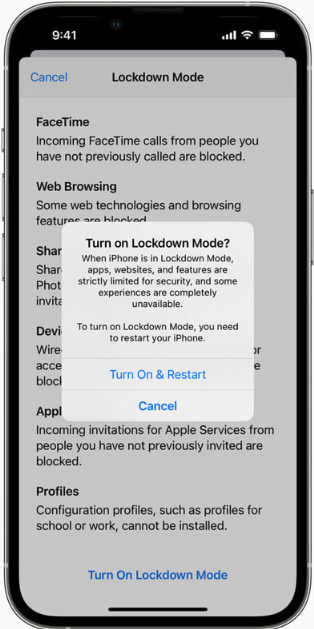
Apple’s iOS 16 includes two new security and privacy features — Lockdown Mode and Safety Check. Wired.com describes Safety Check as a feature for users who are at risk for, or currently experiencing, domestic abuse.

“The tool centralizes a number of controls in one place to make it easier for users to manage and revoke access to their location data and reset privacy-related permissions,” wrote Lily Hay Newman.

“Lockdown Mode, on the other hand, is meant for users who potentially face targeted spyware attacks and aggressive state-backed hacking. The feature comprehensively restricts any nonessential iOS features so there are as few potential points of entry to a device as possible. As more governments and repressive entities around the world have begun purchasing powerful commodity spyware to target individuals of particular importance or interest, iOS’s general security defenses haven’t been able to keep pace with these specialized threats.”

To turn on Lockdown Mode in iOS 16, go to Settings, then Privacy and Security, then Lockdown Mode. Safety Check is located in the same area.

Finally, Adobe released seven patches addressing 63 security holes in Adobe Experience Manager, Bridge, InDesign, Photoshop, InCopy, Animate, and Illustrator. More on those updates is here.

Don’t forget to back up your data and/or system before applying any security updates. If you experience glitches or problems installing any of these patches this month, please consider leaving a comment about it below; there’s a decent chance other readers have experienced the same and may chime in here with useful tips.

—————
Free Secure Email – Transcom Sigma
Boost Inflight Internet
Transcom Hosting
Transcom Premium Domains