The attacks reportedly increased in conjunction with the start of the Wimbledon tennis tournament
—————
Free Secure Email – Transcom Sigma
Boost Inflight Internet
Transcom Hosting
Transcom Premium Domains
—————
Free Secure Email – Transcom Sigma
Boost Inflight Internet
Transcom Hosting
Transcom Premium Domains
—————
Free Secure Email – Transcom Sigma
Boost Inflight Internet
Transcom Hosting
Transcom Premium Domains
—————
Free Secure Email – Transcom Sigma
Boost Inflight Internet
Transcom Hosting
Transcom Premium Domains
—————
Free Secure Email – Transcom Sigma
Boost Inflight Internet
Transcom Hosting
Transcom Premium Domains
The USB Rubber Ducky is getting better and better.
Already, previous versions of the Rubber Ducky could carry out attacks like creating a fake Windows pop-up box to harvest a user’s login credentials or causing Chrome to send all saved passwords to an attacker’s webserver. But these attacks had to be carefully crafted for specific operating systems and software versions and lacked the flexibility to work across platforms.
The newest Rubber Ducky aims to overcome these limitations. It ships with a major upgrade to the DuckyScript programming language, which is used to create the commands that the Rubber Ducky will enter into a target machine. While previous versions were mostly limited to writing keystroke sequences, DuckyScript 3.0 is a feature-rich language, letting users write functions, store variables, and use logic flow controls (i.e., if this… then that).
That means, for example, the new Ducky can run a test to see if it’s plugged into a Windows or Mac machine and conditionally execute code appropriate to each one or disable itself if it has been connected to the wrong target. It also can generate pseudorandom numbers and use them to add variable delay between keystrokes for a more human effect.
Perhaps most impressively, it can steal data from a target machine by encoding it in binary format and transmitting it through the signals meant to tell a keyboard when the CapsLock or NumLock LEDs should light up. With this method, an attacker could plug it in for a few seconds, tell someone, “Sorry, I guess that USB drive is broken,” and take it back with all their passwords saved.
—————
Free Secure Email – Transcom Sigma
Boost Inflight Internet
Transcom Hosting
Transcom Premium Domains
Scammers are using invoices sent through PayPal.com to trick recipients into calling a number to dispute a pending charge. The missives — which come from Paypal.com and include a link at Paypal.com that displays an invoice for the supposed transaction — state that the user’s account is about to be charged hundreds of dollars. Recipients who call the supplied toll-free number to contest the transaction are soon asked to download software that lets the scammers assume remote control over their computer.
KrebsOnSecurity recently heard from a reader who received an email from paypal.com that he immediately suspected was phony. The message’s subject read, “Billing Department of PayPal updated your invoice.”
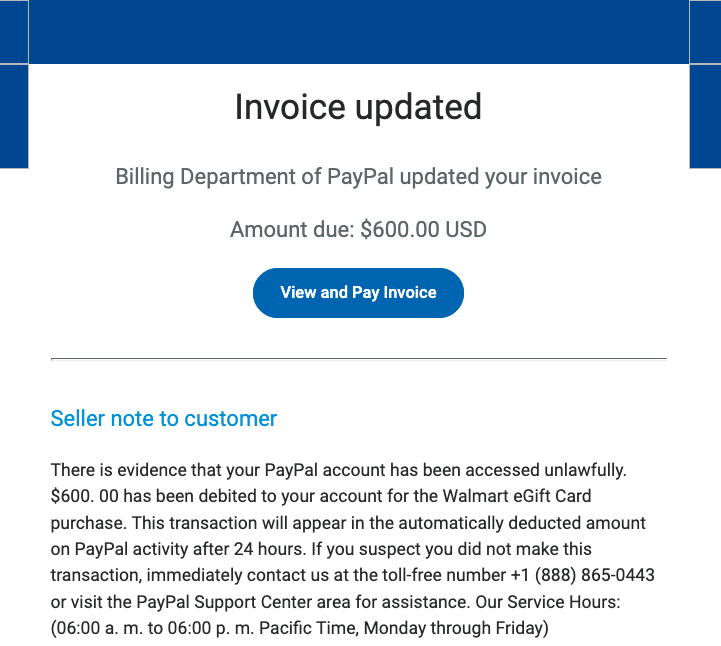
A copy of the phishing message included in the PayPal.com invoice.
While the phishing message attached to the invoice is somewhat awkwardly worded, there are many convincing aspects of this hybrid scam. For starters, all of the links in the email lead to paypal.com. Hovering over the “View and Pay Invoice” button shows the button indeed wants to load a link at paypal.com, and clicking that link indeed brings up an active invoice at paypal.com.
Also, the email headers in the phishing message (PDF) show that it passed all email validation checks as being sent by PayPal, and that it was sent through an Internet address assigned to PayPal.
Both the email and the invoice state that “there is evidence that your PayPal account has been accessed unlawfully.” The message continues:
“$600.00 has been debited to your account for the Walmart Gift Card purchase. This transaction will appear in the automatically deducted amount on PayPal activity after 24 hours. If you suspect you did not make this transaction, immediately contact us at the toll-free number….”
Here’s the invoice that popped up when the “View and Pay Invoice” button was clicked:
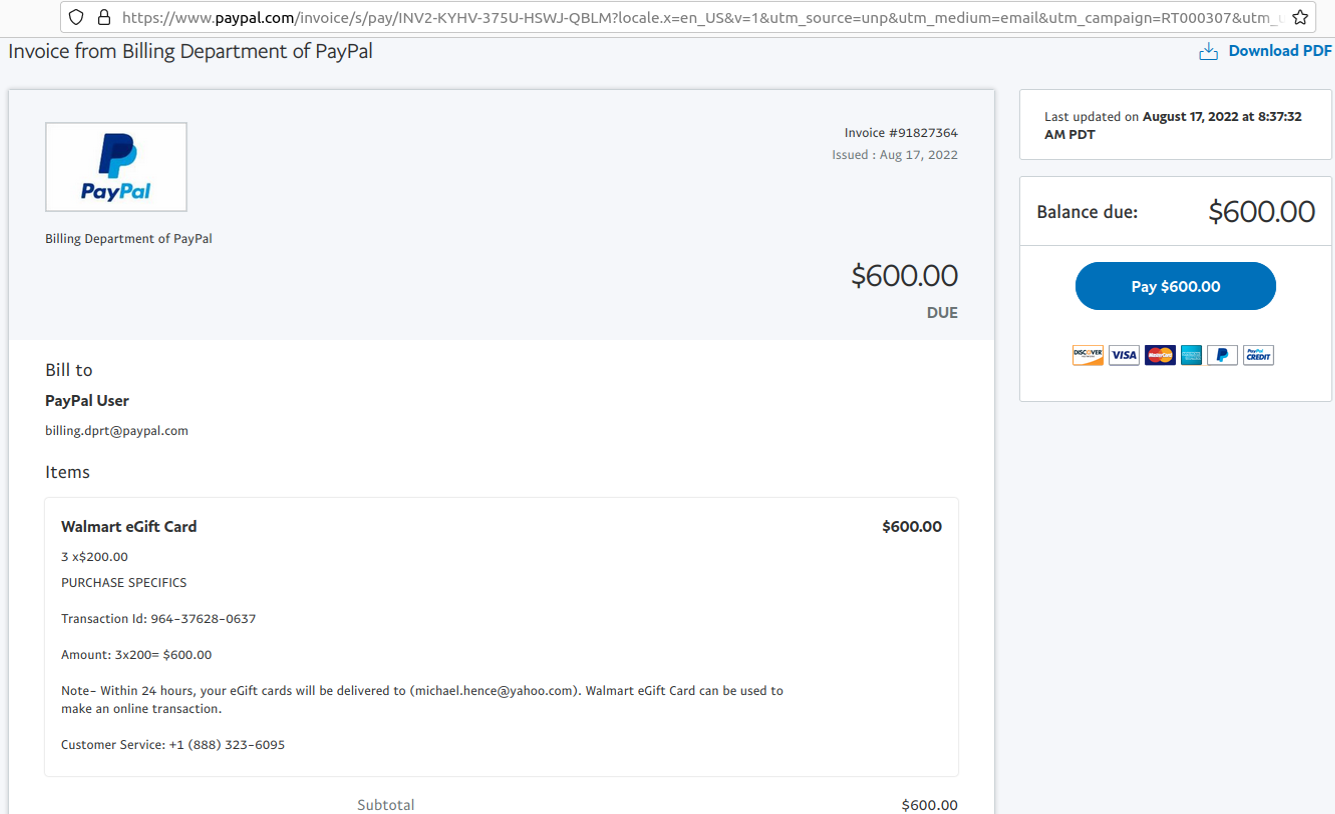
The phony PayPal invoice, which was sent and hosted by PayPal.com.
The reader who shared this phishing email said he logged into his PayPal account and could find no signs of the invoice in question. A call to the toll-free number listed in the invoice was received by a man who answered the phone as generic “customer service,” instead of trying to spoof PayPal or Walmart. Very quickly into the conversation he suggested visiting a site called globalquicksupport[.]com to download a remote administration tool. It was clear then where the rest of this call was going.
I can see this scam tricking a great many people, especially since both the email and invoice are sent through PayPal’s systems — which practically guarantees that the message will be successfully delivered. The invoices appear to have been sent from a compromised or fraudulent PayPal Business account, which allows users to send invoices like the one shown above. Details of this scam were shared Wednesday with PayPal’s anti-abuse (phishing@paypal.com) and media relations teams.
PayPal said in a written statement that phishing attempts are common and can take many forms.
“We have a zero-tolerance policy on our platform for attempted fraudulent activity, and our teams work tirelessly to protect our customers,” PayPal said. “We are aware of this well-known phishing scam and have put additional controls in place to mitigate this specific incident. Nonetheless, we encourage customers to always be vigilant online and to contact Customer Service directly if they suspect they are a target of a scam.”
It’s remarkable how well today’s fraudsters have adapted to hijacking the very same tools that financial institutions have long used to make their customers feel safe transacting online. It’s no accident that one of the most prolific scams going right now — the Zelle Fraud Scam — starts with a text message about an unauthorized payment that appears to come from your bank. After all, financial institutions have spent years encouraging customers to sign up for mobile alerts via SMS about suspicious transactions, and to expect the occasional inbound call about possibly fraudulent transactions.
Also, today’s scammers are less interested in stealing your PayPal login than they are in phishing your entire computer and online life with remote administration software, which seems to be the whole point of so many scams these days. Because why rob just one online account when you can plunder them all?
The best advice to sidestep phishing scams is to avoid clicking on links that arrive unbidden in emails, text messages and other mediums. Most phishing scams invoke a temporal element that warns of dire consequences should you fail to respond or act quickly. If you’re unsure whether the message is legitimate, take a deep breath and visit the site or service in question manually — ideally, using a browser bookmark to avoid potential typosquatting sites.
—————
Free Secure Email – Transcom Sigma
Boost Inflight Internet
Transcom Hosting
Transcom Premium Domains
—————
Free Secure Email – Transcom Sigma
Boost Inflight Internet
Transcom Hosting
Transcom Premium Domains
—————
Free Secure Email – Transcom Sigma
Boost Inflight Internet
Transcom Hosting
Transcom Premium Domains
—————
Free Secure Email – Transcom Sigma
Boost Inflight Internet
Transcom Hosting
Transcom Premium Domains
—————
Free Secure Email – Transcom Sigma
Boost Inflight Internet
Transcom Hosting
Transcom Premium Domains