4 Viral Apps Risking Your Personal & Smartphone Security

Mobile phones have gone through an incredible transformation since their inception in the 1970s. Now, the sheer number of applications is dizzying, as are their privacy policies; however, smartphone apps can bring hours of fun and belly laughs, and occasionally, a viral app captures the world’s attention. Don’t let potential risks to your personal information safety ruin all smartphone apps for you. All you need to share and play safely is a few tips to help you identify which apps are OK to use and how to navigate them intelligently. 

Check out these four viral apps that may be putting your personal information at risk, plus a few tips that’ll help you enjoy smartphone apps safely. 

1. Voilà AI Artist

Voilà AI Artist is a trending app that reimagines your face as a cartoon, caricature, or model of fine Renaissance art. Users can snap a selfie with the app or allow the app to access their photo library. According to WIRED, the app says it deletes users’ photos from its database in 24 to 48 hours, though it’s difficult to confirm that they aren’t stored.  

Approach any app that could potentially use and store your likeness with caution. Deepfake technology is becoming more sophisticated and common by the day. Deepfakes are fabricated videos, images, or sound clips of every day or famous people based on real videos and images. Fake media impacts the victims whose likenesses are used because often the media is demeaning or incendiary. Voilà AI Artist hasn’t been suspected of any wrongdoing, but it’s best to be aware of how your face could be used to endorse something you don’t agree with. 

2. FaceApp 

Another face-altering app that could pose a risk to users’ privacy is FaceApp. Similar to Voilà AI Artist, it’s unclear what the app does with your likeness once you allow it to take your picture. FaceApp’s terms of use agreement outline that the selfies uploaded to the app belong to the app. From there, the app is free “to use, reproduce, modify, adapt, create derivative works from, distribute, perform, and display your User Content.” This line of fine print should make users pause. Again, users’ faces could be used in ways they wouldn’t normally agree to. 

3. Pokémon Go

While the Pokémon Go craze of 2016 has greatly subsided, the next viral app that sweeps the world could replicate the security vulnerabilities the premise presents. Pokémon Go uses augmented reality, which is the kind of technology that makes it look like a Pokémon is strolling across your living room. The app can access your camera, as well as your contacts, pictures, chats, and location. It’s a blast exploring your neighborhood looking for animated critters and seeing nearby strangers’ profiles pop up on your map; however, be wary of sharing location data and images of the inside of your home with people you don’t know in real life. 

4. TikTok 

TikTok may pose a risk to users’ data privacy. TikTok is under suspicion for using data mining tactics. Data mining is a practice where corporations harvest personal details from user-profiles and share them with advertising, marketing, and analytics companies. According to Business Insider, TikTok collects more than 50 kinds of data from users as young as 13 years old, including age, gender, location, and online habits. These facts are often used to create targeted ads that sometimes border on an invasion of privacy. 

How to Navigate Smartphone Apps Safely

Check out these tips to make sure you’re prepared to use apps safely or help you decide to skip trends entirely. 

  • Don’t give in to fads. When all your friends are posting app-generated cartoon images of themselves on social media, cheekily draw your own cartoon and post a picture of that instead. The worse of an artist you are, the better your post will be! 
  • Research before downloading. A quick search before downloading a trending app will likely bring up a few news results that may reveal egregious privacy concerns. Also, read the terms and conditions closely. The fine print often holds the answers to your privacy questions.
  • Change app permissions. Whenever you download a new app, make it a habit to first check out the privacy and data-tracking settings. Opt-out of targeted ads and tracking, and ensure your account is only visible to people you know in real life.   
  • Subscribe to mobile privacy protection. Navigate apps and mobile sites with confidence when you have McAfee Total Protection by your side. McAfee Total Protection provides safe browsing and identity and virus protection for desktops, tablets, and smartphones. 

The post 4 Viral Apps Risking Your Personal & Smartphone Security appeared first on McAfee Blogs.

—————
Boost Internet Speed
Free Business Hosting
Free Email Account
Dropcatch
Free Secure Email
Secure Email
Cheap VOIP Calls
Free Hosting
Boost Inflight Wifi
Premium Domains
Free Domains

McAfee Security Alert: Protect Your Smart Cameras and Wi-Fi Baby Monitors

An important alert for anyone who uses smart cameras, Wi-Fi baby monitors, and other connected  devices that send audio or video over the internet: a recent security advisory indicates millions of these devices may be at risk of remote monitoring or attack. 

The root of the concern is an apparent vulnerability in the Software Development Kit (“SDK”) used with the ThroughTek Kalay network. Millions of smart devices use Kalay and its protocols to communicate over the internet. 

As mentioned in the security advisory, an attacker could exploit the apparent vulnerability to intercept audio and video signals sent to and from Kalay-enabled devices. This could lead to follow-on attacks that utilize the Kalay-enabled Internet of Things (IoT) platform—such as the smart cameras and baby monitors. 

What you can do to help protect your devices right now 

While there is not a comprehensive list of specific devices or manufacturers that may be affected by this alert, millions of devices use the Kalay network and protocols. Given this, people who own these types of devices should strongly consider taking the following steps to protect themselves while ThroughTek and its partners actively address the issue: 

1. Update your devices. Manufacturers using the Kalay protocol have been advised to update to its latest version and enable further security features. Updating your devices regularly increases the chances that you’ll receive security improvements soon after they become available.  

2. Do not connect to your smart cameras, baby monitors, and other devices through public Wi-Fi. Accessing these devices via a smartphone app from an unprotected network can compromise the security of your devices. Use a VPN or a secure cellular data connection instead. 

3. Use strong, unique passwords. Every device of yours should have one, along with a unique username to go along with it. In some cases, connected devices ship with default usernames and passwords, making them that much easier to hack. 

Further protect your connected cameras, baby monitors, and other devices 

With those immediate steps in place, this security advisory offers you a chance to take a fresh look at your network and device security overall. With these straightforward steps in place, you’ll be  more protected against such events in the future—not to mention more secure in general.  

1. Use two-factor authentication 

Our banks, many of the online shopping sites we use, and numerous other accounts use two-factor authentication to help validate that we’re who we say we are when logging in. In short, a username and password combo is an example of one-factor authentication. The second factor in the mix is something you, and only you, own or control, like your mobile phone. Thus, when you log in and get a prompt to enter a security code that’s sent to your mobile phone, you’re taking advantage of two-factor authentication. If your IoT device supports two-factor authentication as part of the login procedure, put it to use and get that extra layer of security. 

2. Secure your internet router 

Your router acts as the internet’s gateway into your home. From there, it works as a hub that connects all your devices—computers, tablets, and phones, along with your IoT devices as well. That means it’s vital to keep your router secure. A quick word about routers: you typically access them via a browser window and a specific address that’s usually printed somewhere on your router. Whether you’re renting your router through your internet provider or have purchased one, the internet provider’s “how to” guide or router documentation can step you through this process. 

The first thing to do is change the default password of your router if you haven’t done so already. Again, use a strong method of password creation. Also, change the name of your router. When you choose a new one, go with name that doesn’t give away your address or identity. Something unique and even fun like “Pizza Lovers” or “The Internet Warehouse” are options that mask your identity and are memorable for you too. While you’re making that change, you can also check that your router is using an encryption method, like WPA2, which helps secure communications to and from your router. If you’re unsure what to do, reach out to your internet provider or router manufacturer. 

3. Set up a guest network specifically for your IoT devices 

Just as you can offer your human guests secure access that’s separate from your own devices, creating an additional network on your router allows you to keep your computers and smartphones separate from IoT devices. This way, if an IoT device is compromised, a hacker will still have difficulty accessing your other devices, like computers and smartphones, along with the data and info that you have stored on them. You may also want to consider investing in an advanced internet router that has built-in protection and can secure and monitor any device that connects to your network. 

4. Update! 

We mentioned this above, yet it’s so important that it calls for a second mention: make sure you have the latest software updates for your IoT devices. That will make sure you’re getting the latest functionality from your device, and updates often contain security upgrades. If there’s a setting that lets you receive automatic updates, enable it so that you always have the latest. 

5. Protect your phone 

You’ve probably seen that you can control a lot of your connected things with your smartphone. We’re using them to set the temperature, turn our lights on and off, and even see who’s at the front door. With that, it seems like we can add the label “universal remote control” to our smartphones—so protecting our phones has become yet more important. Whether you’re an Android or iOS device user, get security software installed on your phone so you can protect all the things it accesses and controls—in addition to you and the phone as well. 

And protect your other things too 

While the apparent vulnerability in the Kalay protocol is at issue here, this security advisory stands as a good reminder to protect all of our connected things—notably our computers and laptops. Using a strong suite of security software likeMcAfee® Total Protection, can help defend your entire family from the latest threats and malware, make it safer to browse, and look out for your privacy too. 

The post McAfee Security Alert: Protect Your Smart Cameras and Wi-Fi Baby Monitors appeared first on McAfee Blogs.

—————
Boost Internet Speed
Free Business Hosting
Free Email Account
Dropcatch
Free Secure Email
Secure Email
Cheap VOIP Calls
Free Hosting
Boost Inflight Wifi
Premium Domains
Free Domains

Younger, But Not Savvier: 3 Cybersecurity Threats Plaguing Millennials

Surprise! Just because you’re a Millennial or Gen Zer doesn’t mean you’re savvier when it comes to technology. Especially when it comes to cybersecurity.  

Turns out, Millennials aren’t quite as tight with their security as the older generations are. That’s according to one study about working from home that focused on younger adults and their older cohorts. It’s perhaps no surprise that nearly half of them said that they enjoyed working from home. What is surprising is that while working from home, “Gen Zers (38%) and Millennials (23%) said they had four or more [technology] issues, on average, every week,” according to the research. 

For comparison, the research also showed that only 12% of employees aged 45 to 54, 4% aged 55 to 64, and 13% of seniors said that they had four or more issues per week. 

Talk about a stereotype-buster! 

Top security threats plaguing millennials 

Aside from technology issues in general, they found themselves dealing with security issues as well. The top three culprits … 

  • Password issues: getting locked out of apps, accounts, and devices 
  • Safe browsing habits: clicking on bad links, leading to hacks and attacks 
  • Tracking and privacy basics: not understanding what “accept all cookies” means 

If this survey is any indication, we could be a lot safer out there, particularly while we’re doing things like paying bills, checking our bank balances, or splitting dinner with friends via a payment app. 

That’s what’s at stake. Millennials have among the highest rates of online shopping by generation at more than 86% (compared to Boomers at just over 62%). They also use social media the most and 50% of them self-describe themselves as being online “almost constantly” (a figure that drops sharply with age). Taken together, that’s a significant level of exposure to potential threats online. So, if there’s one place where Millennials can get a bit savvier, it’s with their cybersecurity. 

Five tips to fight back against viruses, hacks, and attacks 

The good news is that it doesn’t take a whole lot to improve your safety online. With a few straightforward steps, you can protect yourself better than before—and perhaps spare you some of those technology headaches in the process. Let’s take a quick look: 

1. Cover all your bases with security software 

As always, this is “square one” advice when it comes to keeping yourself safe online. Comprehensive security software will do more than protect your stuff. It’ll protect you by making it safer while you use your apps, breeze through some videos, or take care of your finances—practically anything that involves you, your identity, your money, and your data online. And because we do so much of that on our phones, go ahead and add security software on your phone, too. That’ll make you far safer when you’re moving money around online or simply going about your day. 

2. Keep all your accounts straight with a password manager 

Yup, keeping track of all those passwords is a pain. Resetting them when you forget them is a pain too. And even bigger pain is reusing passwords, getting one account hacked, followed by a bunch of others getting hacked too because they use the same password. It happens. And hackers count on lazy password habits. Going online with strong, unique passwords is a must (even if it’s a bit of a pain), yet using a password manager makes it far easier and far more secure. Typically included with comprehensive security software, it can create and safely store strong, unique passwords for each of your accounts. 

3. Steer clear of risky websites and links with an advisor 

What’s lurking behind that link? A sketchy site? A scam looking to steal your personal info? Sometimes it’s tough to know, until you click that link and find out the hard way. A web advisor can identify those bad sites and links for you without clicking. And further, it can block a mistaken click, giving you an extra level of protection. Often available with your security software, you can also get our own McAfee® Web Advisor for free. 

4. Stay extra secure while shopping and banking with a VPN 

By way of an app, a VPN helps keep your personal data safe as you use the internet. More than just protecting your browsing, it further protects you while using apps because of the way it creates a secure connection. Using a VPN is a smart move when using public Wi-Fi because that connection is, well, public, meaning anyone can potentially spy on your activity—potentially lifting passwords, data, and other personal info. A VPN is also a great idea any time you want extra privacy any time, particularly when you’re doing things like banking or shopping online. 

5. A.B.U. – Always Be Updating 

It seems like nearly every day some of your apps and devices will prompt you for an update. Take a moment to follow through on those alerts and install them. In a few moments, you’ll be up to date, which often includes security fixes that can improve your level of protection. Also, those alerts are a good time to ask yourself, “Do I really use that app anymore?” If you don’t, just go ahead and delete that app, along with any account or data associated with it. This leaves you with one less target that hackers can zero in on, thus making you that much safer (and with a less cluttered device to boot).  

Staying safer online = fewer headaches online 

Once you get up and running with these tips, you’ll find that you’re safer than before. Plus, you’ll also find that apps like security software and password managers can take care of a lot of time-consuming tasks for you, practically automatically. Giving you one less thing to worry about.  

The post Younger, But Not Savvier: 3 Cybersecurity Threats Plaguing Millennials appeared first on McAfee Blogs.

—————
Boost Internet Speed
Free Business Hosting
Free Email Account
Dropcatch
Free Secure Email
Secure Email
Cheap VOIP Calls
Free Hosting
Boost Inflight Wifi
Premium Domains
Free Domains

Wanted: Disgruntled Employees to Deploy Ransomware

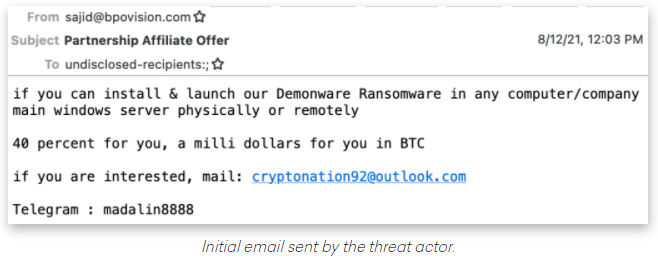
Criminal hackers will try almost anything to get inside a profitable enterprise and secure a million-dollar payday from a ransomware infection. Apparently now that includes emailing employees directly and asking them to unleash the malware inside their employer’s network in exchange for a percentage of any ransom amount paid by the victim company.

Image: Abnormal Security.

Crane Hassold, director of threat intelligence at Abnormal Security, described what happened after he adopted a fake persona and responded to the proposal in the screenshot above. It offered to pay him 40 percent of a million-dollar ransom demand if he agreed to launch their malware inside his employer’s network.

This particular scammer was fairly chatty, and over the course of five days it emerged that Hassold’s correspondent was forced to change up his initial approach in planning to deploy the DemonWare ransomware strain, which is freely available on GitHub.

“According to this actor, he had originally intended to send his targets—all senior-level executives—phishing emails to compromise their accounts, but after that was unsuccessful, he pivoted to this ransomware pretext,” Hassold wrote.

Abnormal Security documented how it tied the email back to a young man in Nigeria who acknowledged he was trying to save up money to help fund a new social network he is building called Sociogram.

Image: Abnormal Security.

Reached via LinkedIn, Sociogram founder Oluwaseun Medayedupin asked to have his startup’s name removed from the story, although he did not respond to questions about whether there were an inaccuracies in Hassold’s report.

“Please don’t harm Sociogram’s reputation,” Medayedupin pleaded. “I beg you as a promising young man.”

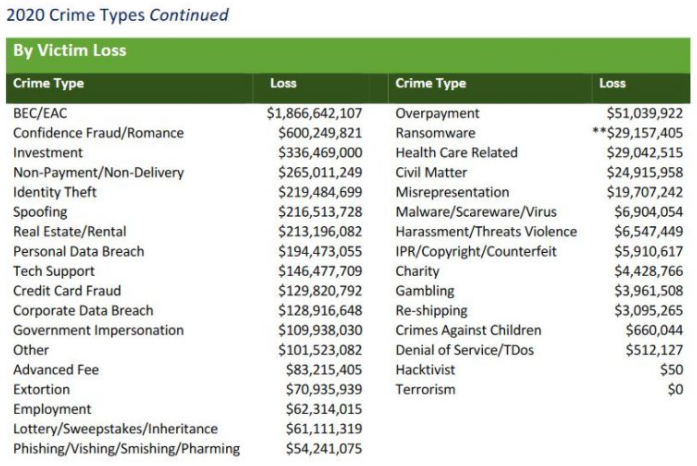
This attacker’s approach may seem fairly amateur, but it would be a mistake to dismiss the threat from West African cybercriminals dabbling in ransomware. While multi-million dollar ransomware payments are hogging the headlines, by far the biggest financial losses tied to cybercrime each year stem from so-called Business Email Compromise (BEC) or CEO Scams, in which crooks mainly based in Africa and Southeast Asia will spoof communications from executives at the target firm in a bid to initiate unauthorized international wire transfers.

According to the latest figures (PDF) released by the FBI Internet Crime Complaint Center (IC3), the reported losses from BEC scams continue to dwarf other cybercrime loss categories, increasing to $1.86 billion in 2020.

Image: FBI

“Knowing the actor is Nigerian really brings the entire story full circle and provides some notable context to the tactics used in the initial email we identified,” Hassold wrote. “For decades, West African scammers, primarily located in Nigeria, have perfected the use of social engineering in cybercrime activity.”

“While the most common cyber attack we see from Nigerian actors (and most damaging attack globally) is business email compromise (BEC), it makes sense that a Nigerian actor would fall back on using similar social engineering techniques, even when attempting to successfully deploy a more technically sophisticated attack like ransomware,” Hassold concluded.

DON’T QUIT YOUR DAY JOB

Cybercriminals trolling for disgruntled employees is hardly a new development. Big companies have long been worried about the very real threat of disgruntled employees creating identities on darknet sites and then offering to trash their employer’s network for a fee (for more on that, see my 2016 story, Rise of the Darknet Stokes Fear of the Insider).

Indeed, perhaps this enterprising Nigerian scammer is just keeping up with current trends. Several established ransomware affiliate gangs that have recently rebranded under new banners seem to have done away with the affiliate model in favor of just buying illicit access to corporate networks.

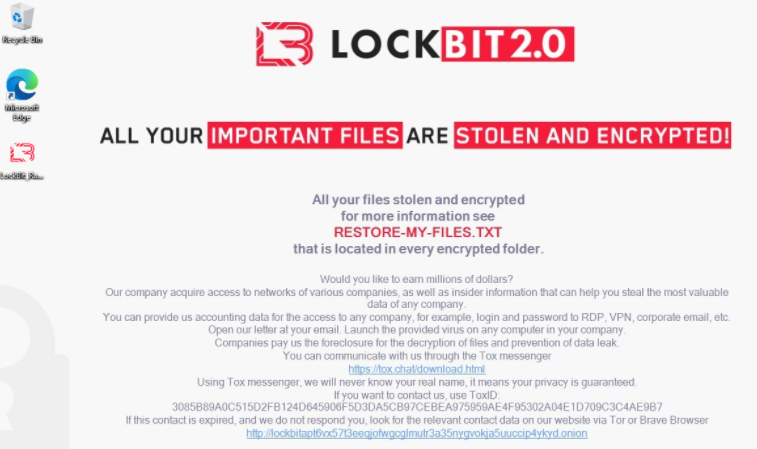
For example, the Lockbit 2.0 ransomware-as-a-service gang actually includes a solicitation for insiders in the desktop wallpaper left behind on systems encrypted with the malware.

“Would you like to earn millions of dollars? Our company acquires access to networks of various companies, as well as insider information that can help you steal the most valuable data of any company,” LockBit’s unusual ad reads. “You can provide us accounting data for the access to any company, for example, login and password to RDP, VPN, corporate email, etc. Open our letter at your email. Launch the provided virus on any computer in your company. Companies pay us the foreclosure for the decryption of files and prevention of data leak.”

Image: Sophos.

Likewise, the newly formed BlackMatter ransomware gang kicked off its presence on the cybercrime forums with the unassuming thread, “Buying/monetizing your access to corporate networks.” The rest of the post reads:

We are looking for access to corporate networks in the following countries:
– the USA
– Canada
– Australia
– the UK

All lines of business except for:
– Healthcare
– Government entities.

Requirements:
– Revenue according to ZoomInfo: over 100 million.
– Number of hosts: 500 to 15,000.
– We do not accept networks that anybody else has already tried to work on.

Two options of cooperation:
– We buy networks: 3 to 100k.
– We monetize them (subject to negotiation on a case-by-case basis).

How we work:
You select an option of cooperation. -> You provide access to the network. -> We check it. -> We take it or not (depending on whether it meets the requirements).

—————
Boost Internet Speed
Free Business Hosting
Free Email Account
Dropcatch
Free Secure Email
Secure Email
Cheap VOIP Calls
Free Hosting
Boost Inflight Wifi
Premium Domains
Free Domains

Airline Employee Jailed for Spending Passengers’ Money

Airline Employee Jailed for Spending Passengers’ Money

A former United Airlines employee has been sent to prison for stealing passengers’ financial data and using it to make fraudulent purchases. 

Hayder Lefta, of Manchester, New Hampshire, worked as a customer service representative at Manchester-Boston Regional Airport in 2018 and 2019. Court documents showed that while assisting customers at the airport, the 25-year-old made a copy of their credit card numbers. 

Lefta later used these stolen card details to purchase airline flights and meals for himself and for friends without the card owners’ consent. 

Other expenses Lefta ran up on customers’ cards included bills for hotels he used for his personal leisure travel. 

An investigation into Lefta was launched after a United Airlines customer who had used the airport in September 2018 discovered charges on their credit card statement that they hadn’t made. 

The fraudulent charges included tickets on Turkish Airlines priced at $2,657 and $1,488, and a $112.31 order placed with a Manchester branch of pizza restaurant Domino’s. 

Investigators linked Lefta’s phone number with the fraudulent Domino’s pizza order and determined that he had been working at the airport when the victim had traveled through it. 

Lefta was eventually linked to more than $31,500 in charges made with stolen credit card numbers. 

Police arrested Lefta on January 8, 2019, while he was working at the airport. A search of his three cell phones, iPad, and computer revealed images of multiple credit card numbers displayed on airline computers along with screen shots of passengers’ personal information.

At least 12 of the passengers whose personal information was found in Lefta’s possession had been the victim of credit card fraud. 

On April 21, 2021, Lefta pleaded guilty to access device fraud. He was sentenced on August 17 to 10 months in prison and ordered to pay restitution in the amount of $75,778.47 to his victims.

“This defendant’s theft and use of credit card numbers from airport customers was a brazen crime that allowed him to go on an undeserved spending spree,” said Acting US Attorney John Farley.  

“As a result of the hard work of our law enforcement partners, he is now a convicted felon who will serve prison time for his offenses and will need to pay restitution to his innocent victims.”

—————
Boost Internet Speed
Free Business Hosting
Free Email Account
Dropcatch
Free Secure Email
Secure Email
Cheap VOIP Calls
Free Hosting
Boost Inflight Wifi
Premium Domains
Free Domains

US Hospitals Divert Care After Cyber-attack

US Hospitals Divert Care After Cyber-attack

A cyber-attack forced hospitals in West Virginia and Ohio to divert patients to other care providers and work from paper records.

Threat actors targeted Memorial Health System with ransomware on the morning of August 15. The assault disrupted the IT systems at nearly all the health system’s 64 clinics and three hospitals – Marietta Memorial, Selby General, and Sistersville General.

By midnight on Sunday, the hospitals were turning away patients, except for heart-attack, stroke and trauma patients, and sending them to Camden Clark Medical Center and Belpre Medical Campus. This may have increased the waiting time for care by as much as an hour for some patients.

The attack triggered the cancellation of radiology examinations and non-urgent operations as staff were unable to access IT systems. 

On August 18, the health system issued a statement announcing that it worked with national cybersecurity experts to resolve the impact of the attack.

“We have reached a negotiated solution and are beginning the process that will restore operations as quickly and as safely as possible,” said Memorial Health System president and CEO Scott Cantley. 

“We are following a deliberate, systematic approach to bring systems back online securely and in a manner that prioritizes our ability to provide patient care.”

Cantley did not state whether the negotiations involved the health system’s agreeing to pay a ransom to the attackers but added that IT systems could be back online as early as Sunday. 

Early indications are that the attack did not involve a data leak. 

Cantley said: “As we conduct our IT remediation work, our security experts have been monitoring and have not noted any indication that any patient or employee data has been publicly released or disclosed.”

He added that the health service planned to strengthen its existing cybersecurity defenses.

“Moving forward, the health system will continue to focus on remediation technology that will be added to already intensive security systems,” said Cantley. 

“It is unfortunate that many health care organizations are confronting the impacts of an evolving cyber-threat landscape. We continue to implement enhancements to our information security, systems, and monitoring capabilities.”

—————
Boost Internet Speed
Free Business Hosting
Free Email Account
Dropcatch
Free Secure Email
Secure Email
Cheap VOIP Calls
Free Hosting
Boost Inflight Wifi
Premium Domains
Free Domains

ICS Vulnerabilities Increase 41%

ICS Vulnerabilities Increase 41%

Disclosures of vulnerabilities affecting industrial control systems (ICS) have grown by 41% in the past six months, according to a report released today by Claroty.

The third Biannual ICS Risk & Vulnerability Report found a rapid acceleration in the number of disclosures being reported since the start of 2021. 

In the last half of 2020, 449 vulnerabilities were disclosed. During the first half of 2021, more than 600 ICS vulnerabilities were disclosed, impacting 76 vendors. 

Claroty researchers described the rise in the number of disclosures as “particularly significant given that in all of 2020 they increased by 25% from 2019 and 33% from 2018.”

Most of the vulnerabilities disclosed represented a serious risk to industrial control systems, with 71% being classified as high or critical. 

Researchers found that 81% of vulnerabilities were discovered by sources other than the affected vendor, including independent researchers, academics, third-party companies, and other research groups.

Worryingly, 90% of the vulnerabilities were identified as not requiring any special conditions to be exploited. Therefore, an attacker who exploited these “low attack complexity” vulnerabilities could expect to enjoy repeatable success every time.

Nearly two-thirds of disclosures (61%) were remotely exploitable, and 66% did not require any user interaction to be exploited. 

Almost three-quarters of vulnerabilities (74%) did not require privileges, so they could be exploited by an attacker who was unauthorized and who did not have access to settings or files.

Amir Preminger, vice president of research at Claroty, said that modernization was raising risks for companies. 

“As more enterprises are modernizing their industrial processes by connecting them to the cloud, they are also giving threat actors more ways to compromise industrial operations through ransomware and extortion attacks,” said Preminger.

They went on to describe the latest cyber-attacks on critical infrastructure in the Unites States as a wake-up call. 

“The recent cyber-attacks on Colonial Pipeline, JBS Foods, and the Oldmsar, Florida, water treatment facility have not only shown the fragility of critical infrastructure and manufacturing environments that are exposed to the internet but have also inspired more security researchers to focus their efforts on ICS specifically,” said Preminger.

—————
Boost Internet Speed
Free Business Hosting
Free Email Account
Dropcatch
Free Secure Email
Secure Email
Cheap VOIP Calls
Free Hosting
Boost Inflight Wifi
Premium Domains
Free Domains

Phishing Costs Surge to $15m Annually for US Organizations

Phishing Costs Surge to $15m Annually for US Organizations

The average cost of phishing for large US organizations has soared by 289% over the past six years, with firms now losing nearly $15m annually, according to Proofpoint.

The security vendor commissioned the Ponemon Institute to poll nearly 600 IT and IT security practitioners to compile its latest Cost of Phishing study.

It revealed that the average large US organization loses $14.8m per year to phishing-related cybercrime, up from $3.8m in 2015 and calculated at $1500 per employee.

Phishing for credentials is a common starting point for ransomware and Business Email Compromise (BEC). The study claimed that ransomware costs large organizations $5.7m annually, while BEC accounts for $6m.

However, although these are average figures, they could rapidly escalate in some circumstances. Companies including Cognizant, Sopra Steria and Norsk Hydro have all suffered losses in the tens of millions of dollars following ransomware incidents. The FBI recorded total BEC losses of $1.8 billion from reported incidents in 2020.

Ponemon Institute founder Larry Ponemon warned firms that the cost of a ransomware attack could amount to much more than the initial pay-out to threat actors.

“What we found is that ransoms alone account for less than 20% of the cost of a ransomware attack,” he explained. “Because phishing attacks increase the likelihood of a data breach and business disruption, most of the costs incurred by companies come from lost productivity and remediation of the issue rather than the actual ransom paid to the attackers.”

According to Proofpoint, the cost of resolving malware infections has doubled since 2015, from $338,098 to $807,506.

Yet, it’s not just infections that can eat into profits. The report claimed that the average cost to contain initial credential phishing compromises increased from $381,920 in 2015 to $692,531 in 2021 — with companies typically experiencing over five of these incidents each year.

“Because threat actors now target employees instead of networks, credential compromise has exploded in recent years, leaving the door wide-open for much more devastating attacks like BEC and ransomware,” said Ryan Kalember, EVP of cybersecurity strategy at Proofpoint.

“Until organizations deploy a people-centric approach to cybersecurity that includes security awareness training and integrated threat protection to stop and remediate threats, phishing attacks will continue.”

—————
Boost Internet Speed
Free Business Hosting
Free Email Account
Dropcatch
Free Secure Email
Secure Email
Cheap VOIP Calls
Free Hosting
Boost Inflight Wifi
Premium Domains
Free Domains

Critical Bug Could Allow Remote Snooping Via Millions of Devices

Critical Bug Could Allow Remote Snooping Via Millions of Devices

Security researchers have found yet another critical IoT supply chain vulnerability affecting millions of devices, which could enable attackers to eavesdrop on real-time camera feeds.

Mandiant revealed the CVE-2021-28372 bug yesterday after reporting it to the Cybersecurity and Infrastructure Security Agency (CISA).

It affects devices using the “Kalay” platform from Taiwanese firm ThroughTek, which makes software for OEMs to use in IP cameras, baby and pet monitoring cameras, digital video recorders (DVRs) and more.

Although Mandiant wasn’t able to ascertain exactly how many devices are affected, the firm warned that, according to ThroughTek, more than 83 million are currently using Kalay.

The news comes just a couple of months after Nozomi Networks discovered a critical bug in the ThroughTek P2P SDK. However, unlike that flaw, this one allows threat actors to communicate with devices remotely, opening the door to remote code execution attacks, Mandiant claimed.

That said, exploitation is far from easy.

“An attacker would require comprehensive knowledge of the Kalay protocol and the ability to generate and send messages. The attacker would also need to obtain Kalay UIDs through social engineering or other vulnerabilities in APIs or services that return Kalay UIDs,” the security firm explained.

“From there, an attacker would be able to remotely compromise affected devices that correspond to the obtained UIDs.”

Mandiant worked closely with ThroughTek on vulnerability disclosure, and both they and CISA recommend any organizations using Kalay to upgrade to new version 3.1.10 without delay. Affected firms are also urged to enable DTLS, which protects data in transit, and AuthKey, which adds an extra layer of authentication during client connection.

Andy Norton, European cyber risk officer at Armis, warned that IoT devices are increasingly the weakest link in the corporate security chain.

“Despite IoT devices carrying very similar risks to organizations, there is currently a lack of mitigating controls in comparison to IT devices,” he added.

“Understanding the purpose of an IoT device and monitoring for changes to the way it behaves … is the current state of the art method for IoT device risk management.”

—————
Boost Internet Speed
Free Business Hosting
Free Email Account
Dropcatch
Free Secure Email
Secure Email
Cheap VOIP Calls
Free Hosting
Boost Inflight Wifi
Premium Domains
Free Domains

CISA Urges Organizations to Patch Critical BlackBerry QNX Bug

CISA Urges Organizations to Patch Critical BlackBerry QNX Bug

A vulnerability in BlackBerry’s QNX Real-Time Operating System (RTOS) could pose a serious security risk to critical infrastructure providers, the US government has warned.

Microsoft first discovered the so-called “BadAlloc” flaws in April. These remote code execution (RCE) bugs cover over 25 CVEs and take the form of integer overflow or wraparound vulnerabilities, it said at the time.

The Cybersecurity and Infrastructure Security Agency (CISA) has issued an alert warning that the QNX RTOS is vulnerable to one of them, CVE-2021-22156, potentially enabling an attacker to perform denial-of-service or remotely control sensitive systems. It has a CVSS score of 9.0, marking it as “critical.”

Although no current reports suggest the bug has been exploited in the wild, CISA urged any organizations “developing, maintaining, supporting, or using” affected systems to patch immediately.

The issue is more urgent given the widespread deployment of QNX in critical infrastructure. BlackBerry claims that the RTOS “is trusted in more than 195 million vehicles” and embedded in systems across “aerospace and defense, automotive, commercial vehicles, heavy machinery, industrial controls, medical, rail and robotics.”

The US Food and Drug Administration has also issued a bulletin, claiming that medical device manufacturers are currently assessing and working to mitigate the vulnerability.

It has been reported that BlackBerry officials first denied that BadAlloc affected their software and then chose not to go public with the news when the flaws were first revealed several months ago.

However, this stance changed after the firm concluded that it could not identify all affected downstream customers that may be using the RTOS via OEM-ed products, according to Politico.

“Software supply chain issues are main stage now, and are the gateway drug to extortion, ransomware, and botnets,” argued BreachQuest CISO, AJ King.

“It’s always better to take early, proactive measures to show your consumers that you’re doing everything in your power to keep their data — and in this case their physical security — safe.”

—————
Boost Internet Speed
Free Business Hosting
Free Email Account
Dropcatch
Free Secure Email
Secure Email
Cheap VOIP Calls
Free Hosting
Boost Inflight Wifi
Premium Domains
Free Domains