News

Is Your Smart Home Vulnerable to a Hack Attack?

Your smart home hums right along. It sets your alarm, opens your garage door, pops up recipes on your refrigerator screen, turns up your lighting, and even spins selections as your in-house DJ. That’s to name just a few of the things it can do. Yet with all these connected conveniences, can smart homes get hacked?

The short answer is, unfortunately, yes. Yet you have plenty of ways you can prevent it from happening.

Why do hackers target smart homes?

Smart homes and the Internet of Things (IoT) devices that populate them often offer prime targets for hackers. The reason? Many IoT smart home devices have poor security features in place. And because a home network is only as strong as its weakest point, smart home devices offer a ready means of entry. With that access to the network, a hacker has access to all the other devices on it…computers, tablets, smartphones, baby monitors, and alarm systems. Everything.

Recent research sheds light on what’s at stake. Cybersecurity teams at the Florida Institute of Technology found that companion apps for several big brand smart devices had security flaws. Of the 20 apps linked to connected doorbells, locks, security systems, televisions, and cameras they studied, 16 had “critical cryptographic flaws” that might allow attackers to intercept and modify their traffic. These flaws might lead to the theft of login credentials and spying, the compromise of the connected device, or the compromise of other devices and data on the network.[i]

Over the years, our research teams at McAfee Labs have uncovered similar security vulnerabilities in other IoT devices like smart coffee makers and smart wall plugs.

Let’s imagine a smart lightbulb with poor security measures. As part of your home network, a motivated hacker might target it, compromise it, and gain access to the other devices on your network. In that way, a lightbulb might lead to your laptop — and all the files and data on it.

In all, hackers have many reasons why they might break into your smart home.

How you can protect your smart home devices

You can take several steps to make your current smart home safer. Some of them involve protecting your devices, while others focus on protecting your home network.

  1. Update your devices. Some manufacturers keep devices current better than others, yet always check for updates. They often include security fixes and other measures to keep hackers out.
  2. Use strong, unique passwords. Every device of yours should have one, along with a unique username. In some cases, connected devices ship with default usernames and passwords, making them that much easier to hack.[ii]
  3. Use multi-factor authentication. Our banks, medical providers, and numerous other services use multi-factor authentication to keep hackers from hijacking accounts. If your smart home device supports two-factor authentication as part of the login procedure, put it to use and get that extra layer of security.
  4. Secure your internet router. Your router acts as the internet’s gateway into your home. From there, it works as a hub that connects all your devices — computers, tablets, and phones, plus your IoT devices as well. That means it’s vital to keep your router secure. The first thing to do is change the default password of your router if you haven’t done so already. Again, use a strong method of password creation. Also, change the name of your router. When you choose a new one, go with a name that doesn’t give away your address or identity. Something unique and even fun like “Pizza Lovers” or “The Internet Warehouse” are options that mask your identity and are memorable for you too.
  5. Keep your router current. Routers need updates too. Many internet service providers (ISPs) automatically push firmware updates to the routers they rent or sell to their customers. Check with yours to see. Likewise, router hardware becomes outdated over time. If you rent a router from your ISP, periodically check to see if they have new equipment available. If you own your router, check to see if it uses the latest security protocols. Currently, Wi-Fi Protected Access II (WPA2) is a strong and common form. Wi-Fi Protected Access II (WPA3) is newer, stronger, and is gaining traction in the marketplace.
  6. Set up a guest network specifically for your smart devices. Just as you can offer your human guests secure access that’s separate from your own devices, creating an additional network on your router allows you to keep your computers and smartphones separate from smart devices. This way, if a smart device is compromised, a hacker will still have difficulty accessing your other devices because they’re on a different network.
  7. In the U.S., look for the Cyber Trust Mark. In 2024, the Federal Communications Commission (FCC) adopted the rules and framework for a new cybersecurity certification program.[iii] The program is voluntary, yet many noteworthy brands have shown support for this new Cyber Trust Mark. The mark will show that the smart device in question uses cybersecurity best practices, which makes it less vulnerable to threats. In a way, you can liken it to the Energy Star certification for appliances — a certification that can help you make a smarter purchasing decision when it comes to outfitting your smart home.
  8. Protect your phone. You’ve probably seen that you can control a lot of your connected things with your smartphone. We use them to set the temperature, turn our lights on and off, and even see who’s at the front door. With that, it seems like we can add the label “universal remote control” to our smartphones — so protecting our phones has become yet more important. Whether you’re an Android or iOS device user, get security software installed on your phone so you can protect all the things it accesses and controls — in addition to you and the phone as well.

And protect yourself too

Aside from protecting your devices, there’s protecting yourself. Comprehensive online protection software will protect your privacy and identity as well. Depending on your location and the plan you select, ours includes up to $2 million in identity theft coverage, plus features that clean up old and risky online accounts. Further features remove your personal info from the sketchiest of online data brokers and help you monitor all your transactions in one place — including retirement and investment accounts. It’s comprehensive protection for a reason.

Want more on setting up your smart home?

Check out our Smart Home Security Guide. It offers further details on device protection and privacy advice for smart devices and smart speakers too. It’s free, and part of the McAfee Safety Series that covers topics ranging from online shopping and cyberbullying to identity protection and ransomware prevention.

[i] https://news.fit.edu/academics-research/apps-for-popular-smart-home-devices-contain-security-flaws-new-research-finds/

[ii] https://www.zdnet.com/article/hacker-leaks-passwords-for-more-than-500000-servers-routers-and-iot-devices/

[iii] https://docs.fcc.gov/public/attachments/DOC-401201A1.pdf


The post Is Your Smart Home Vulnerable to a Hack Attack? appeared first on McAfee Blog.

—————
Free Secure Email – Transcom Sigma
Boost Inflight Internet
Transcom Hosting
Transcom Premium Domains
4 Gewinnt: Cyberrisiken in vier Schritten effektiv managen

Das unternehmerische Risikomanagement gleicht dem Steuern eines Schiffes. Es gilt, viele Variablen, die zudem von Schiff zu Schiff unterschiedlich sein können, zu beachten. IT- und Sicherheitsteams müssen sich zwar nicht um nautische Herausforderungen kümmern, aber ähnlich wie Kapitäne müssen sie Risiken auf eine für ihr Unternehmen angemessene Weise bewerten und managen. Ähnlich wie ein Schiff […]

—————
Free Secure Email – Transcom Sigma
Boost Inflight Internet
Transcom Hosting
Transcom Premium Domains

Internet Safety Begins with All of Us

A safer internet isn’t a nice thing to have. It’s a necessity because we rely on it so heavily. And there’s plenty we can do to make it happen. 

A safer internet might seem like it’s a bit out of our hands as individuals. The truth is that each of us plays a major role in making it so. As members, contributors, and participants who hop on the internet daily, our actions can make the internet a safer place. 

So, specifically, what can we do? Take a few moments to ponder the questions that follow. Using them can help frame your thinking about internet safety and how you can make yourself, and others, safer. 

  1. How am I keeping my devices safe? 
  2. How am I keeping myself and my family safe? 
  3. How am I treating other people online? 

How am I keeping my devices safe? 

Device safety is relatively straightforward provided you take the steps to ensure it. You can protect your things with comprehensive online protection like our McAfee+ plans, you can update your devices and apps, and you can use strong, unique passwords with the help of a password manager. 

Put another way, internet safety is another way to keep your house in shape. Just as you mow your lawn, swap out the batteries in your smoke alarm, or change the filters in your heating system, much goes the same for the way you should look after computers, tablets, phones, and connected devices in your home. They need your regular care and maintenance as well. Again, good security software can handle so much of this automatically or with relatively easy effort on your part. 

If you’re wondering where to start with looking after the security of your devices, check out our article on how to become an IT pro in your home. It makes the process easy by breaking down the basics into steps that build your confidence along the way. 

How am I keeping myself and my family safe? 

This includes all kinds of topics. The range covers identity theft, protecting your personal info, privacy, cyberbullying, screen time, when to get a smartphone for your child, and learning how to spot scams online. Just to name a few. And if you visit our blogs from time to time, you see that we cover those and other topics in detail. It offers a solid resource any time you have questions. 

Certainly, you have tools that can give you a big hand with those concerns. That includes virtual private networks (VPNs) that encrypt your personal info, built-in browser advisors that help you search and surf safely, plus scam protection that lets you know when sketchy links pop up in emails and messages. 

However, internet safety goes beyond devices. It’s a mindset.  As with driving a car, so much of our online safety relies on our behaviors and good judgment. For example, one piece of research found that ninety-one percent of all cyberattacks start with phishing emails.i  

As Tomas Holt, professor of criminal justice at Michigan State University, states, “An individual’s characteristics are critical in studying how cybercrime perseveres, particularly the person’s impulsiveness and the activities that they engage in while online that have the greatest impact on their risk.”  

Put another way, scammers bank on an itchy clicker-finger — where a quick click opens the door for an attack. Educating your family about the risks out there, such as phishing attacks and sketchy links that crop up in search goes a long way to keep everyone out of trouble. In combination with online protection software like ours covers the rest of the way. 

How am I treating other people online? 

A big part of a safer internet is us. Specifically, how we treat each other — and how we project ourselves to friends, family, and the wider internet. With so much of our communication happening online through the written word or posted pictures, all of it creates a climate around each of us. It can take on an uplifting air or mire you in a cloud of negativity. What’s more, it’s largely out there for all to see. Especially on social media. 

Take time to pause and reflect on your climate. A good place to start is with basic etiquette. Verywell Family put together an article on internet etiquette for kids, yet when you give it a close read, you’ll see that it provides good advice for everyone.ii  

In summary, their advice focuses on five key points: 

  1. Treat others how you want to be treated — this is the “Golden Rule,” which applies online just as it does in every other aspect of our lives. 
  2. Keep messages and posts positive and truthful — steering clear of rudeness, hurtful sarcasm, and rumor-mongering is the way to go here. 
  3. Double-check messages before hitting send — ask yourself if what you’ve written can be misinterpreted, especially when people can’t see your facial expression or hear your tone of voice.
  4. Don’t violate a friend’s confidence — think about that picture or post … will it embarrass someone you know or share something not meant to be shared? 
  5. Avoid digital drama — learn when to respectfully exit a conversation that’s getting mean, rude, or otherwise hurtful. 

Of course, the flip side to all of this is what to do when someone targets you with their bad behavior. Such as when an online troll who hurls hurtful or malicious comments your way. That’s a topic in itself. Check out our article on internet trolls and how to handle them. Once again, the advice there is great for everyone in the family. 

Being safer … take it in steps

We’ve shared quite a bit of info in this article and loaded it up with plenty of helpful links too. Don’t feel like you have to take care of everything in one sitting. See what you have in place and make notes about where you’d like to make improvements. Then, start working down the list. A few minutes each week dedicated to your security can greatly increase your security, safety, and savvy. 

[i] https://www.darkreading.com/endpoint/91–of-cyberattacks-start-with-a-phishing-email/d/d-id/1327704

[ii] https://www.verywellfamily.com/things-to-teach-your-kids-about-digital-etiquette-460548

The post Internet Safety Begins with All of Us appeared first on McAfee Blog.

—————
Free Secure Email – Transcom Sigma
Boost Inflight Internet
Transcom Hosting
Transcom Premium Domains

When Get-Out-The-Vote Efforts Look Like Phishing

Multiple media reports this week warned Americans to be on guard against a new phishing scam that arrives in a text message informing recipients they are not yet registered to vote. A bit of digging reveals the missives were sent by a California political consulting firm as part of a well-meaning but potentially counterproductive get-out-the-vote effort that had all the hallmarks of a phishing campaign.

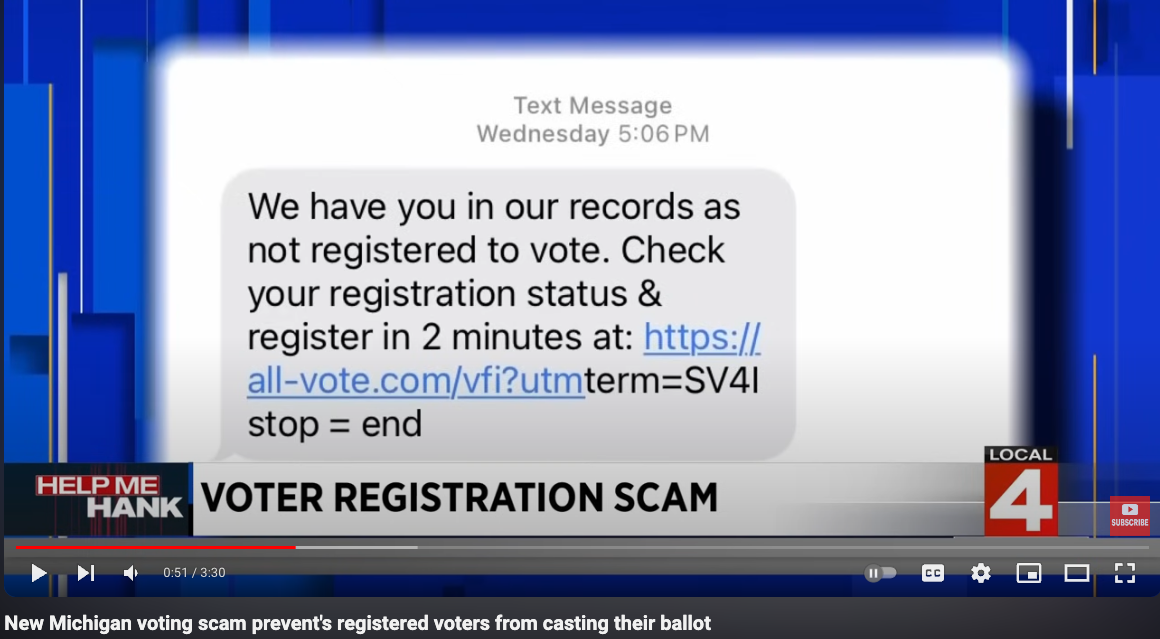
Image: WDIV Detroit on Youtube.

On Aug. 27, the local Channel 4 affiliate WDIV in Detroit warned about a new SMS message wave that they said could prevent registered voters from casting their ballot. The story didn’t explain how or why the scam could block eligible voters from casting ballots, but it did show one of the related text messages, which linked to the site all-vote.com.

“We have you in our records as not registered to vote,” the unbidden SMS advised. “Check your registration status & register in 2 minutes.”

Similar warnings came from an ABC station in Arizona, and from an NBC affiliate in Pennsylvania, where election officials just issued an alert to be on the lookout for scam messages coming from all-vote.com. Some people interviewed who received the messages said they figured it was a scam because they knew for a fact they were registered to vote in their state. WDIV even interviewed a seventh-grader from Canada who said he also got the SMS saying he wasn’t registered to vote.

Someone trying to determine whether all-vote.com was legitimate might visit the main URL first (as opposed to just clicking the link in the SMS) to find out more about the organization. But visiting all-vote.com directly presents one with a login page to an online service called bl.ink. DomainTools.com finds all-vote.com was registered on July 10, 2024. Red flag #1.

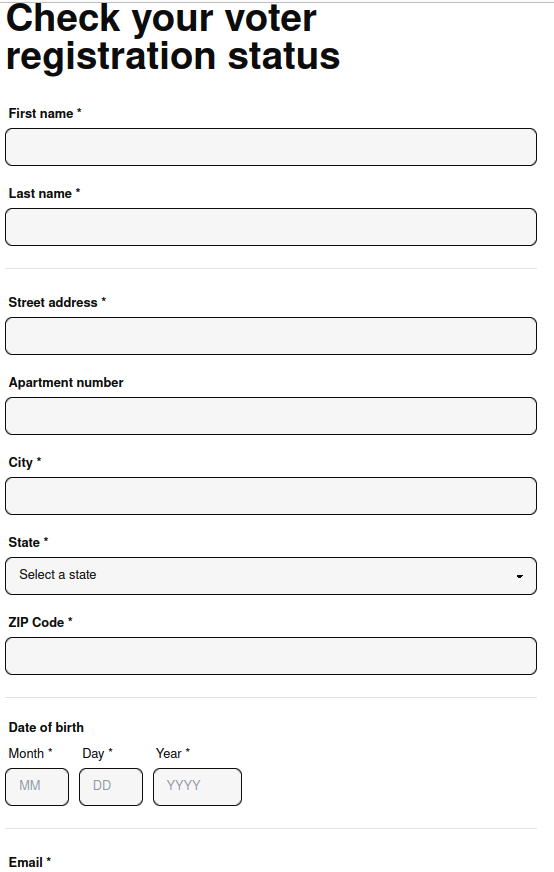
The information requested from people who visited votewin.org via the SMS campaign.

Another version of this SMS campaign told recipients to check their voter status at a site called votewin.org, which DomainTools says was registered July 9, 2024. There is little information about who runs votewin.org on its website, and the contact page leads to generic contact form. Red Flag #2.

What’s more, Votewin.org asks visitors to supply their name, address, email address, date of birth, mobile phone number, while pre-checking options to sign the visitor up for more notifications. Big Red Flag #3.

Votewin.org’s Terms of Service referenced a California-based voter engagement platform called VoteAmerica LLC. The same voter registration query form advertised in the SMS messages is available if one clicks the “check your registration status” link on voteamerica.org.

VoteAmerica founder Debra Cleaver told KrebsOnSecurity the entity responsible for the SMS campaigns telling people they weren’t registered is Movement Labs, a political consulting firm in San Francisco.

Cleaver said her office had received several inquiries about the messages, which violate a key tenet of election outreach: Never tell the recipient what their voter status may be.

“That’s one of the worst practices,” Cleaver said. “You never tell someone what the voter file says because voter files are not reliable, and are often out of date.”

Reached via email, Movement Labs founder Yoni Landau said the SMS campaigns targeted “underrepresented groups in the electorate, young people, folks who are moving, low income households and the like, who are unregistered in our databases, with the intent to help them register to vote.”

Landau said filling out the form on Votewin.org merely checks to see if the visitor is registered to vote in their state, and then attempts to help them register if not.

“We understand that many people are jarred by the messages – we tested hundreds of variations of messages and found that these had the largest impact on someone’s likelihood to register,” he said. “I’m deeply sorry for anyone that may have gotten the message in error, who is registered to vote, and we’re looking into our content now to see if there are any variations that might be less certain but still as effective in generating new legal registrations.”

Cleaver said Movement Labs’ SMS campaign may have been incompetent, but it wasn’t malicious.

“When you work in voter mobilization, it’s not enough to want to do good, you actually need to be good,” she said. “At the end of the day the end result of incompetence and maliciousness is the same: increased chaos, reduced voter turnout, and long-term harm to our democracy.”

To register to vote or to update your voter registration, visit vote.gov and select your state or region.

—————
Free Secure Email – Transcom Sigma
Boost Inflight Internet
Transcom Hosting
Transcom Premium Domains