News

Online Banking – The Safe Way

If you’ve got teens, then no doubt you’ve received the SOS texts. ‘Mum, I need a haircut, can you just spot me $30?’ or ‘I’ve just finished footy and I’m starving, can you transfer me some money?’. Where would the modern parent be without online banking? How did our non-digital forefathers ever cope??

Online banking is just so convenient and basically a necessity of modern life. If you’ve recently tried to conduct a transaction at a branch, then you’ll know exactly what I mean. One of my boys recently tried to set up a new account at a local banking branch and they were told to come back the following day. Instead, we went home and did it online in less than 20 minutes!

Aussie banks are world class at implementing a range of security measures to keep our banking safe however there are still things we can do to avoid our banking details getting into the hands of hackers. But many of us just assume that ‘all is well’ – our banking apps work seamlessly, so why do we need to worry? And that’s where many come unstuck. If it doesn’t appear to be broken, why do we need to fix it? Well, being ahead of the risks is how you keep yourself safe, my friends. So, here are my top tips to ensure all your family members are banking online in the securest way possible.

1. Ensure You Are Using Legit Banking Apps

If you’re changing banks or helping your child set up their online banking, it’s essential that you download your bank’s official app. Imitations do exist! Ideally, download the app from the bank’s website however if this isn’t an option use a genuine app store like Apple’s AppStore or Google Play for Android devices. And always verify the app is legitimate by checking the developer details and reading the reviews.

Budgeting or financial management apps are an incredibly popular way to help manage finances, but you need to be cautious here too as many will require you to share your banking logins. Always check the app’s reviews, its history of data breaches and its security policies before you download.

2. Ensure your Passwords are Long, Strong and Unique

Using the name of your puppy, your kids or worse still, your birthday, is one of the fastest ways of getting your banking details into the hands of hackers. Passwords need to have no connection to any part of your life, should never be stored in your banking app or anywhere on your phone and NEVER, EVER written on the back of your debit card!! Here are my top tips:

Make them long – choose a phrase instead of just 1 word. I love a nonsensical sentence with at least 10 characters.

Always include lower and uppercase letters, a number or 2 and a few symbols.

Every online account needs its own unique password – no exceptions.

Put a reminder in your calendar to update your passwords regularly – at least every 3-6 months.

All sounds too hard? Try a password manager that will not only create complex passwords that no human could ever think of, but it will also remember then for you. Check out McAfee +,  complete no brainer!

3. Say No to Public Wi-Fi

Geez, public Wi-Fi is convenient, particularly if you are travelling. But, using it to undertake any banking or financial dealings is just too risky in, my opinion. Why? I hear you ask. Well, there are many ways hackers can hack public Wi-Fi, let me share a few:

‘Evil twin’ attack. This is when hackers set up malicious hotspots with seemingly logical and trustworthy names eg ‘Free Café Wi-Fi’. But as soon as you connect, they can easily get their hands on your data.

Man-in-the-middle attack (MitM). This is when hackers break into a network and eavesdrop on data as it travels between connected devices and the Wi-Fi router. For example, your online banking password!

Password cracking attack. Scammers use software that automatically tries a huge volume of usernames and passwords so they can control the router. And once they’ve gained control, they can dupe you into downloading malicious software (that could steal your identity) or redirects you to a webpage that phishes for your personal information.

If you don’t think you can possibly survive without public Wi-fi then you need to invest in a VPN that will ensure everything you share is protected.

4. Activate Two Factor Authentication

If your bank offers two-factor authentication to its customers, then your answer needs to be ‘yes please’! Two-factor authentication or multi factor authentication adds another layer of verification to your banking which minimises the chances of hacker causing you harm. If you’ve activated it, you’ll be asked to provide another piece of information after you’ve entered your login details. Usually a special code, this may be delivered to you via an app, text message or even an automated phone call.

5. Request Alerts From Your Bank

It will take just a few minutes to ring your bank and request to be notified when an activity occurs on your account. Every bank will manage this differently, however most banks can alert you on request via email or text if the following occur:

  • Low or high balances
  • New credit and debit transactions
  • New linked external accounts
  • Failed login attempts
  • Password changes
  • Personal information updates

And if anything at all seems a little fishy, contact your bank immediately!

Unfortunately, few things are guaranteed in life and that includes your online safety. And whether you’re an online banking fan or not, opting out isn’t really an option. So, take some time to tighten up your online banking. Only use legit apps; change your passwords so they are long, strong and complex; invest in a VPN so you can use public Wi-Fi and say yes to two-factor authentication. You’ve got this!

Happy banking!!

Alex

The post Online Banking – The Safe Way appeared first on McAfee Blog.

—————
Free Secure Email – Transcom Sigma
Boost Inflight Internet
Transcom Hosting
Transcom Premium Domains

How to Protect Yourself and your Identity Before You Leave on Vacation

Your summer vacation is approaching quickly! You can’t wait to take time away from your responsibilities, jump out of your daily routine, and splash into a new adventure. You may be taking time off, but you can be sure cybercriminals won’t take a break. While traveling, you may encounter scams, theft, and identity theft that put your personal information, devices, and online privacy in jeopardy. 

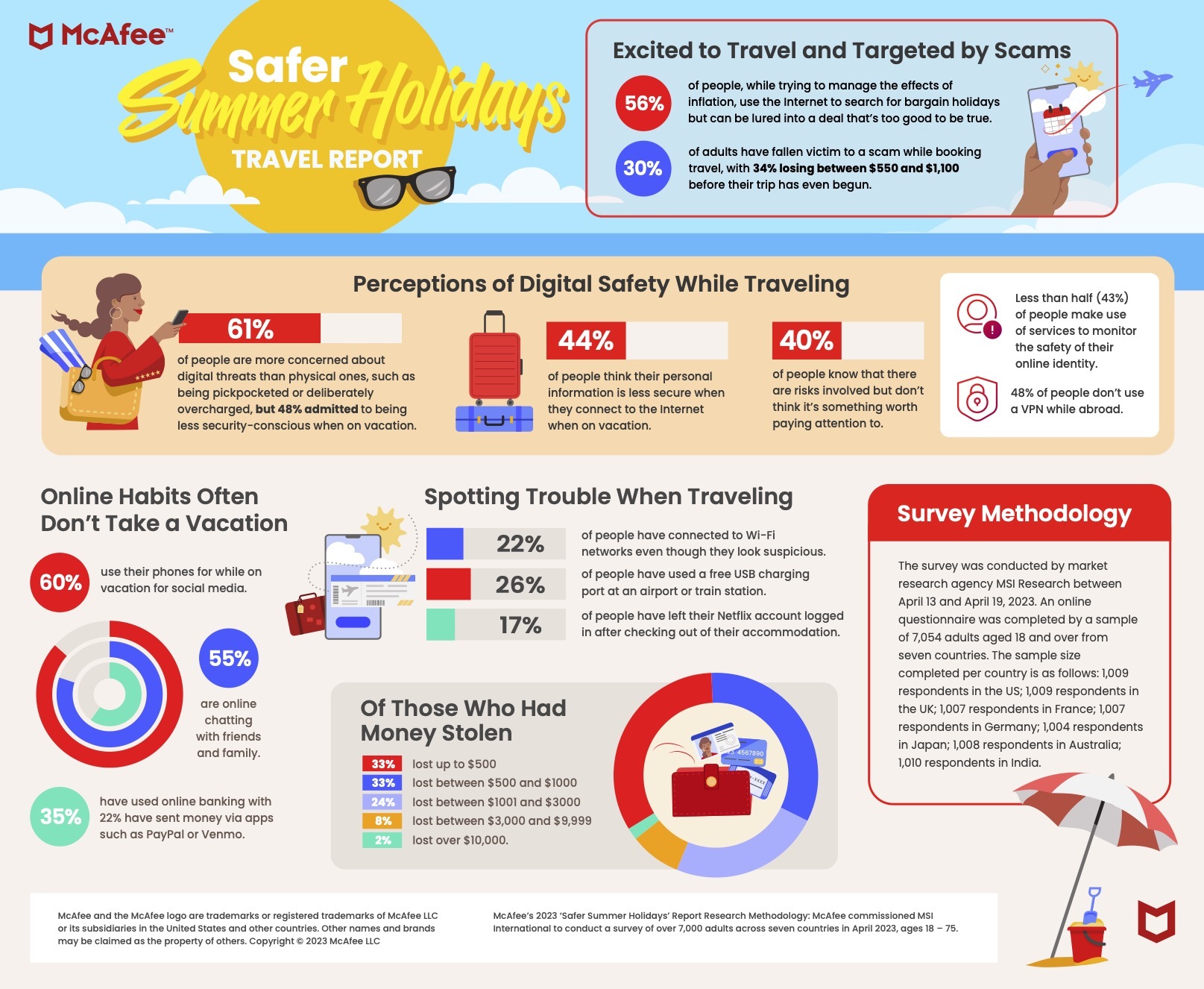
McAfee’s Safer Summer Holidays Travel Report surveyed 7,000 people across seven countries to discover how safe it is to plan and book travel online, and how cautious people are when interacting with digital tools while traveling abroad. The infographic below details the key insights. 

The research reveals 30% of adults have fallen victim or know someone who has fallen victim to an online scam while trying to save money when booking travel. 34% of those who had money stolen have lost over $1,000 before their trip has even begun, while 66% lost up to $1,000.  

62% of all vacationers will travel domestically this year and 42% will do so internationally. With inflation and the cost-of-living crisis, the research reveals new concerns for leisure-seekers who, in their quest for a good deal, may be more likely to fall for a scam. With 94% of people booking travel online this year, it can be easy to get lured into a deal that’s too good to be true. In today’s economic environment, adults are more likely to seek out a bargain deal online (56%), move quickly to snap up a deal (45%), try a new booking site (35%) and even a new destination (36%), in order to save money. However, travel seekers need to stay vigilant to avoid falling for a scam.  

Travel scams can take many forms, with the research finding 14% of all adults have been tricked into making payments through fraudulent platforms and 18% have had their identity stolen when booking online. Of this portion, 7% entered passport information and 11% provided other personally identifiable information to a fake website. 

Discrepancies Between Consumers’ Sentiments and Behaviors 

The research also uncovered a discrepancy between people’s sentiments and behaviors, as well as online safety best practices when travelling. In total, 61% of people are more concerned about digital threats than physical ones, such as being pickpocketed, and 85% of adults hold either some or high concern around their identity being compromised as part of their travel. Despite this, 48% admitted to being less security conscious when on holiday. Whether it’s connecting to Wi-Fi networks even though they look a bit suspicious (22%), using a free USB charging port at an airport or train station (26%), or leaving their Netflix account logged in after checking out of their accommodation (17%), significant numbers of people have engaged in activities that could put them at increased risk of crime while traveling.    

It’s not that people are unaware of the dangers either. While 44% of people think their personal information is less secure when they connect to the internet while on vacation, less than half (43%) make use of any services to monitor the safety of their online identity, and 50% don’t use a VPN while on vacation. Of those that do, 20% only do so because they want to stream geo-specific content. 

Knowing the risks doesn’t stop travelers from engaging in the behavior. While social media is by far the most common online activity for people to use their phones for while on vacation (60%), also common are chatting with friends and family (55%), online banking (35%) and sending money via apps such as PayPal or Venmo (22%).  

“People are often more relaxed and carefree when away from home, but it’s never been more important to remain vigilant when traveling,” says Cagla Ruacan, McAfee’s Head of Product Strategy and Insights. “From the moment you open your laptop to book a vacation, to when you log into airport Wi-Fi while waiting for the flight home, staying alert and taking precautions helps keep yourself and your loved ones safe from online travel scams. Taking early and proactive steps to manage your security, privacy and online identity means you’ll be able to more safely and confidently enjoy your well-earned vacation.” 

How to Protect Yourself from Online Summer Travel Scams 

1. Level Up Your Device Security

When you lose your mobile phone, you’re not just losing an expensive gadget. You’re also losing control of all the valuable personally identifiable information (PII) stored on it. Be especially aware of your surroundings when you’re on vacation. Pickpockets like to congregate in tourist hotspots, at home and abroad. They take advantage of distracted out-of-towners or awestruck sightseers who are less aware of suspicious behavior. 

Before you leave, familiarize yourself with common pickpocketing schemes. For example, if a stranger on the street asks you the time, avoid eye contact and keep walking. In this scam, the stranger will comment on your watch or try to strike up a conversation while their partner scopes out your back pockets. It seems impolite to ignore someone, but if they truly need to know the time, they can ask someone else. Also, how many people are there who don’t have a time-telling device on them? 

When walking around a city or taking public transportation, keep your phone in your front pockets or in a zippered bag that you can hold around your front. Consider buying a phone tether or lanyard for your phone. This will make your phone much more difficult to lift since it’s securely wrapped around your body. 

2. Proactively Protect Your Identity

Before you hop on the plane, train, or automobile, consider investing in identity protection. This way, you can proactively head off any issues that could arise when you should be relaxing. For instance, if your wallet is misplaced or stolen while on vacation, a dark cloud of “what ifs” won’t follow you. What if someone took the contents of your wallet and posted your details online? What if someone used those details to impersonate you online?  

Identity monitoring lessens the possibility of these “what ifs” happening to you. Plus, if someone stole your identity and caused financial damages, identity theft coverage and restoration can recoup your losses and the associated costs necessary to restore your good online standing. In 2021, identity fraud affected 42 million adults and losses totaled $52 billion. Identity monitoring may help you avoid becoming part of these staggering statistics. 

3. Lock Your Credit

Consider freezing your credit before you leave on vacation. A frozen credit means that credit bureaus will prevent anyone (including you) from signing up for a new credit card in your name. So, in case your wallet or passport goes missing or you paid with your credit card at an establishment of dubious character, you can sleep soundly knowing that your hard-earned credit score is intact.  

It’s a good idea to lock your credit before an incident occurs because speed is key to heading off a thief. Additionally, if you’re traveling abroad, it may be difficult to connect to phone numbers in your home country, especially if you didn’t sign up for a roaming cellular plan. 

4. Sign up for a VPN

A virtual private network (VPN) is a must-have online tool to keep your online comings and goings private when you’re on public Wi-Fi. A VPN is software that scrambles your internet traffic, making it nearly impossible for a cybercriminal to digitally eavesdrop. 

When traveling, especially if you don’t sign up for a roaming cellular or data plan, you’ll rely solely on public Wi-Fi networks in hotels, restaurants, libraries, and transportation hubs. Even if your accommodation’s network is password protected and is offered only to guests, it’s still best to surf with the protection of a VPN because you can’t be sure of the intentions of the hundreds of people connected to it. 

VPNs aren’t difficult to set up and once you’re up and running they’re easy to use and do not slow your internet speed. But because you’d rather be poolside instead of comparing VPN plans, it’s best to sign up and become acquainted with the software before you jet off. 

5. Prepare for the Possibilities

The best defense against cybercriminals and thieves is to arm yourself with knowledge. The more aware you are of their schemes, the better you can sniff them out and avoid them. A few weeks before you leave on vacation, check the news and read up on reports about common emerging scams. For example, be wary of public charging stations as criminals are pumping USB charging ports with malware, according to the FBI.1 

Awareness of schemes like this one can help you better prepare before you leave for vacation. Always leave enough time to fully charge your device before adventuring for the day and consider packing your own power bank if your device’s battery life is unreliable. Also, if you’re traveling to another country, make sure to pack a plug converter so you can plug your devices into outlets instead of USB ports. 

Vacation With Cyber Confidence 

McAfee+ is an excellent everyday online security partner. The all-in-one identity and online protection tool keep you safe wherever you are in the world. The unlimited VPN will protect your online privacy while on public Wi-Fi. Plus, the service includes credit lock, which allows you to lock and unlock your credit at the press of a button. Finally, for peace of mind, if your identity is ever compromised, McAfee+ offers lost wallet protection and $1 million in identity theft coverage. 

Don’t let the thought of thieves – those of the cyber and traditional variety – spoil your long-anticipated vacation. Enjoy your fun in the sun with peace of mind that you’re prepared to overcome any hurdle. 

The post How to Protect Yourself and your Identity Before You Leave on Vacation appeared first on McAfee Blog.

—————
Free Secure Email – Transcom Sigma
Boost Inflight Internet
Transcom Hosting
Transcom Premium Domains
Ask Fitis, the Bear: Real Crooks Sign Their Malware

Code-signing certificates are supposed to help authenticate the identity of software publishers, and provide cryptographic assurance that a signed piece of software has not been altered or tampered with. Both of these qualities make stolen or ill-gotten code-signing certificates attractive to cybercriminal groups, who prize their ability to add stealth and longevity to malicious software. This post is a deep dive on “Megatraffer,” a veteran Russian hacker who has practically cornered the underground market for malware focused code-signing certificates since 2015.

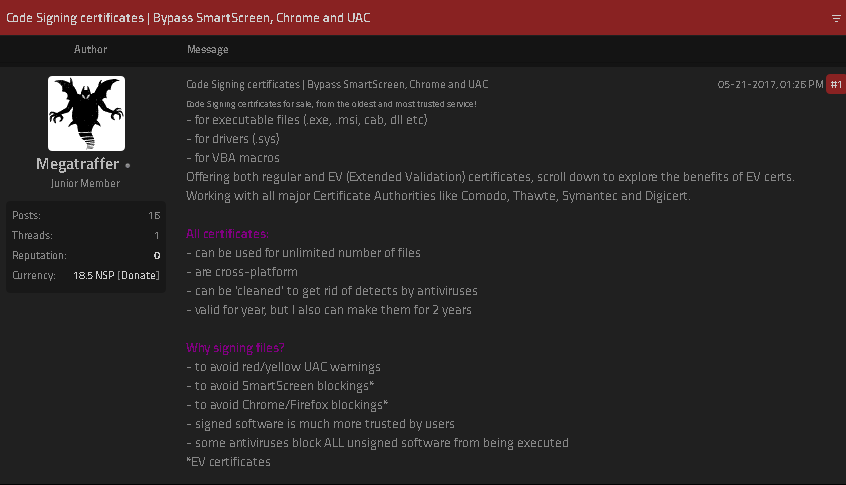
One of Megatraffer’s ads on an English-language cybercrime forum.

A review of Megatraffer’s posts on Russian crime forums shows this user began peddling individual stolen code-signing certs in 2015 on the Russian-language forum Exploit, and soon expanded to selling certificates for cryptographically signing applications and files designed to run in Microsoft Windows, Java, Adobe AIR, Mac and Microsoft Office.

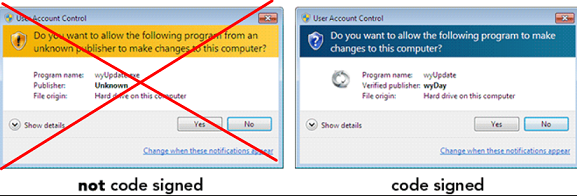
Megatraffer explained that malware purveyors need a certificate because many antivirus products will be far more interested in unsigned software, and because signed files downloaded from the Internet don’t tend to get blocked by security features built into modern web browsers. Additionally, newer versions of Microsoft Windows will complain with a bright yellow or red alert message if users try to install a program that is not signed.

“Why do I need a certificate?” Megatraffer asked rhetorically in their Jan. 2016 sales thread on Exploit. “Antivirus software trusts signed programs more. For some types of software, a digital signature is mandatory.”

At the time, Megatraffer was selling unique code-signing certificates for $700 apiece, and charging more than twice that amount ($1,900) for an “extended validation” or EV code-signing cert, which is supposed to only come with additional identity vetting of the certificate holder. According to Megatraffer, EV certificates were a “must-have” if you wanted to sign malicious software or hardware drivers that would reliably work in newer Windows operating systems.

Part of Megatraffer’s ad. Image: Ke-la.com.

Megatraffer has continued to offer their code-signing services across more than a half-dozen other Russian-language cybercrime forums, mostly in the form of sporadically available EV and non-EV code-signing certificates from major vendors like Thawte and Comodo.

More recently, it appears Megatraffer has been working with ransomware groups to help improve the stealth of their malware. Shortly after Russia invaded Ukraine in February 2022, someone leaked several years of internal chat logs from the Conti ransomware gang, and those logs show Megatraffer was working with the group to help code-sign their malware between July and October 2020.

WHO IS MEGATRAFFER?

According to cyber intelligence firm Intel 471, Megatraffer has been active on more than a half-dozen crime forums from September 2009 to the present day. And on most of these identities, Megatraffer has used the email address 774748@gmail.com. That same email address also is tied to two forum accounts for a user with the handle “O.R.Z.”

Constella Intelligence, a company that tracks exposed databases, finds that 774748@gmail.com was used in connection with just a handful of passwords, but most frequently the password “featar24“. Pivoting off of that password reveals a handful of email addresses, including akafitis@gmail.com.

Intel 471 shows akafitis@gmail.com was used to register another O.R.Z. user account — this one on Verified[.]ru in 2008. Prior to that, akafitis@gmail.com was used as the email address for the account “Fitis,” which was active on Exploit between September 2006 and May 2007. Constella found the password “featar24” also was used in conjunction with the email address spampage@yandex.ru, which is tied to yet another O.R.Z. account on Carder[.]su from 2008.

The email address akafitis@gmail.com was used to create a Livejournal blog profile named Fitis that has a large bear as its avatar. In November 2009, Fitis wrote, “I am the perfect criminal. My fingerprints change beyond recognition every few days. At least my laptop is sure of it.”

Fitis’s Livejournal account. Image: Archive.org.

Fitis’s real-life identity was exposed in 2010 after two of the biggest sponsors of pharmaceutical spam went to war with each other, and large volumes of internal documents, emails and chat records seized from both spam empires were leaked to this author. That protracted and public conflict formed the backdrop of my 2014 book — “Spam Nation: The Inside Story of Organized Cybercrime, from Global Epidemic to Your Front Door.

One of the leaked documents included a Microsoft Excel spreadsheet containing the real names, addresses, phone numbers, emails, street addresses and WebMoney addresses for dozens of top earners in Spamit — at the time the most successful pharmaceutical spam affiliate program in the Russian hacking scene and one that employed most of the top Russian botmasters.

That document shows Fitis was one of Spamit’s most prolific recruiters, bringing more than 75 affiliates to the Spamit program over several years prior to its implosion in 2010 (and earning commissions on any future sales from all 75 affiliates).

The document also says Fitis got paid using a WebMoney account that was created when its owner presented a valid Russian passport for a Konstantin Evgenievich Fetisov, born Nov. 16, 1982 and residing in Moscow. Russian motor vehicle records show two different vehicles are registered to this person at the same Moscow address.

The most interesting domain name registered to the email address spampage@yahoo.com, fittingly enough, is fitis[.]ru, which DomainTools.com says was registered in 2005 to a Konstantin E. Fetisov from Moscow.

The Wayback Machine at archive.org has a handful of mostly blank pages indexed for fitis[.]ru in its early years, but for a brief period in 2007 it appears this website was inadvertently exposing all of its file directories to the Internet.

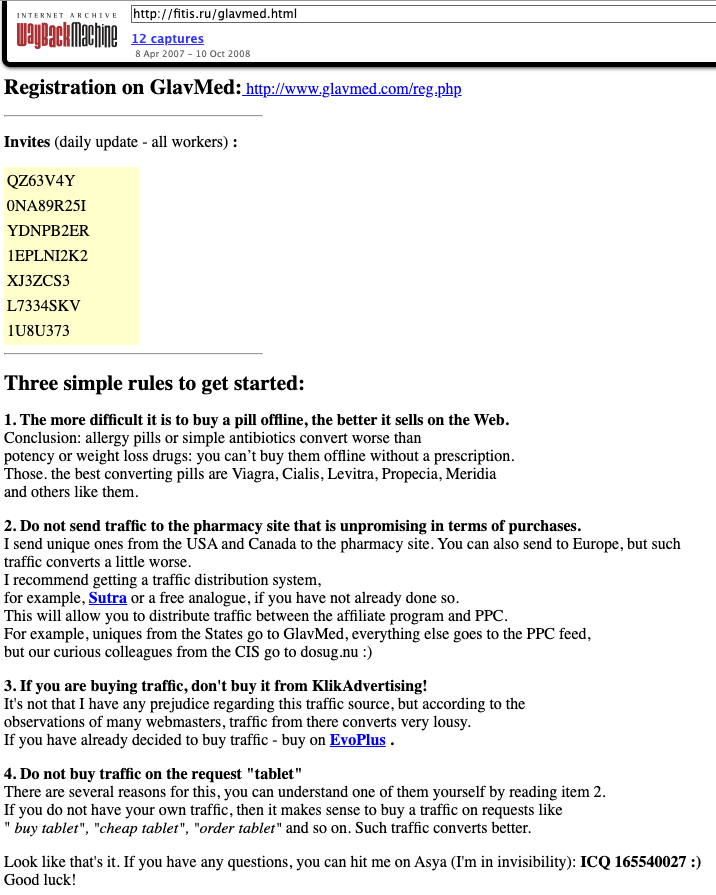
One of the exposed files — Glavmed.html — is a general invitation to the infamous Glavmed pharmacy affiliate program, a now-defunct scheme that paid tens of millions of dollars to affiliates who advertised online pill shops mainly by hacking websites and manipulating search engine results. Glavmed was operated by the same Russian cybercriminals who ran the Spamit program.

A Google translated ad circa 2007 recruiting for the pharmacy affiliate program Glavmed, which told interested applicants to contact the ICQ number used by Fitis, a.k.a. MegaTraffer. Image: Archive.org.

Archive.org shows the fitis[.]ru webpage with the Glavmed invitation was continuously updated with new invite codes. In their message to would-be Glavmed affiliates, the program administrator asked applicants to contact them at the ICQ number 165540027, which Intel 471 found was an instant messenger address previously used by Fitis on Exploit.

The exposed files in the archived version of fitis[.]ru include source code for malicious software, lists of compromised websites used for pharmacy spam, and a handful of what are apparently personal files and photos. Among the photos is a 2007 image labeled merely “fitis.jpg,” which shows a bespectacled, bearded young man with a ponytail standing next to what appears to be a newly-married couple at a wedding ceremony.

Mr. Fetisov did not respond to requests for comment.

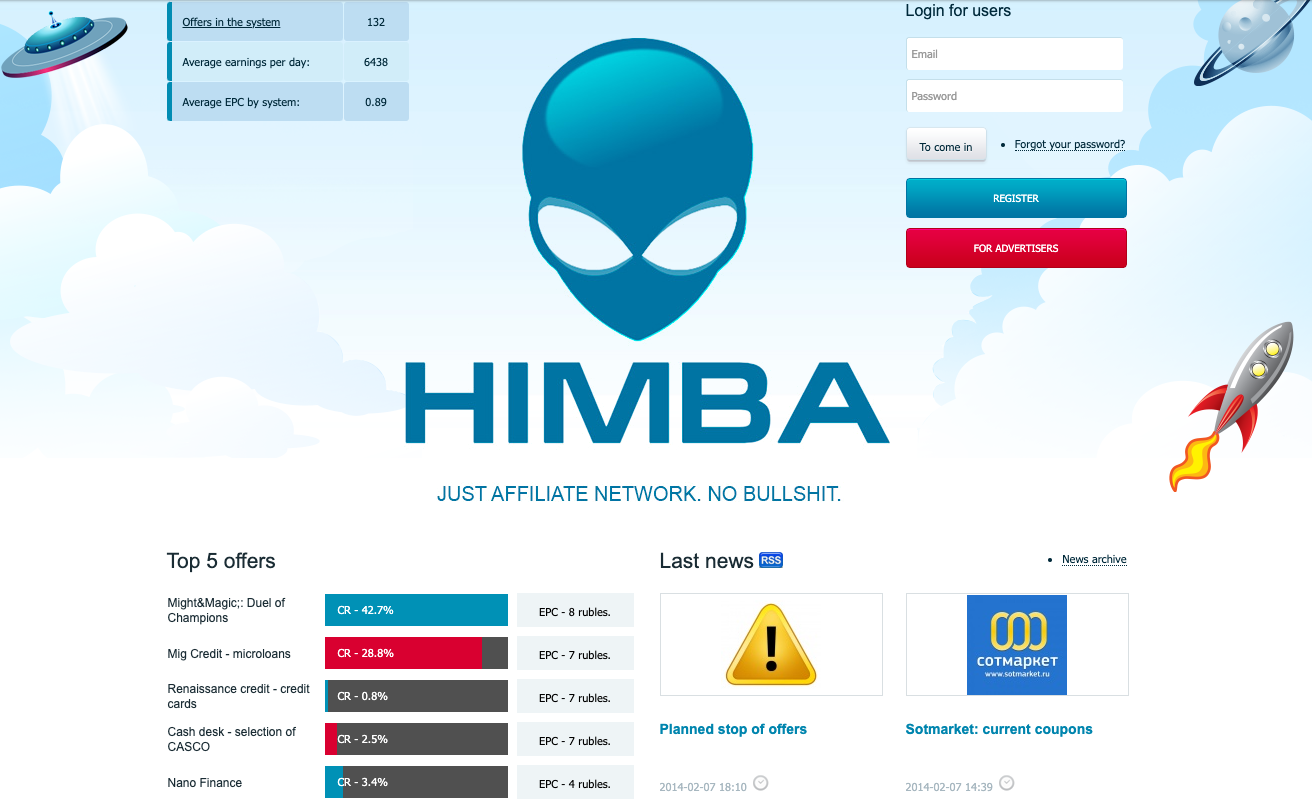
As a veteran organizer of affiliate programs, Fitis did not waste much time building a new moneymaking collective after Spamit closed up shop. New York City-based cyber intelligence firm Flashpoint found that Megatraffer’s ICQ was the contact number for Himba[.]ru, a cost-per-acquisition (CPA) program launched in 2012 that paid handsomely for completed application forms tied to a variety of financial instruments, including consumer credit cards, insurance policies, and loans.

“Megatraffer’s entrenched presence on cybercrime forums strongly suggests that malicious means are used to source at least a portion of traffic delivered to HIMBA’s advertisers,” Flashpoint observed in a threat report on the actor.

Intel 471 finds that Himba was an active affiliate program until around May 2019, when it stopping paying its associates.

Fitis’s Himba affiliate program, circa February 2014. Image: Archive.org.

Flashpoint notes that in September 2015, Megatraffer posted a job ad on Exploit seeking experienced coders to work on browser plugins, installers and “loaders” — basically remote access trojans (RATs) that establish communication between the attacker and a compromised system.

“The actor specified that he is looking for full-time, onsite help either in his Moscow or Kiev locations,” Flashpoint wrote.

—————
Free Secure Email – Transcom Sigma
Boost Inflight Internet
Transcom Hosting
Transcom Premium Domains