News

Make Your Smart Home a Secure Home Too: Securing Your IoT Smart Home Devices

It’s only a smart lightbulb. Why would anyone want to hack that? 

Great question. Because it gets to the heart of security matters for your IoT smart home devices.  

Internet of Things (IoT) devices have certainly made themselves at home in recent years. Once a novelty, they’ve become far more commonplace. The numbers bear that out. Recent research indicates that the average U.S. household has 20.2 connected devices. Europe has 17.4 on average, while Japan trails at 10.3. 

Of course, those figures largely account for computers, tablets, phones, and internet-connected smart TVs. Yet the study uncovered a sizable jump in the presence of other smart devices.  

Comparing 2022 to 2021, smart homes worldwide had: 

  • 55% more cameras. 
  • 43% more smart doorbells. 
  • 38% more home hubs. 
  • 25% more smart light bulbs. 
  • 23% more smart plugs. 
  • 19% more smart thermostats. 

Consider that connected devices in the home rose just 10% globally during the same timeframe. It’s clear that IoT smart home device ownership is on the upswing. Yet has security kept up with all that growth? 

Poor security and consumer IoT smart home devices 

That security question brings us back to the lightbulb.  

An adage in security is this: if a device gets connected, it gets protected. And that protection has to be strong because a network is only as secure as its weakest link. Unfortunately, many IoT devices are indeed the weakest security links on home networks.  

Some recent research sheds light on what’s at stake. Cybersecurity teams at the Florida Institute of Technology found that companion apps for several big brand smart devices had security flaws. Of the 20 apps linked to connected doorbells, locks, security systems, televisions, and cameras they studied, 16 had “critical cryptographic flaws” that might allow attackers to intercept and modify their traffic. These flaws might lead to the theft of login credentials and spying, the compromise of the connected device, or the compromise of other devices and data on the network.  

Over the years, our research teams at McAfee Labs have uncovered similar security vulnerabilities in other IoT devices like smart coffee makers and smart wall plugs 

Vulnerabilities such as these have the potential to compromise other devices on the network. 

Let’s imagine a smart lightbulb with poor security measures. As part of your home network, a motivated hacker might target it, compromise it, and gain access to the other devices on your network. In that way, a lightbulb might lead to your laptop—and all the files and data on it. 

So yes, someone might be quite interested in hacking your lightbulb. 

Botnets: another reason why hackers target smart devices 

One Friday morning in 2016, great swathes of the American internet ground to a halt. 

Major websites and services became unresponsive as internet directory services got flooded with millions and millions of malicious requests. As such, millions and millions of people were affected, along with public agencies and private businesses alike. Behind it, a botnet. An internet drone army of compromised IOT devices like digital video recorders and webcams. 

Known as the Mirai botnet, its initial purpose was to target Minecraft game servers. Essentially to “grief” innocent players. Yet it later found its way into other hands. From there, it became among the first high-profile botnet attacks on the internet. 

Botnet attacks can be small and targeted, such as when bad actors want to target a certain business (or game servers). And they can get as large as Mirai did. Regardless of size, these attacks rely on compromised devices. Consumer IoT devices often get targeted for such purposes for the same reasons listed above. They can lack strong security features out of the box, making them easy to enlist in a botnet. 

In all, the threat of botnets makes another strong case for securing your devices. 

How to protect your smart home network and IoT devices 

To put a fine point on it, security in your smart home is an absolute must. And you can make your smart home far more secure with a few steps. 

Grab online protection for your smartphone. 

Many smart home devices use a smartphone as a sort of remote control, and to gather, store, and share data. So whether you’re an Android owner or an iOS owner, protect your smartphone so you can protect the things it accesses and controls—and the data stored on it too. 

Don’t use the default—Set a strong, unique password. 

One issue with many IoT devices is that they often come with a default username and password. This could mean that your device and thousands of others just like it share the same credentials. That makes it easy for a hacker to access to them because those default usernames and passwords are often published online.  

When you purchase any IoT device, set a fresh password using a strong method of password creation. Likewise, create an entirely new username for additional protection as well. 

Use multi-factor authentication. 

Banks and other online services commonly offer multi-factor authentication to help protect your accounts. In addition to using a username and password for login, it sends a security code to another device you own (often a mobile phone). It throws a big barrier in the way of hackers who try to force their way into your device with a password/username combination. If your IoT devices support multi-factor authentication, consider using it with them too.  

Secure your internet router too. 

Another device that needs good password protection is your internet router. Make sure you use a strong and unique password as well to help prevent hackers from breaking into your home network. Also consider changing the name of your home network so that it doesn’t personally identify you.  

Fun alternatives to using your name or address include everything from movie lines like “May the Wi-Fi be with you” to old sitcom references like “Central Perk.” Also check that your router is using an encryption method, like WPA2 or the newer WPA3, which will keep your signal secure. 

Upgrade to a newer internet router. 

Older routers might have outdated security measures, which might make them more prone to attacks. If you’re renting yours from your internet provider, contact them for an upgrade. If you’re using your own, visit a reputable news or review site such as Consumer Reports for a list of the best routers that combine speed, capacity, and security. 

Update your apps and devices regularly. 

In addition to fixing the odd bug or adding the occasional new feature, updates often fix security gaps. Out-of-date apps and devices might have flaws that hackers can exploit, so update regularly. If you can set your smart home apps and devices to receive automatic updates, select that option so that you’ll always have the latest. 

Set up a guest network specifically for your IoT devices. 

Just as you can offer your guests secure access that’s separate from your own devices, you can create an additional network on your router that keeps your computers and smartphones separate from IoT devices. This way, if an IoT device is compromised, a hacker will still have difficulty accessing your other devices on your primary network that hosts your computers and smartphones. 

Purchasing IoT smart home devices (with security in mind) 

You can take another strong security step before you even bring that new smart device home. Research.  

Unfortunately, there are few consumer standards for smart devices. That’s unlike other household appliances. They must comply with government regulations, industry standards, and consumer-friendly standards like Energy Star ratings. So, some of the research burden falls on the buyer when it comes to purchasing the most secure devices. 

Here are a few steps that can help: 

1) Check out trusted reviews and resources. 

A positive or high customer rating for a smart device is a good place to start, yet purchasing a safer device takes more than that. Impartial third-party reviewers like Consumer Reports will offer thorough reviews of smart devices and their security, as part of a paid subscription. 

Likewise, look for other resources that account for device and data security in their writeups, such as the “Privacy Not Included” website. Run by a nonprofit organization, it reviews a wealth of apps and smart devices based on the strength of their security and privacy measures. 

2) Look up the manufacturer’s track record. 

Whether you’re looking at a device made by a well-known company or one you haven’t heard of before, a web search can show you if they’ve had any reported privacy or security issues in the past. And just because you might be looking at a popular brand name doesn’t mean that you’ll make yourself more private or secure by choosing them. Companies of all sizes and years of operation have encountered problems with their smart home devices.  

What you should look for, though, is how quickly the company addresses any issues and if they consistently have problems with them. Again, you can turn to third-party reviewers or reputable news sources for information that can help shape your decision. 

3) Look into permissions.  

Some smart devices will provide you with options around what data they collect and then what they do with it after it’s collected. Hop online and see if you can download some instructions for manuals for the devices you’re considering. They might explain the settings and permissions that you can enable or disable.  

4) Make sure it uses multi-factor authentication.  

As mentioned above, multi-factor authentication provides an additional layer of protection. It makes things much more difficult for a hacker or bad actor to compromise your device, even if they know your password and username. Purchase devices that offer this as an option. It’s a terrific line of defense.  

5) Look for further privacy and security features. 

Some manufacturers are more security- and privacy-minded than others. Look for them. You might see a camera that has a physical shutter that caps the lens and blocks recording when it’s not in use. You might also find doorbell cameras that store video locally, instead of uploading it to the cloud where others can potentially access it. Also look for manufacturers that call out their use of encryption, which can further protect your data in transit. 

If a device gets connected, it gets protected 

Even the smallest of IoT smart home devices can lead to big issues if they’re not secured. 

It only takes one poorly secured device to compromise everything else on an otherwise secure network. And with manufacturers in a rush to capitalize on the popularity of smart home devices, sometimes security takes a back seat. They might not thoroughly design their products for security up front, and they might not regularly update them for security in the long term.  

Meanwhile, other manufacturers do a fine job. It takes a bit of research on the buyer’s part to find out which manufacturers handle security best. 

Aside from research, a few straightforward steps can keep your smart devices and your network safe. Just as with any other connected device, strong passwords, multi-factor authentication, and regular updates remain key security steps. 

For a secure smart home, just remember the adage: if a device gets connected, it gets protected. 

The post Make Your Smart Home a Secure Home Too: Securing Your IoT Smart Home Devices appeared first on McAfee Blog.

—————
Free Secure Email – Transcom Sigma
Boost Inflight Internet
Transcom Hosting
Transcom Premium Domains
Phishing Domains Tanked After Meta Sued Freenom

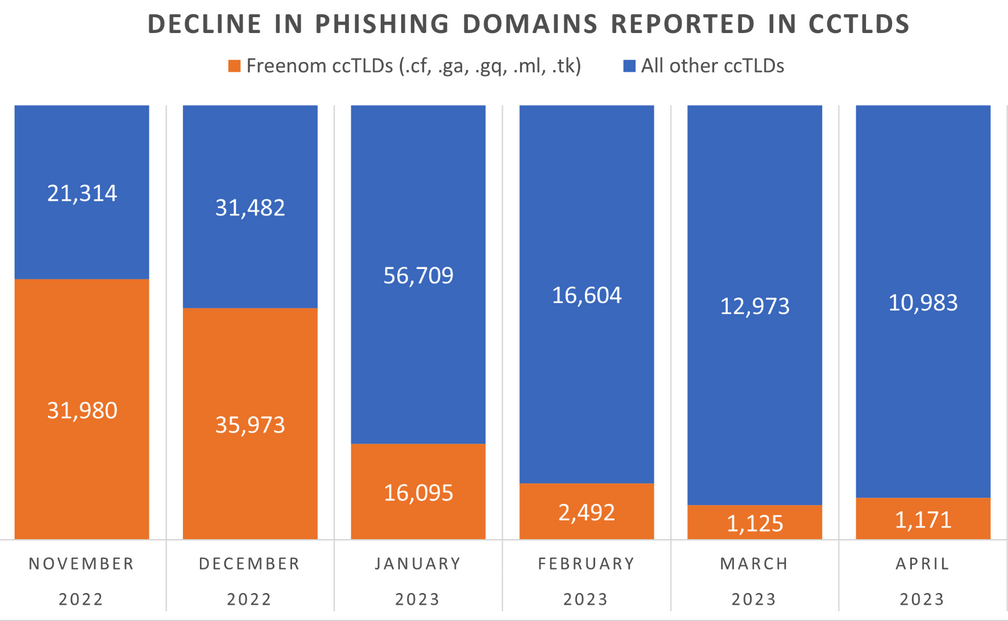
The number of phishing websites tied to domain name registrar Freenom dropped precipitously in the months surrounding a recent lawsuit from social networking giant Meta, which alleged the free domain name provider has a long history of ignoring abuse complaints about phishing websites while monetizing traffic to those abusive domains.

The volume of phishing websites registered through Freenom dropped considerably since the registrar was sued by Meta. Image: Interisle Consulting.

Freenom is the domain name registry service provider for five so-called “country code top level domains” (ccTLDs), including .cf for the Central African Republic; .ga for Gabon; .gq for Equatorial Guinea; .ml for Mali; and .tk for Tokelau.

Freenom has always waived the registration fees for domains in these country-code domains, but the registrar also reserves the right to take back free domains at any time, and to divert traffic to other sites — including adult websites. And there are countless reports from Freenom users who’ve seen free domains removed from their control and forwarded to other websites.

By the time Meta initially filed its lawsuit in December 2022, Freenom was the source of well more than half of all new phishing domains coming from country-code top-level domains. Meta initially asked a court to seal its case against Freenom, but that request was denied. Meta withdrew its December 2022 lawsuit and re-filed it in March 2023.

“The five ccTLDs to which Freenom provides its services are the TLDs of choice for cybercriminals because Freenom provides free domain name registration services and shields its customers’ identity, even after being presented with evidence that the domain names are being used for illegal purposes,” Meta’s complaint charged. “Even after receiving notices of infringement or phishing by its customers, Freenom continues to license new infringing domain names to those same customers.”

Meta pointed to research from Interisle Consulting Group, which discovered in 2021 and again last year that the five ccTLDs operated by Freenom made up half of the Top Ten TLDs most abused by phishers.

Interisle partner Dave Piscitello said something remarkable has happened in the months since the Meta lawsuit.

“We’ve observed a significant decline in phishing domains reported in the Freenom commercialized ccTLDs in months surrounding the lawsuit,” Piscitello wrote on Mastodon. “Responsible for over 60% of phishing domains reported in November 2022, Freenom’s percentage has dropped to under 15%.”

Interisle collects data from 12 major blocklists for spam, malware, and phishing, and it receives phishing-specific data from Spamhaus, Phishtank, OpenPhish and the APWG Ecrime Exchange. The company publishes historical data sets quarterly, both on malware and phishing.

Piscitello said it’s too soon to tell the full impact of the Freenom lawsuit, noting that Interisle’s sources of spam and phishing data all have different policies about when domains are removed from their block lists.

“One of the things we don’t have visibility into is how each of the blocklists determine to remove a URL from their lists,” he said. “Some of them time out [listed domains] after 14 days, some do it after 30, and some keep them forever.”

Freenom did not respond to requests for comment.

This is the second time in as many years that a lawsuit by Meta against a domain registrar has disrupted the phishing industry. In March 2020, Meta sued domain registrar giant Namecheap, alleging cybersquatting and trademark infringement.

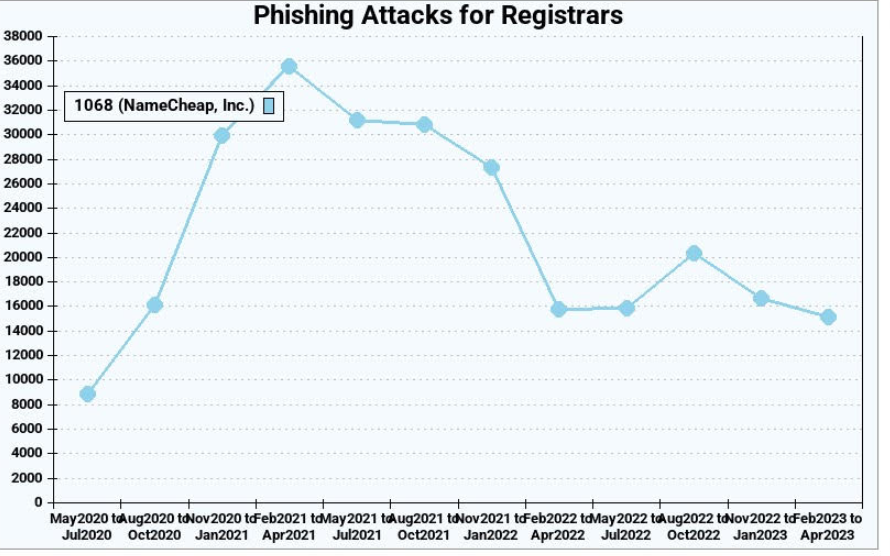
The two parties settled the matter in April 2022. While the terms of that settlement have not been disclosed, new phishing domains registered through Namecheap declined more than 50 percent the following quarter, Interisle found.

Phishing attacks using websites registered through Namecheap, before and after the registrar settled a lawsuit with Meta. Image: Interisle Consulting.

Unfortunately, the lawsuits have had little effect on the overall number of phishing attacks and phishing-related domains, which have steadily increased in volume over the years.  Piscitello said the phishers tend to gravitate toward registrars that offer the least resistance and lowest price per domain. And with new top-level domains constantly being introduced, there is rarely a shortage of super low-priced domains.

“The abuse of a new top-level domain is largely the result of one registrar’s portfolio,” Piscitello told KrebsOnSecurity. “Alibaba or Namecheap or another registrar will run a promotion for a cheap domain, and then we’ll see flocking and migration of the phishers to that TLD. It’s like strip mining, where they’ll buy hundreds or thousands of domains, use those in a campaign, exhaust that TLD and then move on to another provider.”

Piscitello said despite the steep drop in phishing domains coming out of Freenom, the alternatives available to phishers are many. After all, there are more than 2,000 accredited domain registrars, not to mention dozens of services that let anyone set up a website for free without even owning a domain.

“There is no evidence that the trend line is even going to level off,” he said. “I think what the Meta lawsuit tells us is that litigation is like giving someone a standing eight count. It temporarily disrupts a process. And in that sense, litigation appears to be working.”

—————
Free Secure Email – Transcom Sigma
Boost Inflight Internet
Transcom Hosting
Transcom Premium Domains

On the Poisoning of LLMs

Interesting essay on the poisoning of LLMs—ChatGPT in particular:

Given that we’ve known about model poisoning for years, and given the strong incentives the black-hat SEO crowd has to manipulate results, it’s entirely possible that bad actors have been poisoning ChatGPT for months. We don’t know because OpenAI doesn’t talk about their processes, how they validate the prompts they use for training, how they vet their training data set, or how they fine-tune ChatGPT. Their secrecy means we don’t know if ChatGPT has been safely managed.

They’ll also have to update their training data set at some point. They can’t leave their models stuck in 2021 forever.

Once they do update it, we only have their word—pinky-swear promises—that they’ve done a good enough job of filtering out keyword manipulations and other training data attacks, something that the AI researcher El Mahdi El Mhamdi posited is mathematically impossible in a paper he worked on while he was at Google.

—————
Free Secure Email – Transcom Sigma
Boost Inflight Internet
Transcom Hosting
Transcom Premium Domains

Why Are Some Countries Banning TikTok?

Waiting in the checkout line. Waiting to fall asleep. Waiting for your boring work call to finally end. 

When you find yourself in these situations, do you usually have your phone in hand? And does it usually include scrolling through videos on TikTok? You’re far from alone! The app has 150 million users in the United States and more than a billion daily users worldwide.1 

However, governments around the world believe that while you’re exploring the world through short-form video, unscrupulous characters are lurking in the background collecting your personal data. Here’s the real story behind TikTok bans and what they mean for you and your online privacy. 

Why Is TikTok Banned? 

TikTok is owned by ByteDance, a Chinese company. Much of the data privacy unease surrounding TikTok is ByteDance’s opacity in their data mining practices. It’s unknown how much data it collects on users and what it does with that information. Since the Chinese government has a hand in many of the businesses based in the country, it’s unclear if the government is party to the mined data. Because many countries are tense politically with China, some governments are being cautious about limiting ByteDance’s access to personal information and potentially government secrets.  

So far, various countries have banned TikTok from the work phones of government employees, including the United States, Australia, Canada, Taiwan, and various European Union members.2 India completely banned the app in the country in 2020. Various other countries with strict limits on self-expression have also attempted to forbid their citizens from accessing TikTok. 

Montana became the first state to ban TikTok in May 2023. The governor cited “protecting Montanans’ personal and private data” as the reason behind the new bill, which is set to go into effect in January 2024.3  

What Do the Bans Mean for You? 

For the general population, bans of TikTok on government-issued devices will not affect your access to the platform Even for government employees, this just means that you can’t access the app from your work phone, laptop, or tablet. On your own time and your personal devices, you can still scroll to your heart’s content. 

Montana’s TikTok bill could pick up steam with other states claiming to protect the PII of their citizens; however, the Montana law and any similar ones that may arise are likely to be scrutinized as a violation of freedom of speech. As of now, it’s unclear whether the bill – and future ones like it – will be invalidated due to a violation of the First Amendment.   

How these TikTok bans and the news headlines may affect you is that they emphasize the necessity of social media best practices and guarding your personally identifiable information (PII) more closely. 

How to Maintain Your Privacy on TikTok 

Because it’s unclear how much and with whom TikTok is gathering and sharing your data, it’s best to play it safe and limit the amount you reveal about yourself on the app. Here are a few tips to give you peace of mind and improve your online privacy: 

1. Turn off geo-tagging.

This is a good practice on any social media platform. Geo-tagging is a function where the app uses GPS to track your location and then publish it alongside your post. This feature may put your personal safety at risk, since stalkers can use the geotag, context clues, and video background to guess at your location.  

2. Disable tracking and targeted ads.

TikTok, Facebook, Instagram, and gaming apps depend on advertisers’ dollars to make money. To provide users with the most relevant ads (and improve their chances of making a sale), companies gather information about you and build a profile based on your online comings and goings. Most apps that allow tracking must ask your permission first to do so. Always uncheck this box and disable ad tracking, because there’s no guarantee that the PII the ad company collects will stay a secret. Did you know that 98% of people have their personal information up for sale on the internet? Personal Data Cleanup is an excellent tool to erase your private details from the internet and keep it out of the hands of strangers. 

3. Keep your life a mystery.

Oversharing on social media may leave you vulnerable to social engineering schemes. This happens when a scammer gathers details about you and then tailor-makes a scam that’s likely to get your attention. For example, if your social media profiles make it clear that you’re an animal lover, a scammer may write a heartfelt post about needing donations to save their beloved pet.  

4. Use a VPN.

A virtual private network (VPN) scrambles your online traffic, making it very difficult for someone to digitally eavesdrop on you or pinpoint your location. Plus, a VPN works on any device, not just desktops. So, while you scroll on a computer, tablet, or smartphone, a VPN can keep your internet traffic a secret. 

Enjoy TikTok Safely 

Don’t worry: TikTok – the constant companion in times of boredom, transit, and when you’re in need of a laugh – isn’t going anywhere anytime soon. For the general population in most parts of the world, the app is staying put. 

However, just because it’s not banned doesn’t mean that it’s 100% safe for your online privacy. Keep our tips in mind the next time you scroll through or post. To fully cover your bases and give you peace of mind, partner with McAfee+ Ultimate. This all-in-one service includes unlimited VPN for all your devices, Personal Data Cleanup, and more.  

Laugh, cry, learn, and explore the world through TikTok with confidence in the security of your online privacy! 

1TikTok, “Celebrating our thriving community of 150 million Americans 

2Associated Press, “Here are the countries that have bans on TikTok 

3CNN, “Montana governor bans TikTok 

The post Why Are Some Countries Banning TikTok? appeared first on McAfee Blog.

—————
Free Secure Email – Transcom Sigma
Boost Inflight Internet
Transcom Hosting
Transcom Premium Domains