News

New Wave of SHTML Phishing Attacks

Authored By Anuradha

McAfee Labs has recently observed a new wave of phishing attacks. In this wave, the attacker has been abusing server-parsed HTML (SHTML) files. The SHTML files are commonly associated with web servers redirecting users to malicious, credential-stealing websites or display phishing forms locally within the browser to harvest user-sensitive information. 

SHTML Campaign in the field: 

Figure 1. shows the geological distribution of McAfee clients who detect malicious SHTML files. 

Figure 1. McAfee Client Detection of SHTML 


Attackers victimize users by distributing SHTML files as email attachments. The sentiments used in such phishing emails include a payment confirmation, invoice, shipment etc., The email contains a small thread of messages to make the recipient more curious to open the attachment.  

Figure 2. Email with SHTML attachment 


Analysis: 

When the SHTML attachment is clicked, it opens a blurred fake document with a login page in the browser as shown in Figure 3. To read the document, however, the user must enter his/her credentials. In some cases, the email address is prefilled. 

Figure 3. Fake PDF document 


Figure 4. Fake Excel document 


Figure 5. Fake DHL Shipping document


Attackers commonly use JavaScript in the SHTML attachments that will be used either to generate the malicious phishing form or to redirect or to hide malicious URLs and behavior. 


Figure 6. SHTML with JavaScript code 


Below is the code snippet that shows how the blurred background image is loaded. The blurred images are taken from legitimate websites such as: 

https://isc.sans.edu  

https://i.gyazo.com 

Figure 7. Code to load blurred image  


Abusing submission form service: 

Phishing attacks abuse static form service providers to steal sensitive user information, such as Formspree and Formspark

Formspree.io is a back-end service that allows developers to easily add forms on their website without writing server-side code, it also handles form processing and storage. It takes HTML form submissions and sends the results to an email address. 

The attackers use the formpsree.io URL as an action URL which defines where the form data will be sent. Below Figure 8. shows the code snippet for action URL that works in conjunction with POST method.  


Figure 8. Formspree.io as action URL with POST method 


When the user enters the credentials and hits the “submit” button, the data is sent to Formspree.io. Subsequently, Formspree.io forwards the information to the specified email address. Below Figure 9. shows the flow of user submission data from webpage to attacker email address. 

Figure 9. Flow of user submission data 


Known malicious forms may be blocked, preventing the form submission data from being sent to the attacker. Below Figure 10. shows the Form blocked due to suspected fraudulent activity. 

Figure 10. Form Blocked 


To prevent the user from recognizing that they’ve just been phished, the attacker redirects the user’s browser to an unrelated error page that is associated to a legitimate website. 

Below Figure 11.  shows the redirected webpage.

Figure 11. Redirected webpage 


To conclude, phishing is a form of social engineering in which attackers trick people into disclosing confidential information or installing malware. It is a widespread and pervasive problem. This blurry image phishing scam uses simple basic HTML and JavaScript code, but it can still be effective. A blurry image is enough to trick many users into believing the email as legitimate. To stay protected, users should keep their system up-to-date and refrain from clicking links and opening SHTML attachments that comes through email from untrusted sources. 


IOCs 

McAfee customers are protected against this phishing campaign. 

 
Type   Value   Product   Detected  
URL   formspree[.]io/f/xjvderkn  McAfee WebAdvisor   Blocked  
URL   cianindustries[].com/error/excel.php  McAfee WebAdvisor   Blocked  


URL   twenty88[.]com/mincs/mea.ph  McAfee WebAdvisor   Blocked  
URL   sweet.classicbo[.]com/mailb_fixpd.ph  McAfee WebAdvisor   Blocked  


Type  Value  Product  Detected 
shtml(Adobe)  0a072e7443732c7bdb9d1f3fdb9ee27c  Total Protection and LiveSafe  HTML/Phishing.qz 
shtml(Excel)  3b215a37c728f65c167941e788935677  Total Protection and LiveSafe  HTML/Phishing.rb 
shtml(DHL)  257c1f7a04c93a44514977ec5027446c  Total Protection and LiveSafe  HTML/Phishing.qz 


The post New Wave of SHTML Phishing Attacks appeared first on McAfee Blog.

—————
Free Secure Email – Transcom Sigma
Boost Inflight Internet
Transcom Hosting
Transcom Premium Domains

Microsoft Patch Tuesday, May 2023 Edition

Microsoft today released software updates to fix at least four dozen security holes in its Windows operating systems and other software, including patches for two zero-day vulnerabilities that are already being exploited in active attacks.

First up in May’s zero-day flaws is CVE-2023-29336, which is an “elevation of privilege” weakness in Windows which has a low attack complexity, requires low privileges, and no user interaction. However, as the SANS Internet Storm Center points out, the attack vector for this bug is local.

“Local Privilege escalation vulnerabilities are a key part of attackers’ objectives,” said Kevin Breen, director of cyber threat research at Immersive Labs. “Once they gain initial access they will seek administrative or SYSTEM-level permissions. This can allow the attacker to disable security tooling and deploy more attacker tools like Mimikatz that lets them move across the network and gain persistence.”

The zero-day patch that has received the most attention so far is CVE-2023-24932, which is a Secure Boot Security Feature Bypass flaw that is being actively exploited by “bootkit” malware known as “BlackLotus.” A bootkit is dangerous because it allows the attacker to load malicious software before the operating system even starts up.

According to Microsoft’s advisory, an attacker would need physical access or administrative rights to a target device, and could then install an affected boot policy. Microsoft gives this flaw a CVSS score of just 6.7, rating it as “Important.”

Adam Barnett, lead software engineer at Rapid7, said CVE-2023-24932 deserves a considerably higher threat score.

“Microsoft warns that an attacker who already has Administrator access to an unpatched asset could exploit CVE-2023-24932 without necessarily having physical access,” Barnett said. “Therefore, the relatively low CVSSv3 base score of 6.7 isn’t necessarily a reliable metric in this case.”

Barnett said Microsoft has provided a supplementary guidance article specifically calling out the threat posed by BlackLotus malware, which loads ahead of the operating system on compromised assets, and provides attackers with an array of powerful evasion, persistence, and Command & Control (C2) techniques, including deploying malicious kernel drivers, and disabling Microsoft Defender or Bitlocker.

“Administrators should be aware that additional actions are required beyond simply applying the patches,” Barnett advised. “The patch enables the configuration options necessary for protection, but administrators must apply changes to UEFI config after patching. The attack surface is not limited to physical assets, either; Windows assets running on some VMs, including Azure assets with Secure Boot enabled, also require these extra remediation steps for protection. Rapid7 has noted in the past that enabling Secure Boot is a foundational protection against driver-based attacks. Defenders ignore this vulnerability at their peril.”

In addition to the two zero-days fixed this month, Microsoft also patched five remote code execution (RCE) flaws in Windows, two of which have notably high CVSS scores.

CVE-2023-24941 affects the Windows Network File System, and can be exploited over the network by making an unauthenticated, specially crafted request. Microsoft’s advisory also includes mitigation advice. The CVSS for this vulnerability is 9.8 – the highest of all the flaws addressed this month.

Meanwhile, CVE-2023-28283 is a critical bug in the Windows Lightweight Directory Access Protocol (LDAP) that allows an unauthenticated attacker to execute malicious code on the vulnerable device. The CVSS for this vulnerability is 8.1, but Microsoft says exploiting the flaw may be tricky and unreliable for attackers.

Another vulnerability patched this month that was disclosed publicly before today (but not yet seen exploited in the wild) is CVE-2023-29325, a weakness in Microsoft Outlook and Explorer that can be exploited by attackers to remotely install malware. Microsoft says this vulnerability can be exploited merely by viewing a specially-crafted email in the Outlook Preview Pane.

“To help protect against this vulnerability, we recommend users read email messages in plain text format,” Microsoft’s writeup on CVE-2023-29325 advises.

“If an attacker were able to exploit this vulnerability, they would gain remote access to the victim’s account, where they could deploy additional malware,” Immersive’s Breen said. “This kind of exploit will be highly sought after by e-crime and ransomware groups where, if successfully weaponized, could be used to target hundreds of organizations with very little effort.”

For more details on the updates released today, check out roundups by Action1, Automox and Qualys, If today’s updates cause any stability or usability issues in Windows, AskWoody.com will likely have the lowdown on that.

Please consider backing up your data and/or imaging your system before applying any updates. And feel free to sound off in the comments if you experience any problems as a result of these patches.

—————
Free Secure Email – Transcom Sigma
Boost Inflight Internet
Transcom Hosting
Transcom Premium Domains

Feds Take Down 13 More DDoS-for-Hire Services

The U.S. Federal Bureau of Investigation (FBI) this week seized 13 domain names connected to “booter” services that let paying customers launch crippling distributed denial-of-service (DDoS) attacks. Ten of the domains are reincarnations of DDoS-for-hire services the FBI seized in December 2022, when it charged six U.S. men with computer crimes for allegedly operating booters.

Booter services are advertised through a variety of methods, including Dark Web forums, chat platforms and even youtube.com. They accept payment via PayPal, Google Wallet, and/or cryptocurrencies, and subscriptions can range in price from just a few dollars to several hundred per month. The services are generally priced according to the volume of traffic to be hurled at the target, the duration of each attack, and the number of concurrent attacks allowed.

The websites that saw their homepages replaced with seizure notices from the FBI this week include booter services like cyberstress[.]org and exoticbooter[.]com, which the feds say were used to launch millions of attacks against millions of victims.

“School districts, universities, financial institutions and government websites are among the victims who have been targeted in attacks launched by booter services,” federal prosecutors in Los Angeles said in a statement.

Purveyors of booters or “stressers” claim they are not responsible for how customers use their services, and that they aren’t breaking the law because — like most security tools — these services can be used for good or bad purposes. Most booter sites employ wordy “terms of use” agreements that require customers to agree they will only stress-test their own networks — and that they won’t use the service to attack others.

But the DOJ says these disclaimers usually ignore the fact that most booter services are heavily reliant on constantly scanning the Internet to commandeer misconfigured devices that are critical for maximizing the size and impact of DDoS attacks. What’s more, none of the services seized by the government required users to demonstrate that they own the Internet addresses being stress-tested, something a legitimate testing service would insist upon.

This is the third in a series of U.S. and international law enforcement actions targeting booter services. In December 2022, the feds seized four-dozen booter domains and charged six U.S. men with computer crimes related to their alleged ownership of the popular DDoS-for-hire services. In December 2018, the feds targeted 15 booter sites, and three booter store defendants who later pleaded guilty.

While the FBI’s repeated seizing of booter domains may seem like an endless game of virtual Whac-a-Mole, continuously taking these services offline imposes high enough costs for the operators that some of them will quit the business altogether, says Richard Clayton, director of Cambridge University’s Cybercrime Centre.

In 2020, Clayton and others published “Cybercrime is Mostly Boring,” an academic study on the quality and types of work needed to build, maintain and defend illicit enterprises that make up a large portion of the cybercrime-as-a-service market. The study found that operating a booter service effectively requires a mind-numbing amount of constant, tedious work that tends to produce high burnout rates for booter service operators — even when the service is operating efficiently and profitably.

For example, running an effective booter service requires a substantial amount of administrative work and maintenance, much of which involves constantly scanning for, commandeering and managing large collections of remote systems that can be used to amplify online attacks, Clayton said. On top of that, building brand recognition and customer loyalty takes time.

“If you’re running a booter and someone keeps taking your domain or hosting away, you have to then go through doing the same boring work all over again,” Clayton told KrebsOnSecurity. “One of the guys the FBI arrested in December [2022] spent six months moaning that he lost his servers, and could people please lend him some money to get it started again.”

In a statement released Wednesday, prosecutors in Los Angeles said four of the six men charged last year for running booter services have since pleaded guilty. However, at least one of the defendants from the 2022 booter bust-up — John M. Dobbs, 32, of Honolulu, HI — has pleaded not guilty and is signaling he intends to take his case to trial.

The FBI seizure notice that replaced the homepages of several booter services this week.

Dobbs is a computer science graduate student who for the past decade openly ran IPStresser[.]com, a popular and powerful attack-for-hire service that he registered with the state of Hawaii using his real name and address. Likewise, the domain was registered in Dobbs’s name and hometown in Pennsylvania. Prosecutors say Dobbs’ service attracted more than two million registered users, and was responsible for launching a staggering 30 million distinct DDoS attacks.

Many accused stresser site operators have pleaded guilty over the years after being hit with federal criminal charges. But the government’s core claim — that operating a booter site is a violation of U.S. computer crime laws — wasn’t properly tested in the courts until September 2021.

That was when a jury handed down a guilty verdict against Matthew Gatrel, a then 32-year-old St. Charles, Ill. man charged in the government’s first 2018 mass booter bust-up. Despite admitting to FBI agents that he ran two booter services (and turning over plenty of incriminating evidence in the process), Gatrel opted to take his case to trial, defended the entire time by court-appointed attorneys.

Gatrel was convicted on all three charges of violating the Computer Fraud and Abuse Act, including conspiracy to commit unauthorized impairment of a protected computer, conspiracy to commit wire fraud, and unauthorized impairment of a protected computer. He was sentenced to two years in prison.

A copy of the FBI’s booter seizure warrant is here (PDF). According to the DOJ, the defendants who pleaded guilty to operating booter sites include:

Jeremiah Sam Evans Miller, aka “John The Dev,” 23, of San Antonio, Texas, who pleaded guilty on April 6 to conspiracy and violating the computer fraud and abuse act related to the operation of a booter service named RoyalStresser[.]com (formerly known as Supremesecurityteam[.]com);

Angel Manuel Colon Jr., aka “Anonghost720” and “Anonghost1337,” 37, of Belleview, Florida, who pleaded guilty on February 13 to conspiracy and violating the computer fraud and abuse act related to the operation of a booter service named SecurityTeam[.]io;

Shamar Shattock, 19, of Margate, Florida, who pleaded guilty on March 22 to conspiracy to violate the computer fraud and abuse act related to the operation of a booter service known as Astrostress[.]com;

Cory Anthony Palmer, 23, of Lauderhill, Florida, who pleaded guilty on February 16 to conspiracy to violate the computer fraud and abuse act related to the operation of a booter service known as Booter[.]sx.

All four defendants are scheduled to be sentenced this summer.

The booter domains seized by the FBI this week include:

cyberstress[.]org
exoticbooter[.]com
layerstress[.]net
orbitalstress[.]xyz
redstresser[.]io
silentstress[.]wtf
sunstresser[.]net
silent[.]to
mythicalstress[.]net
dreams-stresser[.]org
stresserbest[.]io
stresserus[.]io
quantum-stress[.]org

—————
Free Secure Email – Transcom Sigma
Boost Inflight Internet
Transcom Hosting
Transcom Premium Domains

AI Hacking Village at DEF CON This Year

At DEF CON this year, Anthropic, Google, Hugging Face, Microsoft, NVIDIA, OpenAI and Stability AI will all open up their models for attack.

The DEF CON event will rely on an evaluation platform developed by Scale AI, a California company that produces training for AI applications. Participants will be given laptops to use to attack the models. Any bugs discovered will be disclosed using industry-standard responsible disclosure practices.

—————
Free Secure Email – Transcom Sigma
Boost Inflight Internet
Transcom Hosting
Transcom Premium Domains

Deconstructing Amadey’s Latest Multi-Stage Attack and Malware Distribution

Authored by By Yashvi Shah 

McAfee Labs have identified an increase in Wextract.exe samples, that drop a malware payload at multiple stages.  

Wextract.exe is a Windows executable file that is used to extract files from a cabinet (.cab) file. Cabinet files are compressed archives that are used to package and distribute software, drivers, and other files. It is a legitimate file that is part of the Windows operating system, and it is located in the System32 folder of the Windows directory. However, like other executable files, it can be vulnerable to exploitation by malicious actors who might use it as a disguise for malware. 

Some common ways that malicious actors use a fake or modified version of wextract.exe include: 

  1. Malware Distribution: Malicious actors can use a fake version of the wextract.exe to deliver malware onto a victim’s computer. They can disguise the malware as a legitimate file and use the fake wextract.exe to extract and execute the malicious code. 
  2. Information stealing: A fake or modified wextract.exe can be used to steal sensitive information from a victim’s computer. Malicious actors can modify the code to include keyloggers or other data-stealing techniques. 
  3. Remote Access: Malicious actors can use a fake wextract.exe to gain remote access to a victim’s computer. They can use the modified wextract.exe to create a backdoor or establish a remote connection to the victim’s computer, allowing them to carry out various malicious activities. 
  4. Ransomware Delivery: Malicious actors can use a fake or modified “wextract.exe” to install ransomware on a victim’s system. For example, they may create a fake Windows Installer package that appears to be a legitimate software update or utility but also includes a modified “wextract.exe” that encrypts the victim’s files and demands a ransom payment for their decryption.  

McAfee Labs collected malicious wextract.exe samples from the wild, and its behavior was analyzed.  

This blog provides a detailed technical analysis of malicious “wextract.exe” that is used as a delivery mechanism for multiple types of malwares, including Amadey and Redline Stealer. It also provides detailed information on the techniques used by the malware to evade detection by security software and execute its payload. Once the malware payloads are executed on the system, they establish communication with a Command and Control (C2) server controlled by the attacker. This communication allows the attacker to exfiltrate data from the victim’s system, including sensitive information such as login credentials, financial data, and other personal information.
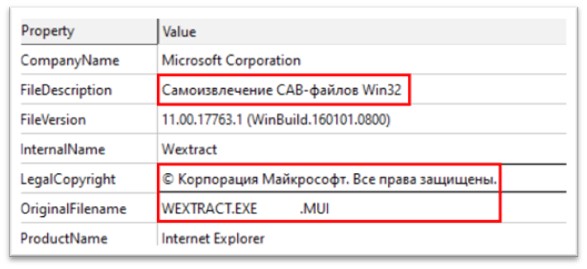
Figure 1: Characteristic of the file 


The file is a 32-bit Portable Executable file, which is 631.50 Kb in size. The original name of the file is WEXTRACT.EXE.MUI. The file description is “Самоизвлечение CAB-файлов Win32”, written in Russian, and means “Self-Extracting Win32 CAB Files”. The legal copyright mentions Microsoft Corporation. A lot of static strings of this file were found to be written in Russian. 

Normally, the resource section (.rsrc) contains resources used by the program, such as icons, bitmaps, strings, and dialog boxes. Attackers leverage the resource section of a PE file to improve the success of their attacks by evading detection, enhancing persistence, and adding functionality. 

The resource section of this sample has multiples files, out of which CABINET resource holds 75.75% of the total file, which makes the said resource suspicious. 
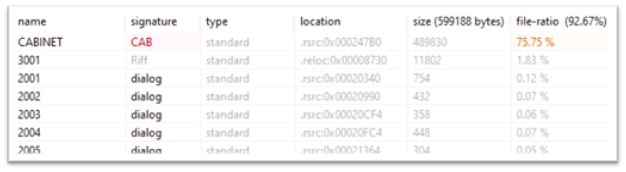
Figure 2: Resources in the file 


A CAB (Cabinet) file is a compressed archive file format that is often used to compress and package multiple files into a single file for distribution or installation. A CAB file in the resource section of a PE file can be used for various purposes such as storing additional program files or data, including language-specific resources, or compressing and storing commonly used resources to reduce the size of the executable.  

The CABINET holds two executables, cydn.exe and vona.exe. 
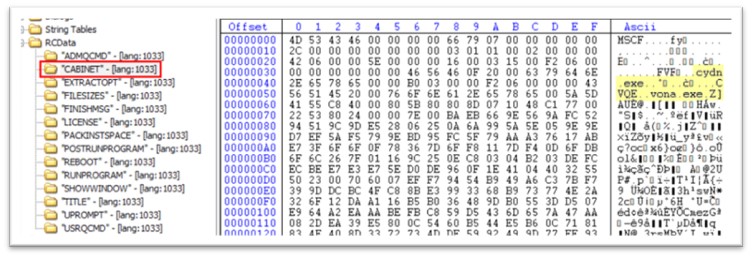
Figure 3: CABINET in resource section 


Likewise, under RCDATA, there is another attribute called “RUNPROGRAM”, which starts cydn.exe.  RUNPROGRAM in the resource section of a malware file typically refers to a resource that contains instructions for the malware to execute a specific program or command. When the malware is executed, it will load the resource containing the “RUNPROGRAM” command and attempt to execute the specified program or command. This technique is often used by malware authors to execute additional malicious programs or commands on the infected system. For example, the “RUNPROGRAM” resource may contains instructions to download and execute additional malware, or to launch a malicious script or command that can perform various malicious activities such as stealing sensitive data, creating backdoors, or disabling security software. 
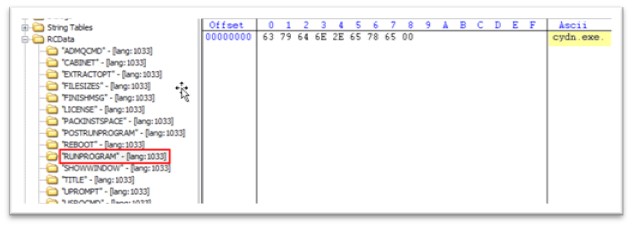
Figure 4: RUNPROGRAM attribute stating “cydn.exe” 


Like RUNPROGRAM, POSTRUNPROGRAM also holds the instruction to run the executable after RUNPROGRAM is executed. Hence, once cydn.exe is executed, vona.exe will be executed. 
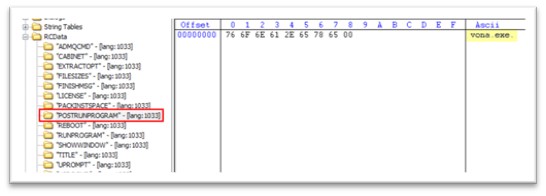
Figure 5: POSTRUNPROGRAM stating “vona.exe” 

Once WEXTRACT.exe is executed, both cydn.exe and vona.exe is dropped in the TEMP folder. The TEMP folder is a commonly used location for malware to store temporary files and other data, as it is typically writable by any user account and is not usually subject to strict security restrictions. This can make it easier for the malware to operate without raising suspicion or triggering security alerts. 
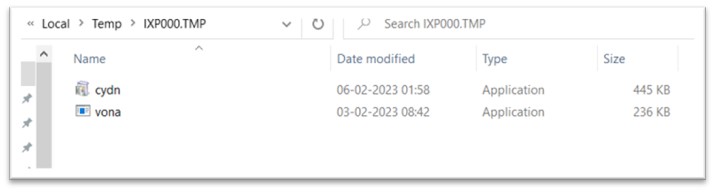
Figure 6: Files dropped in TEMP folder 

Stage 2: Analysis of cydn.exe 

The file showed high file ratio of the resource section, with the entropy of 7.810. Entropy is a measure of the randomness or unpredictability of the data in the file. It is often used as an indicator of whether a file is likely to be malicious or not. 

In the case of a PE file, high entropy can indicate that the file contains a significant amount of compressed or encrypted data, or that it has been obfuscated or packed in a way that makes it more difficult to analyze. This can be a common technique used by malware authors to evade detection by antivirus software. 
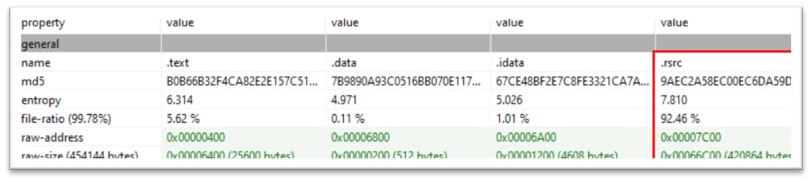
 

Figure 7: File ratio and entropy of the resource section 


Like the previous file, cydn.exe also had two executables archived in its resource section, named aydx.exe and mika.exe. The “RUNPROGRAM” attribute commands to run aydx.exe and the “POSTRUNPROGRAM” attribute commands to execute mika.exe once aydx.exe is executed. These files are also dropped in TEMP folder. 

Figure 8: aydx.exe and mika.exe packed in resource section 
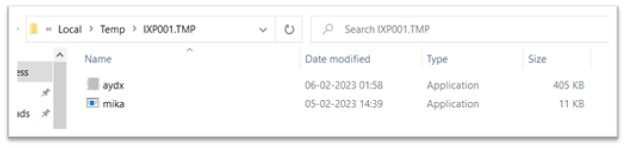
 

Figure 9: Executables dropped in another TEMP folder 

The order of file execution is as follows: First, Wextract.exe and cydn.exe, which have already been discussed, are followed by aydx.exe, and then by mika.exe and vona.exe. 
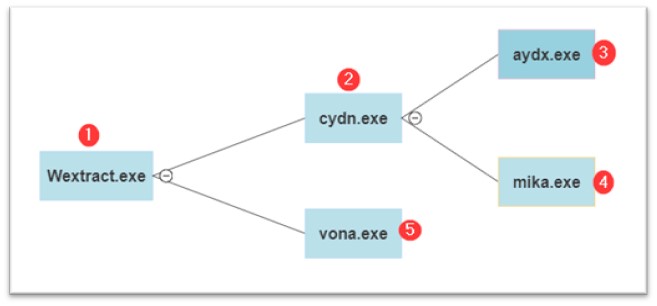
 

Figure 10: Execution flow 

Stage 3: Analysis of aydx.exe 

Aydx.exe is a 32-bit Portable Executable file, which is 405Kb and is compiled in C/C++. Once executed, it attempts to make a request to IP address: 193.233.20.7. 

Figure 11: Malware trying to connect to IPv4 

This IP address is linked with Redline Stealer connecting on port number 4138. 

Analysis of mika.exe 

Mika.exe is 32-bit Portable Executable, complied in .NET and is just 11 KB in size. The original name of the file is “Healer.exe”. This exe file makes no internet activity but does something in the target machine which assists malwares from further stages to carry out their execution.  

The intent of mika.exe is to turn off Windows Defender in all possible ways. Once mika.exe was executed, this is how the Defender settings of the system looked like: 
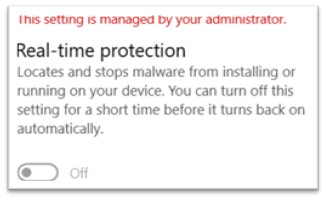
Figure 12: Real-time protection turned off 

This setting was irreversible and couldn’t be turned back to on via settings of Windows. Following this, logs from Procmon were analyzed and there were entries regarding Windows defender, such as: 
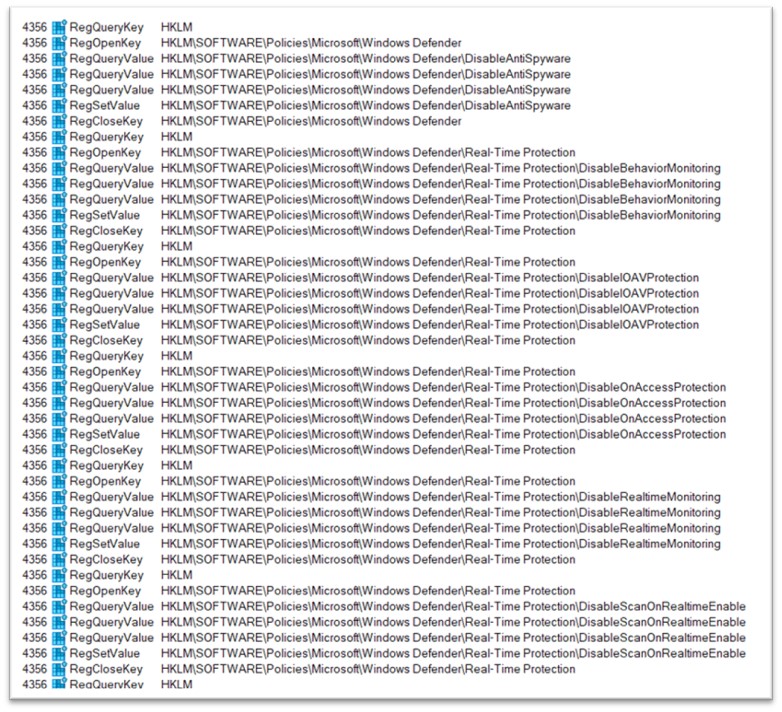
Figure 13: Procmon logs 

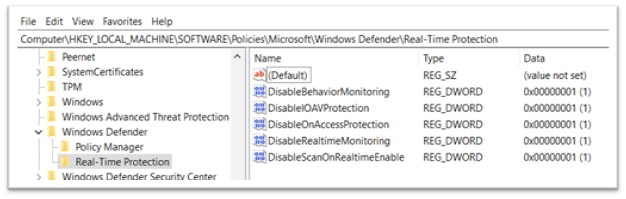
To validate this, Registry was analysed and all the changes were found there. The changes in Registry were found to be in exact order as of Procmon logs. In Windows, the registry is a hierarchical database that stores configuration settings and options for the operating system, as well as for applications and devices. It is used to store information about the hardware, software, user preferences, and system settings on a Windows computer. Following keys are added under Real-Time Protection: 

  • DisableBehaviourMonitoring 
  • DisableIOAVProtection 
  • DisableOnAccessProtection 
  • DisableRealtimeMonitoring 
  • DisableScanOnRealitimeEnable 

Figure 14: Keys added in Registry 

By doing so malware is restricting all the normal users from turning the Windows Defender on. When attackers disable Windows Defender through the registry, the change is likely to persist even if the user or administrator tries to re-enable it through the Windows Defender settings. This allows the attacker to maintain control over the system for a longer period. This supports malwares of further stages to easily execute themselves without any hinderances. This can be leveraged by all the malwares, regardless of their correspondence to this very campaign. 

Stage 4: Analysis of vona.exe 

Vona.exe, a variant of the Amadey malware family, is compiled in C/C++ and is 236 KB in size. This is the last file to be executed from the current cluster.  When executed, a highly extensive process tree quickly appeared. 
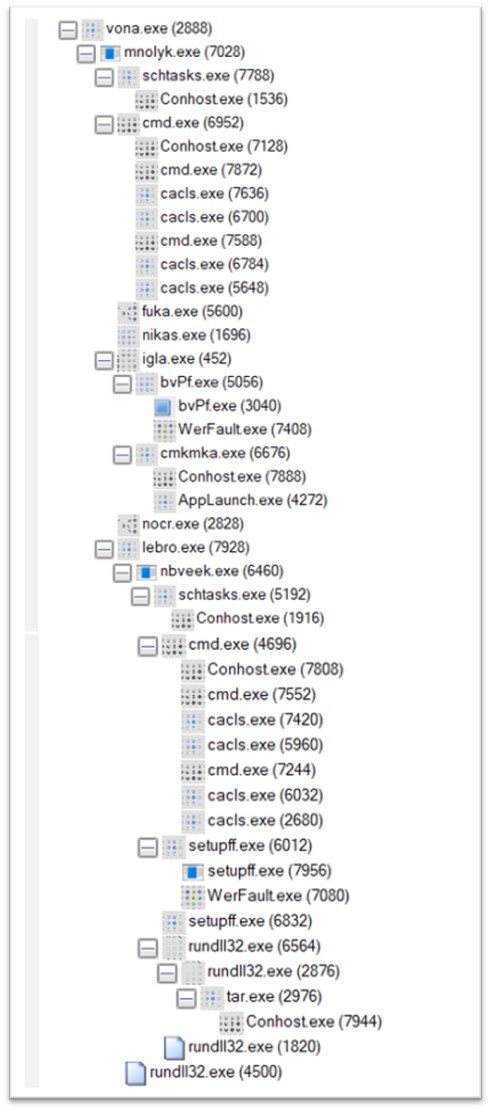
Figure 15: Process tree of vona.exe 


Stage 5: Analysis of mnolyk.exe 

An immediate child process of vona.exe is mnolyk.exe, another Amadey component, is dropped in a folder in TEMP folder. 


Figure 16: mnolyk.exe dropped in TEMP folder 

Mnolyk.exe makes active connections to IP addresses 62.204.41.5 and 62.204.41.251 

Malicious DLLs are downloaded from 62.204.41.5, which are executed later in the campaign. The target was made to search for two different DLLs, namely cred.dll and clip.dll. 
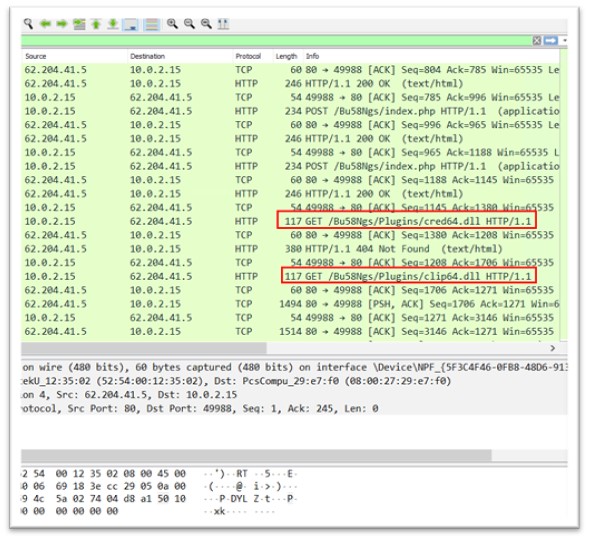
Figure 17: Malicious dlls downloaded 


From 62.204.41.251, various exe files are downloaded to the TEMP folder, and later executed. Exes downloaded are: 

fuka.exe 

Figure 18: fuka.exe 


nikas.exe 

Figure 19: nikas.exe 

igla.exe 

Figure 20: igla.exe 

nocr.exe

Figure 21: nocr.exe 

lebro.exe

Figure 22: lebro.exe 


Following the execution of mnolyk.exe, a series of schtasks.exe and cacls.exe were executed. 

The command line for schtasks.exe is “C:WindowsSystem32schtasks.exe” /Create /SC MINUTE /MO 1 /TN mnolyk.exe /TR “C:UserstestAppDataLocalTemp5eb6b96734mnolyk.exe” /F 

  • “/Create” – This is the command to create a new scheduled task. 
  • “/SC MINUTE” – This parameter sets the scheduling interval for the task to “MINUTE”. The task will run every minute. 
  • “/MO 1” – This parameter sets the repeat count to “1”. The task will run only once. 
  • “/TN” – This parameter specifies the name of the task. The name should be specified after the “/TN” parameter. 

So, the entire command line “schtasks.exe /Create /SC MINUTE /MO 1 /TN” would create a scheduled task that runs once every minute. The name of the task specified is the path to mnolyk.exe. 


There were several instances of cacls.exe created. One of them is explained here along with its parameter. The command line is “CACLS  ”mnolyk.exe” /P “test:R” /E” 

  • “CACLS” – This is the command to change the ACL of a file. 
  • “mnolyk.exe” – This is the file for which the ACL will be modified. 
  • “/P test:R” – This parameter specifies the permission change for a user named “test”. The “:R” at the end indicates that the “test” user will be granted “Read” permission. 
  • “/E” – This parameter specifies that the ACL change will be made to the file’s effective ACL. The effective ACL is the actual set of permissions that are applied to the file. 

So, the entire command line “CACLS mnolyk.exe /P test:R /E” would grant the “test” user or group “Read” permission to the “mnolyk.exe” file. Hence the user “test” can neither write nor delete this file. If in place of “/P test:R”, “/P test:N” was mentioned, which is mentioned in one of the command line, it would give “None” permission to the user. 


Stage 6: Analyzing fuka.exe, nikas.exe, igla.exe, nocr.exe and lebro.exe 

Fuka.exe 

Fukka.exe, a variant of the Redline Stealer malware family, is 175 KB and is compiled in .NET. The original name of the file is Samarium.exe. It shows some network activity with IP 193.233.20.11. 

Figure 23: Network activity of fuka.exe 

Nikas.exe 

Nikas.exe is 248 KB executable file compiled in C/C++. It disables automatic updates for Windows and checks the status of all the sub-fields of Real-Time Protection that were previously changed by mika.exe. No network activity was found during replication. 

Igla.exe 

Igla.exe is 520 KB file, compiled in C/C++. The original name of the file is WEXTRACT.EXE.MUI. Like we saw in cydn.exe, this PE has also two more exes packed in its resource section, bvPf.exe and cmkmka.exe. Once igla.exe is executed, bvPf.exe is executed, followed by cmkmka.exe. 
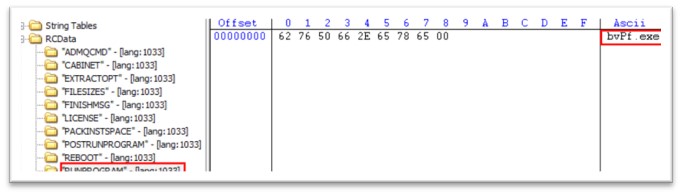
Figure 24: RUNPROGRAM attribute in igla.exe 
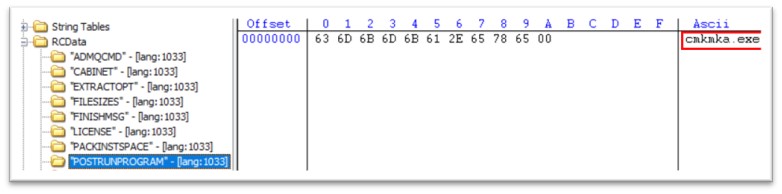
 

Figure 25: POSTRUNPROGRAM attribute in igla.exe 


bvPf.exe 

bvPf.exe is 306 KB in size and is compiled in C/C++.  The original filename is nightskywalker.exe. The file is dropped in a folder in TEMP folder of the system. 

The exe has tried connecting to 193.233.20.11, but server did not respond, and no communication took place. 

cmkmka.exe 

cmkmka.exe is 32-bit PE file, 283.5 KB in size. It further launches AppLaunch.exe which communicates to C2. 

It communicates to the IP address: 176.113.115.17 which is an active C2 for Redline Stealer and connects to the port 4132. 
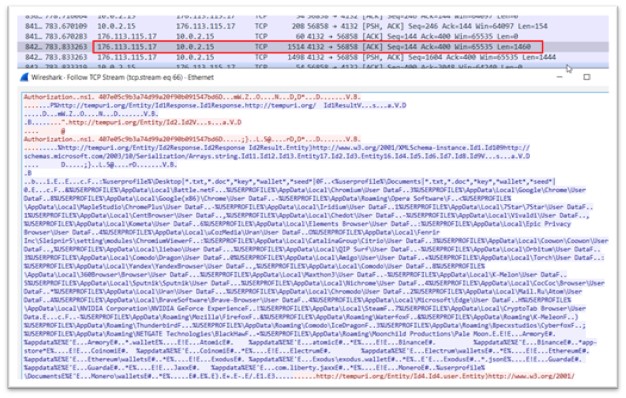
 

Figure 26: Data exfiltration 


The blue-colored content in the data indicates the information being transmitted from the Command and Control (C2) server, which is providing instructions to the malware regarding the specific data that needs to be retrieved along with their corresponding paths. These paths include user profiles of different web browsers, various crypto wallet paths, and other related data. 

As a response, all the data residing at the specified paths is sent back to the C2 server of the malware. This includes all the profiles of different web browsers, information related to crypto wallets, and even user-related data from the Windows operating system. This process allows the C2 server to collect a vast amount of sensitive information from the infected system, which could be exploited by the attackers for malicious purposes. 

Nocr.exe 

Nocr.exe, a component of Redline Stealer, is a 175 KB .NET binary. The original name of the file is Alary.exe.  It communicates to the IP address 176.113.115.17. 

Lebro.exe 

Lebro.exe, a component of Amadey, is a 235 KB file, compiled in C/C++. Lebro.exe is responsible for executing nbveek.exe, which is a next stage of the malware. The file is again dropped in TEMP folder. 
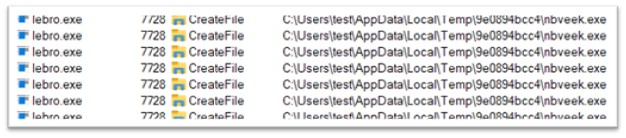
Figure 27: Dropping another executable in TEMP folder 

Stage 7: Analyzing nbveek.exe 

The hashes of lebro.exe and nbveek.exe are same, they are the same binaries, hence it is Amadey. It is connecting to IP 62.204.41.88.  


Figure 28: Network activity of nbveek.exe 


The target system executes a php file, and the content of file includes the command to download another exe called setupff.exe. This exe is downloaded to the TEMP folder. 

Before setupff.exe is executed, again the series of schtasks.exe and cacls.exe are executed which were seen previously also. The same parameters were passed for nbveek.exe as they were for mnolyk.exe. 

Setupff.exe 

Setupff.exe is compiled in C/C++ and is 795 KB.  The file could not execute and threw Windows error. 

Stage 8: Final stage 

Later, another instance of setupff.exe was created which further invokes multiple instances of rundll32.exe. Here, the two dlls downloaded by mnolyk.exe, clip64.dll and cred64.dll, are executed through rundll32.exe. McAfee Labs detects these dlls to be Amadey maware. 

The network activity shows the dll to be connecting to 62.204.41.88. This dll again starts exfiltrating data to C2: 
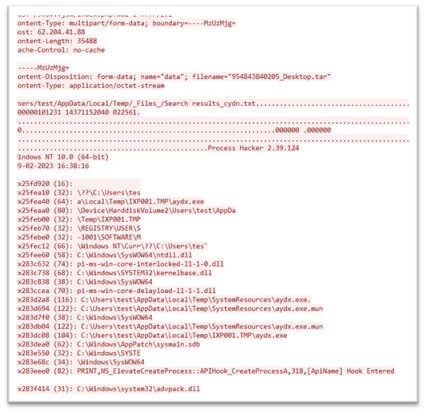
 

Figure 29:Data exfiltration 


To conclude, the threat posed by the multi-stage attack that drops the Amadey botnet, and subsequently Redline Stealer, is significant and requires constant vigilance from both consumers and security professionals. By using the Amadey botnet as a delivery mechanism for other malware, attackers can leverage these same capabilities to evade detection and maintain persistence on infected computers. They can use Amadey to drop a wide range of malware, such as spyware, ransomware, and trojans, which can be used for a variety of malicious purposes, such as stealing sensitive information, encrypting files for ransom, or taking control of a computer for use in a larger botnet. Our analysis of various samples of this attack has revealed that the Amadey botnet distributes malware from multiple families and is not restricted to Redline Stealer alone. 

At McAfee, we are committed to providing our customers with robust and effective antivirus and anti-malware solutions that can detect and protect against threats like the Amadey botnet and other malware families. Our security software uses a combination of signature, machine learning, threat intelligence and behavioral-based detection techniques to identify and stop threats before they can cause damage. 


Indicators of Compromise (IOCs): 

File Type  SHA-256  Product  Detection 
.exe  80fed7cd4c7d7cb0c05fe128ced6ab2b9b3d7f03edcf5ef532c8236f00ee7376  Total Protection and LiveSafe  Downloader-FCND
Lockbit-FSWW
PWS-FDON 
.exe  d8e9b2d3afd0eab91f94e1a1a1a0a97aa2974225f4f086a66e76dbf4b705a800  Total Protection and LiveSafe  PWS-FDON
Lockbit-FSWW 
.exe  1d51e0964268b35afb43320513ad9837ec6b1c0bd0e56065ead5d99b385967b5  Total Protection and LiveSafe  Lockbit-FSWW 
.exe  850cd190aaeebcf1505674d97f51756f325e650320eaf76785d954223a9bee38  Total Protection and LiveSafe  PWS-FDON 
.exe  6cbcf0bb90ae767a8c554cdfa90723e6b1127e98cfa19a2259dd57813d27e116  Total Protection and LiveSafe  Downloader-FCND 
.exe  8020580744f6861a611e99ba17e92751499e4b0f013d66a103fb38c5f256bbb2  Total Protection and LiveSafe  AgentTesla-FCYU 
.exe  021ae2fadbc8bc4e83013de03902e6e97c2815ab821adaa58037e562a6b2357b  Total Protection and LiveSafe  Lockbit-FSWW 
.exe  aab1460440bee10e2efec9b5c83ea20ed85e7a17d4ed3b4a19341148255d54b1  Total Protection and LiveSafe  Lockbit-FSWW 
.exe  54ce28a037eea87448e65bc25f8d3a38ddd4b4679516cc59899b77150aa46fcc  Total Protection and LiveSafe  GenericRXVK-HF 
.exe  0cca99711baf600eb030bbfcf279faf74c564084e733df3d9e98bea3e4e2f45f  Total Protection and LiveSafe  AgentTesla-FCYU 
.exe  ad1d5475d737c09e3c48f7996cd407c992c1bb5601bcc6c6287eb80cde3d852b  Total Protection and LiveSafe  Downloader-FCND 
.exe  d40d2bfa9fcbf980f76ce224ab6037ebd2b081cb518fa65b8e208f84bc155e41  Total Protection and LiveSafe  GenericRXVJ-QP 
.dll  cdd4072239d8a62bf134e9884ef2829d831efaf3f6f7f71b7266af29df145dd0  Total Protection and LiveSafe  PWS-FDOE 
.dll  10ee53988bcfbb4bb9c8928ea96c4268bd64b9dfd1f28c6233185e695434d2f8  Total Protection and LiveSafe  Trojan-FUUW 
.dll  3492ed949b0d1cbd720eae940d122d6a791df098506c24517da0cc149089f405  Total Protection and LiveSafe  Trojan-FUUW 
IPv4  193.233.20.7     
IPv4  62.204.41.5     
IPv4  62.204.41.251     
IPv4  193.233.20.11     
IPv4  176.113.115.17     
IPv4  62.204.41.88     


The post Deconstructing Amadey’s Latest Multi-Stage Attack and Malware Distribution appeared first on McAfee Blog.

—————
Free Secure Email – Transcom Sigma
Boost Inflight Internet
Transcom Hosting
Transcom Premium Domains

How To Be Safe On WhatsApp

I’m betting you have WhatsApp on your phone. Or, if you don’t – I’m quite sure a member of your family would. As the most popular messaging app in the world with 2 billion active monthly users, it’s clearly a favourite for many of us who want to keep in contact with both our Apple and Android friends in a safe and encrypted fashion. 

My relationship with WhatsApp was a slow burn. I discovered it a few years back when it became apparent that group messages to a close cluster of girlfriends weren’t being received by my Android pals. WhatsApp solved that problem instantly. But then over several years, I realized it solved quite a few other pesky problems namely expensive and tricky phone calls when travelling overseas and my frustration at not being able to send a message to a large group of people. I became a fan girl! 

But it hasn’t always been smooth sailing for WhatsApp users, over the years there have been scams including the 10th birthday scam where users were offered the chance to win 1000GB of free data and most recently the ‘mum and dad’ scam. There was also a wave of controversy in 2021, when new WhatsApp owner, Meta, introduced a new Privacy Policy which had a swathe of users concerned that it would share data with Facebook. Many of us threatened not to sign however if we didn’t – we couldn’t use it! So, we all agreed, somewhat reluctantly in the name of convenience and moved on. 

WhatsApp Offers Rolls Royce Encryption But Is It Enough? 

WhatsApp’s default end-to-end encryption sets it apart from other messaging apps and is another one of my favourite features. But what does that actually mean? In short, it means that your messages can only be read on the recipient’s phone. Likewise, video and audio calls can only be answered by the intended receiver. WhatsApp encrypts every message sent on its platform which means the only people who can decode it are the sender and the receiver. WhatsApp can’t access anything you share and nor could a hacker if they were to intercept a message. Love end-to-end encryption! 

But this doesn’t mean that there are no risks using WhatsApp. Like all online platforms, staying ahead of the risks is the smartest way of ensuring you have the best experience. And there are several steps you can take to stay ahead of the threats on WhatsApp. Here are my top tips: 

My Top Tips To Stay Safe While Using WhatsApp 

1. Turn On Automatic Updates 

Keeping your WhatsApp software up to date is essential as updates will almost always include fixes or ‘patches’ for new vulnerabilities and threats. Why not automate them to ensure that this happens? This means you won’t be at risk if you forget to update the software yourself. 

2. Be Careful What You Share 

Never ever share personal data or crucial financial information on the app, in case your device ends up in the wrong hands or it becomes infected with spyware or malware. And this goes for any app – keep your personal information nice and tight.  

3. Protect Your Device From Spyware 

To prevent your device from becoming compromised by malicious software, ensure your device has some super-duper mobile security software. McAfee’s Mobile Security software, available for both iOS and Android, will protect devices of all types from cyberthreats. 

4. Ignore Suspicious Messages 

As anyone can message anyone on WhatsApp, it’s inevitable you may receive some random or suspicious looking messages. Always err on the side of caution and do not respond to direct messages from people you don’t know. If you receive a promotional offer from a company that is quite tempting, go directly to their website to confirm. Scammers will often send out 1000’s of emails with a tempting offer and link to a malicious website in the hope that someone will ‘bite’. Don’t be caught in a phishing scam! 

5. Add a Pin Number 

Enabling 2 factor authentication is one the best ways to secure your WhatsApp account and ensure a hacker can’t download your account on their phone. Without your 6-digit pin number, a hacker can’t get into your account, even if they get their hands on the SMS code they need to activate your account on another device. And it takes 30 seconds to set up!  

6. Be Aware Of The Most Common WhatsApp Hacking Strategy 

If you haven’t set up your 6-digit pin, then you are at risk at being ‘socially hacked’. This is how it works: a hacker, who has hijacked one of your friend’s accounts, will message you asking for the 6-digit code that’s just been sent to your account. They will say it’s meant for them. And as you ‘know’ this person, you are likely to send that code straight through without even questioning them. But in fact, the 6-digit code in question has been requested by the hacker for your account, so the minute you share it – you will be immediately locked out! So, never ever share your 6-digit code with anyone. No-one will ever have a legitimate reason to request it.   

But please don’t let these risks put you off this fantastic messaging app. I’m a big believer in understanding the challenges so you can prepare yourself, go ahead and enjoy! And I haven’t even touched on some of the more fun aspects of the app – the stickers & the status updates – they can be quite the conversation starter! So go ahead and enjoy but just make sure you’ve done your homework!! 

Stay safe everyone! 

Alex  

The post How To Be Safe On WhatsApp appeared first on McAfee Blog.

—————
Free Secure Email – Transcom Sigma
Boost Inflight Internet
Transcom Hosting
Transcom Premium Domains