News

Encrypted Messaging Service Hack Exposes Phone Numbers

Many people opt for encrypted messaging services because they like the additional layers of privacy they offer. They allow users to message their closest friends, family, and business partners without worrying about a stranger digitally eavesdropping on their conversation. The same people who message over encrypted services and apps are likely also diligent with securing their internet connections and using a VPN. 

Despite all those safeguards, everyday people are left in the lurch when the companies with which they entrust their information are victims of cyberattacks. That was the case for users of the encrypted messaging app, Signal. Due to a phishing attack and subsequent leak of customer phone numbers, people are looking to identify potential consequences, protect themselves from SIM swapping, monitor their identity, and take measures to make sure their information is safe in the future. 

What Happened?  

A recent cyberattack targeted Signal, an end-to-end encrypted messaging service.1 The attackers exposed about 1,900 phone numbers belonging to Signal users. While other personally identifiable information (PII), message history, and contact lists were spared, valid phone numbers in the hands of a cybercriminal can be enough to wreak havoc on affected users.  

It is likely that another recent and successful phishing scheme at Twilio was the entry point for the Signal hackers. (Signal partners with Twilio to send SMS verification codes to people registering for the Signal app.) At Twilio, phishers tricked employees into divulging their credentials. 

To rectify the situation and protect users, Signal is contacting affected users and asking them to re-register their devices. Also, the company is urging all users to enable registration lock, which is an additional security measure that requires a unique PIN to register a phone with Signal.  

Lessons Learned

There are many lessons not only companies but everyday people can learn from the Signal and Twilio hacks. Here are some ways you can take action at the first signs of a compromised phone number and to help prevent cyber-events like this from happening to you.  

Know the signs of SIM swapping 

SIM swapping occurs when a cybercriminal gets ahold of your cellphone number and a few other pieces of your PII and registers your phone number to a device and a new SIM card that isn’t yours. If they successfully reregister your phone number, they can then access your data, change account passwords, and lock you out of your most important accounts. 

Luckily, since most of us use our phones every day, SIM swapping is usually detected quickly. If your phone isn’t connecting to the network and you’re not receiving calls and texts, it could be a sign that your wireless provider may have reassigned your number to an impersonator. In this case, contact your wireless provider immediately. 

To make SIM swapping nearly impossible, always turn on multifactor authentication. Also known as MFA, multifactor authentication is a method many online accounts use to ensure that only the authorized user can gain entry. This could entail sending a one-time code by email or text, prompting security questions, or scanning for fingerprint or facial recognition in addition to asking for the account password. MFA is an additional layer of security that’s quick to implement. The extra few seconds it takes to type in a code or stand still for a facial scan is well worth the frustration is causes cybercriminals.  

Be selective with whom you share your PII

These days, everyone has dozens of online accounts for everything from banking and shopping to streaming services and gaming. Since you can’t predict which company is going to be breached next, limit the number of possible doors a cybercriminal could break through to access your PII. In the Signal hack, it was their third-party vendor that was likely the cause of the leaked phone numbers. This unpredictability means it’s best to limit sharing your PII with as few accounts as possible. A great practice is to regularly organize your online accounts and deactivate the ones you no longer use. 

Never share your passwords 

A phishing attack seems to have been the first domino to fall in the Twilio and Signal incident. It could’ve been prevented if everyone followed this absolute rule: Never share your password! Your employer nor your bank nor the IRS, for example, will ever ask you for your password to an online account. If you receive correspondence asking you to share your password, no matter how official it looks, do not comply.  

Phishers often lace their electronic correspondences with an urgent or authoritarian tone, threatening severe consequences if they don’t receive a response within a short timeframe. This is a ploy to get people to act too quickly without thinking through the request. If you receive a message that outlines dire consequences for seemingly small infractions, step away from the message for at least 15 minutes and think it through. Stay calm and follow up through official channels, such as a listed phone number on the organization’s website or a customer service chat room, to iron out the alleged situation instead. 

Stay Protected

Diligent cybersecurity habits go a long way toward keeping you and your family’s PII out of the hands of malicious characters. However, in the case you trust a company with your information but it’s leaked in a breach, McAfee Total Protection can give you peace of mind. McAfee Total Protection offers premium security in various areas including antivirus, identity monitoring, secure VPN, Protection Score, and Personal Data Cleanup. Its advanced monitoring abilities are faster and offer broader detection for your identity. Plus, McAfee Total Protection can cover you up to $1 million in identity theft restoration. 

Keep your eyes peeled for cybersecurity news and breaches that may have affected your PII. From there, take action and leverage McAfee services to help you fill in the gaps. 

1The Hacker News, “Nearly 1,900 Signal Messenger Accounts Potentially Compromised in Twilio Hack 

The post Encrypted Messaging Service Hack Exposes Phone Numbers appeared first on McAfee Blog.

—————
Free Secure Email – Transcom Sigma
Boost Inflight Internet
Transcom Hosting
Transcom Premium Domains
USB “Rubber Ducky” Attack Tool

The USB Rubber Ducky is getting better and better.

Already, previous versions of the Rubber Ducky could carry out attacks like creating a fake Windows pop-up box to harvest a user’s login credentials or causing Chrome to send all saved passwords to an attacker’s webserver. But these attacks had to be carefully crafted for specific operating systems and software versions and lacked the flexibility to work across platforms.

The newest Rubber Ducky aims to overcome these limitations. It ships with a major upgrade to the DuckyScript programming language, which is used to create the commands that the Rubber Ducky will enter into a target machine. While previous versions were mostly limited to writing keystroke sequences, DuckyScript 3.0 is a feature-rich language, letting users write functions, store variables, and use logic flow controls (i.e., if this… then that).

That means, for example, the new Ducky can run a test to see if it’s plugged into a Windows or Mac machine and conditionally execute code appropriate to each one or disable itself if it has been connected to the wrong target. It also can generate pseudorandom numbers and use them to add variable delay between keystrokes for a more human effect.

Perhaps most impressively, it can steal data from a target machine by encoding it in binary format and transmitting it through the signals meant to tell a keyboard when the CapsLock or NumLock LEDs should light up. With this method, an attacker could plug it in for a few seconds, tell someone, “Sorry, I guess that USB drive is broken,” and take it back with all their passwords saved.

—————
Free Secure Email – Transcom Sigma
Boost Inflight Internet
Transcom Hosting
Transcom Premium Domains

PayPal Phishing Scam Uses Invoices Sent Via PayPal

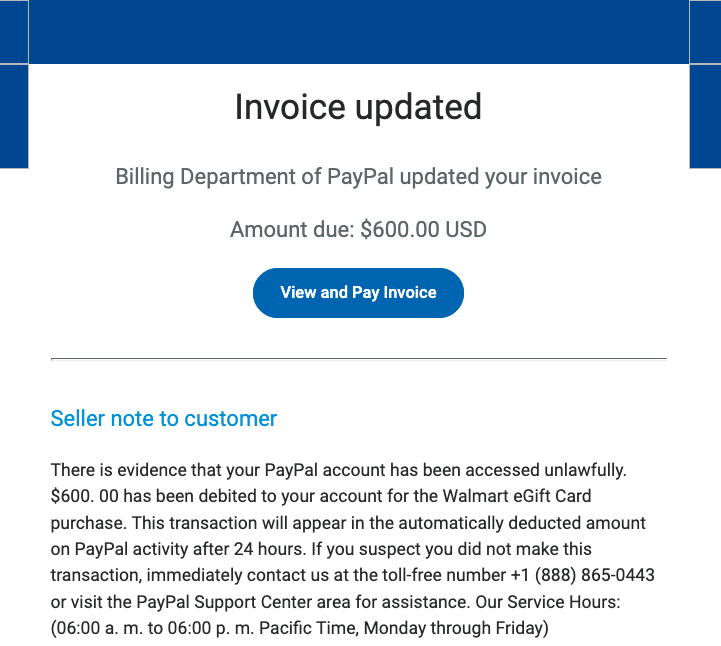
Scammers are using invoices sent through PayPal.com to trick recipients into calling a number to dispute a pending charge. The missives — which come from Paypal.com and include a link at Paypal.com that displays an invoice for the supposed transaction — state that the user’s account is about to be charged hundreds of dollars. Recipients who call the supplied toll-free number to contest the transaction are soon asked to download software that lets the scammers assume remote control over their computer.

KrebsOnSecurity recently heard from a reader who received an email from paypal.com that he immediately suspected was phony. The message’s subject read, “Billing Department of PayPal updated your invoice.”

A copy of the phishing message included in the PayPal.com invoice.

While the phishing message attached to the invoice is somewhat awkwardly worded, there are many convincing aspects of this hybrid scam. For starters, all of the links in the email lead to paypal.com. Hovering over the “View and Pay Invoice” button shows the button indeed wants to load a link at paypal.com, and clicking that link indeed brings up an active invoice at paypal.com.

Also, the email headers in the phishing message (PDF) show that it passed all email validation checks as being sent by PayPal, and that it was sent through an Internet address assigned to PayPal.

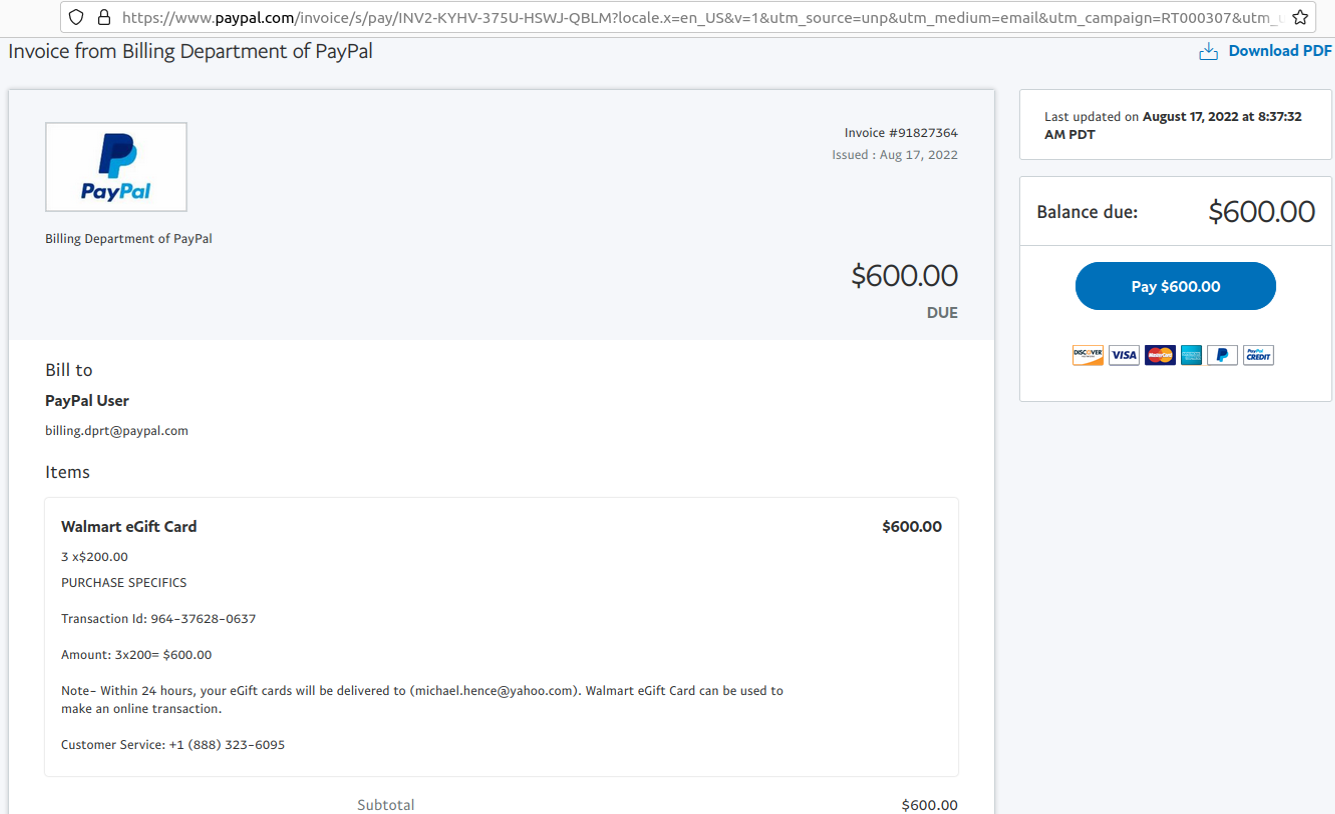
Both the email and the invoice state that “there is evidence that your PayPal account has been accessed unlawfully.” The message continues:

“$600.00 has been debited to your account for the Walmart Gift Card purchase. This transaction will appear in the automatically deducted amount on PayPal activity after 24 hours. If you suspect you did not make this transaction, immediately contact us at the toll-free number….”

Here’s the invoice that popped up when the “View and Pay Invoice” button was clicked:

The phony PayPal invoice, which was sent and hosted by PayPal.com.

The reader who shared this phishing email said he logged into his PayPal account and could find no signs of the invoice in question. A call to the toll-free number listed in the invoice was received by a man who answered the phone as generic “customer service,” instead of trying to spoof PayPal or Walmart. Very quickly into the conversation he suggested visiting a site called globalquicksupport[.]com to download a remote administration tool. It was clear then where the rest of this call was going.

I can see this scam tricking a great many people, especially since both the email and invoice are sent through PayPal’s systems — which practically guarantees that the message will be successfully delivered. The invoices appear to have been sent from a compromised or fraudulent PayPal Business account, which allows users to send invoices like the one shown above. Details of this scam were shared Wednesday with PayPal’s anti-abuse (phishing@paypal.com) and media relations teams.

PayPal said in a written statement that phishing attempts are common and can take many forms.

“We have a zero-tolerance policy on our platform for attempted fraudulent activity, and our teams work tirelessly to protect our customers,” PayPal said. “We are aware of this well-known phishing scam and have put additional controls in place to mitigate this specific incident. Nonetheless, we encourage customers to always be vigilant online and to contact Customer Service directly if they suspect they are a target of a scam.”

It’s remarkable how well today’s fraudsters have adapted to hijacking the very same tools that financial institutions have long used to make their customers feel safe transacting online. It’s no accident that one of the most prolific scams going right now — the Zelle Fraud Scam — starts with a text message about an unauthorized payment that appears to come from your bank. After all, financial institutions have spent years encouraging customers to sign up for mobile alerts via SMS about suspicious transactions, and to expect the occasional inbound call about possibly fraudulent transactions.

Also, today’s scammers are less interested in stealing your PayPal login than they are in phishing your entire computer and online life with remote administration software, which seems to be the whole point of so many scams these days. Because why rob just one online account when you can plunder them all?

The best advice to sidestep phishing scams is to avoid clicking on links that arrive unbidden in emails, text messages and other mediums. Most phishing scams invoke a temporal element that warns of dire consequences should you fail to respond or act quickly. If you’re unsure whether the message is legitimate, take a deep breath and visit the site or service in question manually — ideally, using a browser bookmark to avoid potential typosquatting sites.

—————
Free Secure Email – Transcom Sigma
Boost Inflight Internet
Transcom Hosting
Transcom Premium Domains