For the past four years, a sprawling Android-based botnet called Popa has forced millions of consumer TV boxes to relay Internet traffic linked to advertising fraud, account takeovers, and mass data-scraping efforts. This week, researchers from multiple security firms concluded that the Popa botnet is linked to NetNut, a “residential proxy” provider operated by the publicly-traded Israeli firm Alarum Technologies Ltd [NASDAQ: ALAR].

Malicious streaming devices sold online that enroll the user’s home Internet address in a residential proxy service. Image: HUMAN Security.
Popa is a massive botnet, but by all accounts it is unlike traditional botnets that enlist compromised systems in destructive activities, such as coordinating huge distributed denial-of-service attacks. Rather, Popa appears designed with a singular purpose: Implementing a persistent communications layer capable of registering a device, maintaining long-lived encrypted connections, and opening communication tunnels on demand.
Experts say Popa is a plugin component associated with the Vo1d botnet, a large-scale malware campaign targeting unofficial Android-based TV boxes. These devices, which are marketed under thousands of brand names and model numbers and broadly available for purchase at top e-commerce destinations, all advertise the ability to stream hundreds of subscription video services for an up front one-time fee.
But as the FBI and security industry experts have warned repeatedly, these streaming boxes typically bundle or come pre-installed with software that turns the user’s TV into a “residential proxy” — allowing anyone to route their Internet traffic through that device for as long as it remains plugged into a wall socket and connected to a local network. More concerning, some of these proxy networks do little to stop malicious customers from communicating with and even compromising systems on the local network of the unsuspecting device owner.
The first clues about Popa’s origins came in a 2025 report from the Chinese security company XLAB, which flagged at least nine domain names that were used to register and direct the activities of compromised devices. In a report released today, the security firm Qurium described how it stumbled on some of those same domains while investigating a series of disruptive and expensive data scraping events targeting the company’s hosted organizations in May 2026, in which the scraping activity was scattered evenly across more than 1.4 million Internet addresses.
Qurium said it found several dozen domains used to control Popa that were all hosted in lockstep across multiple Internet addresses over time, including gmslb[.]net, safernetwork[.]io, tera-home[.]com, and ninjatech[.]io. Digging deeper, Qurium discovered gmslb[.]net was referenced in dozens of pirated or modded video content streaming apps, such as CRICFy, DooFlix, Sprozfy, RTS Tv, Flixoid, CyberFlix, Rapid Streamz, TvMob and HD/OceanStreams.
Qurium’s report notes that most of the domains long used to control the Popa botnet were seized or dismantled in July 2025, after Google, HUMAN Security and Trend Micro teamed up to disrupt Badbox 2.0, a botnet that is closely associated with Vo1d. Qurium said that immediately after that disruption, several dozen new domains were registered to serve as controllers for the Popa botnet, but that one of those control domains was not new: ninjatech[.]io.
Ninjatech is a company founded by Moishi Kramer, whose LinkedIn profile says he is vice president of research and development at NetNut. That resume credits Kramer for helping NetNut to build from the “ground up,” “designing the architecture,” and “scaling the NetNut” before the company was acquired by Alarum Technologies. A self-created listing at the job board F6S references Kramer as the sole owner of the Ninjatech domain (a screen capture of it is pictured below).
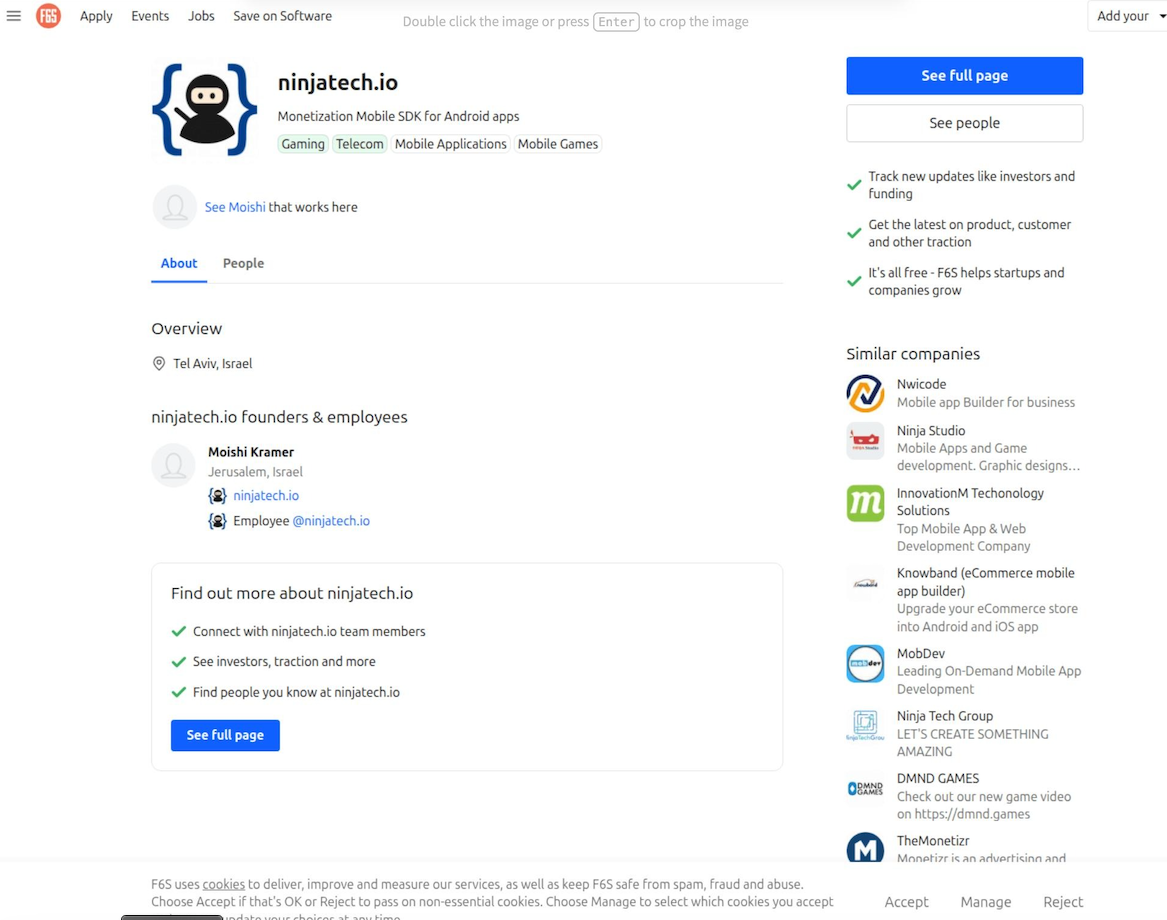
Image: F6S.com.
Responding via email, Mr. Kramer said Ninjatech ceased operations approximately five years ago, when the company sold a software development kit (SDK) called Popa that was designed to use a small portion of a device’s bandwidth and to run only after the host application obtained user consent.
“That code was sold and licensed to third parties including resellers years ago,” Kramer said. “Once software is distributed that way, the original developer has no control over how others later modify, rebrand, or deploy it.”
Kramer said neither he nor NetNut builds, operates or maintains the infrastructure being described as Popa, nor does he control the Ninjatech domain.
“I didn’t register the June 2025 domains you mention, and I don’t know who did,” he continued. “I have no control over, or visibility into, that infrastructure. I can only tell you it isn’t operated by me or by NetNut.”
But in a separate Popa research report released today, the proxy-tracking company Synthient said a recent analysis of the Popa SDK revealed outbound traffic clearly associated with NetNut.
“The research team assesses with high confidence that devices running Popa forward traffic from Netnut clients,” Synthient wrote. “This proves without a shadow of a doubt that Popa actively continues to be used by NetNut as part of their proxy pool.”
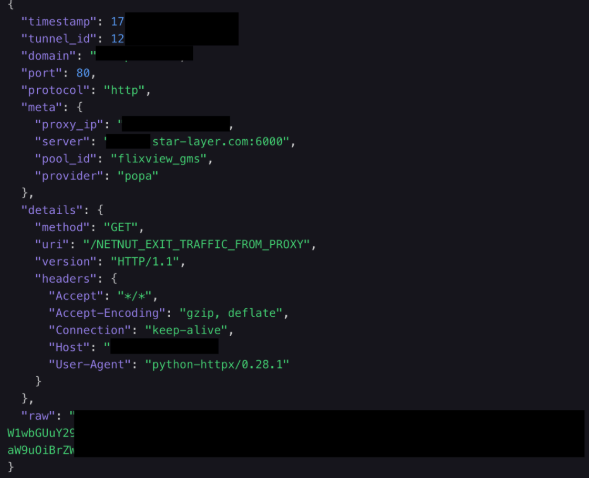
Synthient’s platform receiving outbound traffic from Popa. Image: Synthient.com.
Alarum Technologies, NetNut’s Tel Aviv-based parent company, said the reports by Synthient and Qurium contained “demonstrably inaccurate assertions and flawed deductions rather than verified facts.” Alarum shared a statement saying they reject the basic characterization of the SDKs and technologies discussed in the reports as a “botnet.”
“The SDKs at issue are designed to facilitate bandwidth-sharing functionality and do not transform user devices into malware-controlled systems or otherwise compromise the devices on which they operate,” the statement reads. “Netnut operates a commercial proxy network and maintains policies, procedures, and technological measures designed to promote lawful and responsible use of its services.”
Alarum said NetNut places “significant emphasis on appropriate notice and consent mechanisms, conducts customer due diligence, monitors for potential misuse, and takes steps intended to detect and mitigate suspicious or unauthorized activity.”
“This method of operation is supported both by internal procedures and policies, including performing KYC checks and additional due diligence of NetNut’s customers, as well as employing various technological measures, designed to assist in identifying and addressing suspected misuse of the network,” their statement continued.
However, in a report released on June 8, the proxy tracking service Spur asserted that NetNut does not require corporate verification or meaningful “know your customer” procedures before allowing customers to purchase proxy access.
“An individual can sign up, pay, and route traffic through partner address space, including space belonging to institutions whose users never opted in,” Spur wrote. “The ‘verified corporations only’ claim is simply marketing for bandwidth sellers, not an access control on who actually uses the proxies.”
“Nor is NetNut the only front door,” Spur continued. “A number of downstream white labelers and resellers repackage the same ISP proxy pool under their own brands. These outlets typically perform no KYC at all, less scrutiny than NetNut itself, who at the very least might assign an account manager to potential users. Anyone who knows where to look can buy access through a reseller with nothing more than a burner email address and $5 in crypto.”
Synthient found that although the most recent builds of Popa (as of three months ago) have added the ability to ask the user for consent before installing proxy components, not all variants or previous versions of Popa contain this functionality.
“Of the over 20 genuine Popa publishers analyzed, none of them were observed asking for user consent,” Sythient wrote.
THE PREVALENCE OF POPA
Chris Formosa is senior lead information security engineer for Black Lotus Labs, a division of the Internet backbone carrier Lumen Technologies.
“What especially makes Popa dangerous is just how widely used NetNut is for reselling and sharing,” Formosa said, explaining that many other proxy services simply resell NetNut proxies rather than building out their own far-flung proxy networks. “So these Popa IPs appear in tons of different services all over the ecosystem, which makes it one of the most problematic and dangerous proxy botnets on the market currently.”
Formosa said the Popa botnet averages between 1.5 million to 2.5 million distinct IP addresses each day, relying on between 250 and 300 Internet addresses that are used to direct its activities.
“That’s why Popa is so dangerous,” Formosa said. “It may not be the largest botnet we have seen, but it is spread all over the industry, making its power very amplified.”
Formosa said while that makes Popa one of the larger botnets out there today, its numbers pale in comparison to those previously boasted by IPIDEA, a China-based proxy provider that until recently operated a daily pool of nearly 10 million devices that they resold as proxies to anyone. In January 2026, Synthient published research showing that multiple new large DDoS botnets had grown rapidly by tunneling through IPIDEA proxies into the local networks of unsuspecting TV box owners and infecting other Android-based devices behind the user’s firewall.
IPIDEA is based largely on SDKs used to view pirated streaming content on a vast number of TV box devices, but the service’s numbers have dwindled since January, when Google and industry partners took legal action to seize domain names that IPIDEA used to control devices and proxy traffic through them.
Jérôme Meyer, a security researcher at Nokia Deepfield, said the total population of devices participating in the Popa botnet may be far higher than Lumen’s estimates. Meyer told KrebsOnSecurity that Nokia is monitoring 26 of at least 359 known relay nodes for the botnet, and estimates that each relay node handles between 35,000 and 60,000 clients simultaneously.
“On the relay node subset I am looking at (26 of them), 750,000 unique sources in 24 hours,” Meyer wrote in response to questions.
Nokia Deepfield released its own report today on RoboVPN, a VPN app tied to the Vo1d botnet’s Popa plugin that Qurium attributes to NetNut/Alarum Technologies.
THE SYMBIOSIS OF PROXIES AND DATA SCRAPING
Experts say many of the world’s largest proxy providers have updated their public-facing branding to highlight their utility for training AI platforms, implying it is a primary use case for their residential proxies. That’s because AI services tend to rely on constantly mass-scraping the Internet for new text, images and video content that can be used to train large language models (LLMs).
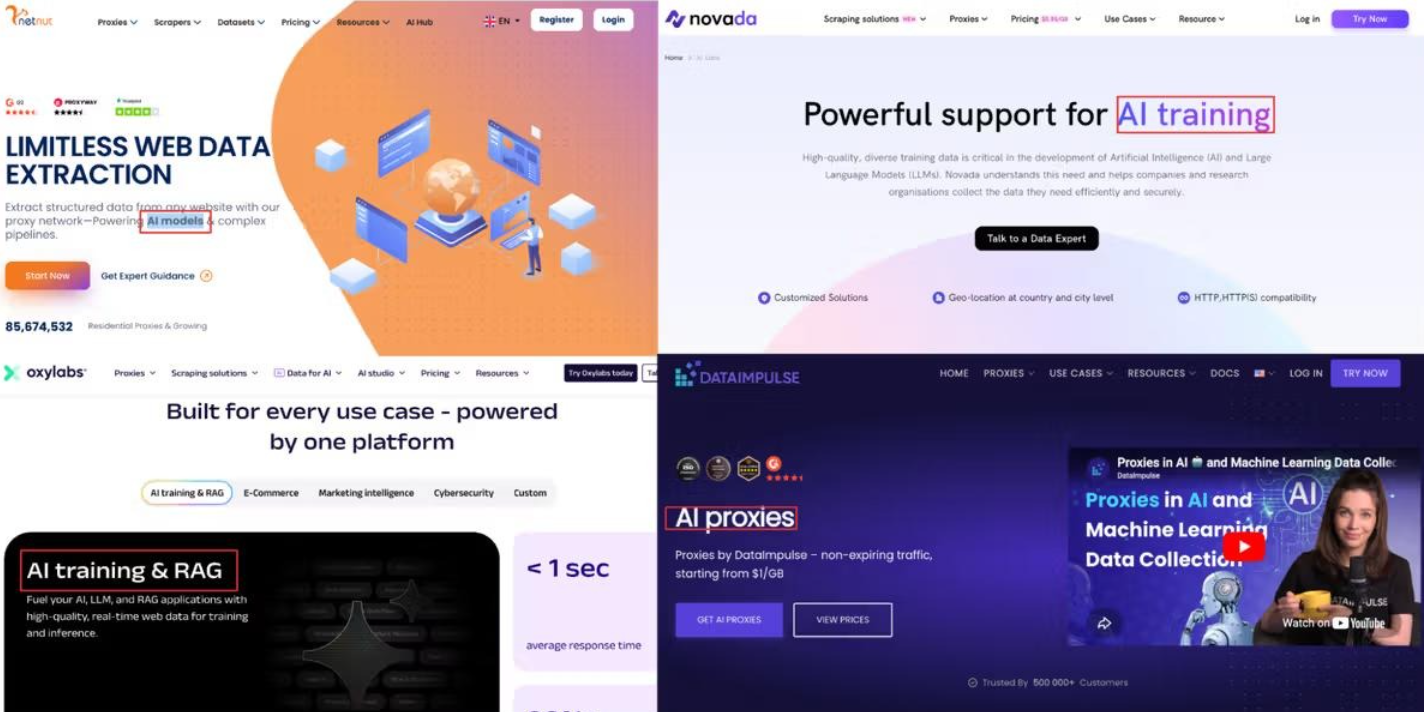
NetNut and other proxy services have recast themselves as critical infrastructure for the AI scraping economy. Image: Synthient.com.
“AI companies depend on web-scraped content: for pre-training, for retrieval, for agent grounding, for search,” reads a report this month from Include Security that examines the prevalence of proxy SDKs in smart TV apps. “But the modern web isn’t scrapeable from a datacenter. Cloudflare, DataDome, HUMAN, among others throttle or block requests from known cloud IPs. The workaround is residential proxies. A scraping job routed through a Comcast or T-Mobile subscriber’s connection arrives at the target site from an IP that belongs to a paying residential customer.”
This non-stop content scraping has spawned more than 70 copyright infringement lawsuits against major tech companies that have acknowledged large-scale data scraping as a major source of the “brains” behind their commercial AI offerings. Ironically, much of that scraping is being aided by proxy services that are intimately tied to unofficial Android TV boxes and associated SDKs whose stated purpose is streaming pirated content.
The scraping activity has become so aggressive that it often overwhelms the targeted websites, preventing them from being reachable by legitimate visitors. In many reported cases, nonprofit organizations, libraries and universities have complained of constantly battling to keep their services online in the face of relentless data-scraping firms hiding behind residential proxy services.
A survey conducted last year by the Confederation of Open Access Repositories (COAR) found while some content scraping bots are rather innocuous, “others are sufficiently aggressive that they are increasingly causing service disruptions in repositories and other scholarly communications infrastructures.” More than 90 percent of survey respondents indicated their repository is encountering aggressive bots, usually more than once a week, and often leading to slow downs and service outages.
“Automated web scraping is nothing new, and has been the key technology underlying search engines such as Google for over 30 years,” wrote Brendan O’Connell, platform manager at the Directory of Open Access Journals (DOAJ), a free, community-curated index of peer-reviewed academic journals. “However, the current investor-fueled AI startup craze means there are now thousands of well-funded companies developing and deploying their own scraping tools to train AI models, alongside existing major players like OpenAI and Google.”
DON’T TOUCH THAT DIAL!
Across the United States, local communities are pushing back against the proliferation of new data centers aimed primarily at improving the capabilities of AI. But security experts say the general public remains largely unaware that using one of these unsanctioned Android TV boxes means their “smart TV” is almost certainly using a significant amount of bandwidth each month to help train modern AI models.
Even households without these sketchy TV boxes can still have their smart TVs turned into residential proxy nodes, just by downloading one of thousands of apps made available on Samsung and LG smart TVs. Spur said it recently scraped the LG and Samsung app stores and found that each had approximately 3,000 apps available for download. Many of these apps are simple games or utilities that state in the fine print that the user’s Internet connection will be used to download data and that they can opt out at any time.
Spur said it found that more than 42 percent of apps available for download via the webOS operating system on LG smart TVs include SDKs that turn one’s television into an always-on residential proxy node. More than a quarter of the apps made for Samsung’s Tizen operating system had similar residential proxy components, Spur found.
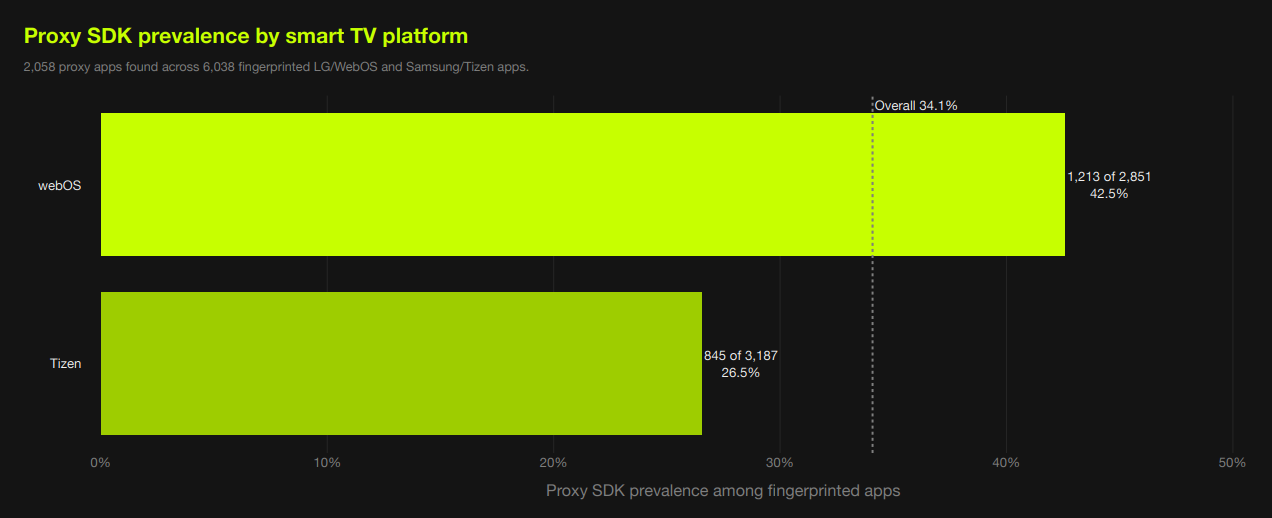
Image: Spur.us.
Experts say it’s questionable whether TV apps with proxy SDKs can obtain meaningful consent from users for installing an always-on proxy connection, particularly when anyone in a household — including children — can effectively opt the family TV into a residential proxy network just by installing a simple game or app.
“Privacy-policy disclosure is the wrong control surface for a TV,” Include Security wrote. “It is hard to scroll through a legal document navigated by arrow keys on a remote, and the in-app consent dialog doesn’t convey that a paying customer is about to route their scraping traffic through the user’s home internet.”
Spur’s head of research Sean Simmons told KrebsOnSecurity that most people do not have a working mental model for what it means to sell access to their residential IP address, no matter what device they are using.
“And on a TV, the gap is even wider,” Simmons said. “A one-time prompt navigated with a remote can disappear into the setup flow, while the app keeps monetizing the connection long after anyone remembers what they accepted.”
Simmons said LG and Samsung should follow the lead of other TV platforms that have already drawn a line against residential proxy providers, pointing to policies by Amazon that prohibit apps facilitating proxy services for third parties. Likewise the TV streaming device maker Roku reportedly now bars developers from using proxy SDKs and has removed apps that bundled them.

Piracy related apps pushing proxy SDKs onto unconsenting users. Image: Synthient.
Apps that turn one’s device into a residential proxy node are not limited to smart TVs and no-name streaming boxes, of course. As noted by the security firm Infoblox, mobile app developers can embed SDKs provided by the residential proxy networks into their products to monetize their software, allowing them to receive a small amount of money on each installation.
The result, Infoblox said, is that devices are frequently enrolled without the owner’s knowledge, typically through free applications such as VPNs, streaming apps, screensavers and “productivity” apps such as PDF viewers and break reminders.
All too often, these proxy services are beaconing out from employee devices brought into the workplace, Infoblox found. In a blog post earlier this month, Infoblox said it discovered that fully 65% of its customer base was querying one or more residential proxy related domains.
“We saw steady growth in these queries in 2025, with a 25% increase over the year to over 500 billion per month,” Infoblox wrote. “Over 90% of our pharmaceutical and food & beverage customers have queried residential proxy indicators. Perhaps even more concerning is that over 60% of government and banking customers have as well.”
Infoblox researchers Nick Sundvall and David Brunsdon warned that with residential proxies in the corporate environment, external access is granted to an organization’s IP space.
“If threat actors were to abuse the residential proxy to attack a third party, the third party’s incident response would, correctly, identify your residential proxy as the source,” they wrote. “Untangling that, by proving that you were the conduit and not the threat actor, costs time, creates legal exposure, and can damage your reputation. The stunning prevalence of these services within customer environments warrants attention from both network defenders and policy makers who should consider how the risks posed by residential proxies could be impacting their security posture.”