New Ryuk Ransomware Sample Targets Webservers

Executive Summary

Ryuk is a ransomware that encrypts a victim’s files and requests payment in Bitcoin cryptocurrency to release the keys used for encryption. Ryuk is used exclusively in targeted ransomware attacks.

Ryuk was first observed in August 2018 during a campaign that targeted several enterprises. Analysis of the initial versions of the ransomware revealed similarities and shared source code with the Hermes ransomware. Hermes ransomware is a commodity malware for sale on underground forums and has been used by multiple threat actors.

To encrypt files Ryuk utilizes a combination of symmetric AES (256-bit) encryption and asymmetric RSA (2048-bit or 4096-bit) encryption. The symmetric key is used to encrypt the file contents, while the asymmetric public key is used to encrypt the symmetric key. Upon payment of the ransom the corresponding asymmetric private key is released, allowing the encrypted files to be decrypted.

Because of the targeted nature of Ryuk infections, the initial infection vectors are tailored to the victim. Often seen initial vectors are spear-phishing emails, exploitation of compromised credentials to remote access systems and the use of previous commodity malware infections. As an example of the latter, the combination of Emotet and TrickBot, have frequently been observed in Ryuk attacks.

Coverage and Protection Advice

Ryuk is detected as Ransom-Ryuk![partial-hash].

Defenders should be on the lookout for traces and behaviours that correlate to open source pen test tools such as winPEAS, Lazagne, Bloodhound and Sharp Hound, or hacking frameworks like Cobalt Strike, Metasploit, Empire or Covenant, as well as abnormal behavior of non-malicious tools that have a dual use. These seemingly legitimate tools (e.g., ADfind, PSExec, PowerShell, etc.) can be used for things like enumeration and execution. Subsequently, be on the lookout for abnormal usage of Windows Management Instrumentation WMIC (T1047). We advise everyone to check out the following blogs on evidence indicators for a targeted ransomware attack (Part1, Part2).

  • Looking at other similar Ransomware-as-a-Service families we have seen that certain entry vectors are quite common among ransomware criminals:
  • E-mail Spear phishing (T1566.001) often used to directly engage and/or gain an initial foothold. The initial phishing email can also be linked to a different malware strain, which acts as a loader and entry point for the attackers to continue completely compromising a victim’s network. We have observed this in the past with the likes of Trickbot & Ryuk or Qakbot & Prolock, etc.
  • Exploit Public-Facing Application (T1190) is another common entry vector, given cyber criminals are often avid consumers of security news and are always on the lookout for a good exploit. We therefore encourage organizations to be fast and diligent when it comes to applying patches. There are numerous examples in the past where vulnerabilities concerning remote access software, webservers, network edge equipment and firewalls have been used as an entry point.
  • Using valid accounts (T1078) is and has been a proven method for cybercriminals to gain a foothold. After all, why break the door down if you already have the keys? Weakly protected RDP access is a prime example of this entry method. For the best tips on RDP security, please see our blog explaining RDP security.
  • Valid accounts can also be obtained via commodity malware such as infostealers that are designed to steal credentials from a victim’s computer. Infostealer logs containing thousands of credentials can be purchased by ransomware criminals to search for VPN and corporate logins. For organizations, having a robust credential management and MFA on user accounts is an absolute must have.

When it comes to the actual ransomware binary, we strongly advise updating and upgrading endpoint protection, as well as enabling options like tamper protection and Rollback. Please read our blog on how to best configure ENS 10.7 to protect against ransomware for more details.

Summary of the Threat

Ryuk ransomware is used exclusively in targeted attacks

Latest sample now targets webservers

New ransom note prompts victims to install Tor browser to facilitate contact with the actors

After file encryption, the ransomware will print 50 copies of the ransom note on the default printer

Learn more about Ryuk ransomware, including Indicators of Compromise, Mitre ATT&CK techniques and Yara Rule, by reading our detailed technical analysis.

The post New Ryuk Ransomware Sample Targets Webservers appeared first on McAfee Blogs.

Premium Domain Names – transcom.uk
Transcom ISP – The UK’s Best Business ISP
DoubleCheck any website at doublecheck.uk
Microsoft Issues Emergency Patch for Windows Flaw

Microsoft on Tuesday issued an emergency software update to quash a security bug that’s been dubbed “PrintNightmare,” a critical vulnerability in all supported versions of Windows that is actively being exploited. The fix comes a week ahead of Microsoft’s normal monthly Patch Tuesday release, and follows the publishing of exploit code showing would-be attackers how to leverage the flaw to break into Windows computers.

At issue is CVE-2021-34527, which involves a flaw in the Windows Print Spooler service that could be exploited by attackers to run code of their choice on a target’s system. Microsoft says it has already detected active exploitation of the vulnerability.

Satnam Narang, staff research engineer at Tenable, said Microsoft’s patch warrants urgent attention because of the vulnerability’s ubiquity across organizations and the prospect that attackers could exploit this flaw in order to take over a Windows domain controller.

“We expect it will only be a matter of time before it is more broadly incorporated into attacker toolkits,” Narang said. “PrintNightmare will remain a valuable exploit for cybercriminals as long as there are unpatched systems out there, and as we know, unpatched vulnerabilities have a long shelf life for attackers.”

In a blog post, Microsoft’s Security Response Center said it was delayed in developing fixes for the vulnerability in Windows Server 2016, Windows 10 version 1607, and Windows Server 2012. The fix also apparently includes a new feature that allows Windows administrators to implement stronger restrictions on the installation of printer software.

“Prior to installing the July 6, 2021, and newer Windows Updates containing protections for CVE-2021-34527, the printer operators’ security group could install both signed and unsigned printer drivers on a printer server,” reads Microsoft’s support advisory. “After installing such updates, delegated admin groups like printer operators can only install signed printer drivers. Administrator credentials will be required to install unsigned printer drivers on a printer server going forward.”

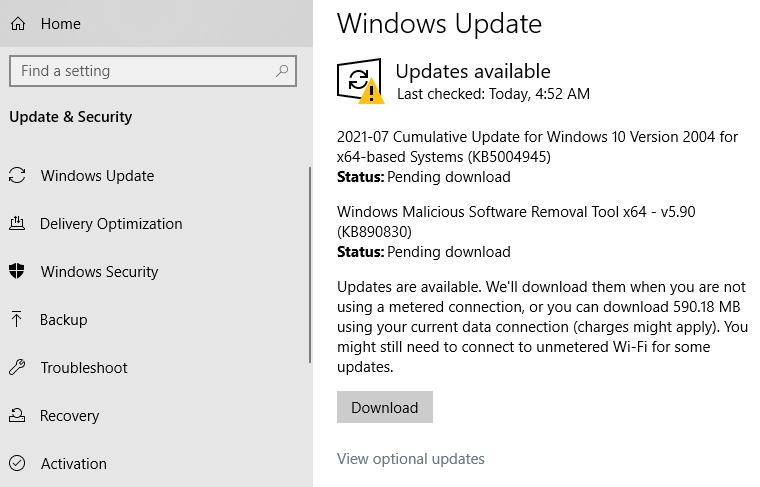
Windows 10 users can check for the patch by opening Windows Update. Chances are, it will show what’s pictured in the screenshot below — that KB5004945 is available for download and install. A reboot will be required after installation.

Friendly reminder: It’s always a good idea to backup your data before applying security updates. Windows 10 has some built-in tools to help you do that, either on a per-file/folder basis or by making a complete and bootable copy of your hard drive all at once.

Microsoft’s out-of-band update may not completely fix the PrinterNightmare vulnerability. Security researcher Benjamin Delpy posted on Twitter that the exploit still works on a fully patched Windows server if the server also has Point & Print enabled — a Windows feature that automatically downloads and installs available printer drivers.

Delpy said it’s common for organizations to enable Point & Print using group policies because it allows users to install printer updates without getting approval first from IT.

This post will be updated if Windows users start reporting any issues in applying the patch.

Premium Domain Names – transcom.uk
Transcom ISP – The UK’s Best Business ISP
DoubleCheck any website at doublecheck.uk

Vulnerability in the Kaspersky Password Manager

A vulnerability (just patched) in the random number generator used in the Kaspersky Password Manager resulted in easily guessable passwords:

The password generator included in Kaspersky Password Manager had several problems. The most critical one is that it used a PRNG not suited for cryptographic purposes. Its single source of entropy was the current time. All the passwords it created could be bruteforced in seconds. This article explains how to securely generate passwords, why Kaspersky Password Manager failed, and how to exploit this flaw. It also provides a proof of concept to test if your version is vulnerable.

The product has been updated and its newest versions aren’t affected by this issue.

Stupid programming mistake, or intentional backdoor? We don’t know.

More generally: generating random numbers is hard. I recommend my own algorithm: Fortuna. I also recommend my own password manager: Password Safe.

EDITED TO ADD: Commentary from Matthew Green.

Premium Domain Names – transcom.uk
Transcom ISP – The UK’s Best Business ISP
DoubleCheck any website at doublecheck.uk

The Industry Applauds MVISION XDR – Turning Raves into Benefits

Do you usually read what critics say before deciding to see a movie or read a book? We believe these McAfee MVISION XDR reviews were worth the wait. But rather than simply share a few top-tier analyst blurbs with you, we’d like to walk through what these insights mean to our growing set of customers and how their sec operations will evolve with greater efficiencies.

Extended Detection and Response products, better known as XDR, not only extended the capabilities of EDR platforms, but according to Gartner[1] “ XDR products may be able to reduce the complexity of security configuration and incident response to provide a better security outcome than isolated best-of-breed components.”

Rave 1: Be more proactive vs reactive

Our Enterprise Security Manager (ESM)/SecOps team briefed a top-tier analyst firm on ESM product execution and the MVISION XDR platform in particular. His reaction to our use cases? “These are great and it is useful to have examples that cut across different events, which is illustrative more so than anything. The response to the cuts across various tools, and the proactive configuration aspect with the security score type analysis, is also pretty rare in this market.”

The takeaway: Preventing an incident is much better than cleaning up after the fact. MVISION XDR powered by MVISION Insights offers a unified security posture score from endpoint to cloud, delivering a more robust and comprehensive assessment across your environment. It allows you to drill down on specifics to enhance your security.

[callout] “The vendor has stolen a march on some of its competitors, at least in the short term, with this offering. A lot of vendors are aiming to get to an offering comprising threat intel + prioritization + recommendations + automation, but few if any have actually reached that point today.” – Omdia

Rave 2: Open to easily unite security

A top-tier analyst firm mentioned that many EDR vendors today call themselves “Open XDR” vendors, but they do not offer a fully effective XDR product. The analyst sees XDR as a significant opportunity for McAfee to expand the breadth of our product portfolio.

The takeaway: A fully effective XDR product unites security controls to detect and assess comprehensively and prevent erratic movement of advanced threats. A robust product portfolio with an integrated service offering from a platform vendor with a proven track record of integrating security (McAfee) is critical to achieve this.

Rave 3: Data-aware to prioritize organizational impact

Noted by a top-tier analyst firm, only McAfee and one other offers data-awareness in the XDR offering. This XDR capability alerts the analyst that the threat impact is targeted at sensitive data.

Rave 4: Automatic analysis across the vectors accelerate investigations and response

The takeaway: Many SOCs have siloed tools that hinders their ability to detect and respond quickly and appropriately. SOC’s must prioritize threat intelligence to rapidly make critical decisions.

Rave 5: Improving the SOC

A top-tier analyst firm believes the primary segments for XDR capabilities are in the three groups to solve problems: 1) Workspace 2) Network 3) Cloud workloads. Giving hardening guidance is good for customers, so any vulnerability exposure and threat scoring are good priorities for MVISION Insights.

The takeaway: McAfee MVISION XDR provides automation that eliminates many manual tasks but more importantly, it empowers SOC analysts to prioritize the threats that matter and stay ahead of adversaries.

Rave 6: Efficiently cloud-delivered

A top-tier analyst firm likes our product direction. “Where you’re going with XDR, and with the cloud console — that’s the way to go. It feels like we have crossed the Rubicon of cloud-delivered.”

The takeaway: By going cloud-native, MVISION XDR enables more efficient, better, and faster decisions with automated investigations driven by correlation analysis across multiple vectors. We can provide unified visibility and control of threats across endpoints, networks and the cloud.

To discover why McAfee MVISION XDR earns rave industry reviews, see our resources on XDR to evolve your security operations to be more efficient and effective.

Resource: [1] Gartner Innovation Insight for Extended Detection and Response, Peter Firstbrook, Craig Lawson , 8 April 2021


The post The Industry Applauds MVISION XDR – Turning Raves into Benefits appeared first on McAfee Blogs.

Premium Domain Names – transcom.uk
Transcom ISP – The UK’s Best Business ISP
DoubleCheck any website at doublecheck.uk

Travel Smart: Protecting Your Family’s Smartphones While on Vacation

Families are hitting the road again. And it’s absolutely no surprise that they’re taking their smartphones with them. Perhaps what is surprising is that so many of them may be hitting the road without any digital or mobile protection. 

Our recent research shows that 68% of people in the U.S. said that they’re planning to travel for leisure this year, slightly higher than the international average of 64%.1 However, our research also discovered that nearly half of them don’t use mobile security software to protect themselves or their smartphones.  

That lack of protection is a concern, particularly as our April 2021 Threats Report detected a more than 100% increase in attacks aimed at mobile devices. It makes sense that such is the case, as the pandemic led to increased adoption of online activities like banking, shopping, and even doctor visits via telemedicine—often straight from our smartphones.  

However, our smartphones can be as vulnerable as any other device (like our computers). Accordingly, with the volumes of valuable data that those activities create on our smartphones, cyber crooks were sure to follow.  

The good news is that you can indeed enjoy all of that mobile convenience without worry, even on vacation. No doubt many travelers will do some online banking or even some online food ordering while they’re out and about. Likewise, their kids will be online for stretches of that time too, whether it’s on chat apps like Snapchat, social media like Instagram and TikTok, games like Fortnite and Among Us, or streaming videos. Go ahead, do it all. Just make sure you’re protected before you hit the road.  

With that, add mobile protection to your packing list. I’ve put together a shortlist of straightforward things you can do that will help you and your kids stay safe online while on the road this summer.  

Quickly protect your smartphone 

  1. Protect your devices: Just as we’ve learned to protect our computers and laptops from threats, the same holds true for our smartphones and tablets. Whether you protect yours through a mobile security app or as part of the multi-device coverage that comes with your comprehensive security software, mobile protection can alert you of threats and unsecured networks while also adding in the protection of a VPN. 
  1. Use a VPN: A virtual private network (VPN) protects you in two ways. It increases security on public connections, and it increases the protection of your private information while you’re online—particularly important when you shop and bank. Strong VPN protection is a must when you connect to public Wi-Fi while traveling like at airports, hotels, and other vacation rentals where your online activity could be subject to prying eyes. 
  1. Lock up your devices: We talk a great deal about digital security, yet there’s also the physical security of your devices to consider too. After all, devices can get lost or stolen. Take steps to protect your devices by ensuring they’re locked with a PIN or other protection like facial recognition. For your apps, use two-factor authentication wherever possible for extra protection should your device end up in someone else’s hands. 
  1. Enable device tracking: Whether you do this through your phone’s operating system or through a mobile security app, this will help you quickly locate the device’s whereabouts. Additionally, enabling tracking can also give you the power to erase a phone’s data should you have reason to fear that it has really fallen into the wrong hands. 

Special travel advice for the kiddos 

While the tips above are great for the  whole family, the following additional steps are what you can take to protect your children even further:

Review the location settings on the phone 

Tracking your child’s smartphone not only allows you to find it easily if it’s lost or stolen but can also put you at ease by knowing where your child is.  Yet it’s important to use location tracking selectively. Not every app needs location tracking to work as intended, even though many apps ask for permission to enable it. Go into the phone’s settings and disable the location features on an app-by-app basis.  For example, a weather app doesn’t need your child’s second-by-second location information to work properly, nor should a gaming app need it at all. Likewise, photos taken on a phone can embed location information that can be easily read when shared, revealing plenty about when and where it was taken. In all, enable the location services for only the most necessary of apps like maps. 

Use travel as a time to reset

Recent research shows that tweens spend nearly five hours on their screens each day, while teenagers push that up to more than seven hours a day. Some staycation time is a good time to pare back those hours and enjoy the local scenery, even if for a short stretch. You can use your travel time as well to re-establish your phone rules. That way, vacation stays entertaining but doesn’t affect the habits you set into effect back home. 

Keep tuned in 

Above and beyond security settings and software, there’s you. Get in the habit of talking with your child for a sense of what they’re doing online. As a mom, I like to ask them about their favorite games, share some funny TikTok clips or cute photos with them, and generally make it a point to be a part of their digital lives. It’s great, because it gives you peace of mind knowing what types of things they are doing or interactions they are having online. 

For those of you hitting the road in the coming weeks, enjoy your travels, wherever they take you! 

Stay Updated

To stay updated on all things McAfee and on top of the latest consumer and mobile security threats, follow @McAfee_Home on Twitter, subscribe to our newsletter, listen to our podcast Hackable?, and ‘Like’ us on Facebook.  

The post Travel Smart: Protecting Your Family’s Smartphones While on Vacation appeared first on McAfee Blogs.

Premium Domain Names – transcom.uk
Transcom ISP – The UK’s Best Business ISP
DoubleCheck any website at doublecheck.uk