House of Commons (HoC) Beefs up Cyber Training Following Matt Hancock CCTV Leak Scandal

House of Commons (HoC) Beefs up Cyber Training Following Matt Hancock CCTV Leak Scandal

The UK House of Commons (HoC), the house of the UK Parliament, has pushed through over 2,600 out of 3,000 members of staff through cyber training following the Whitehall CCTV security leaks from the Matt Hancock scandal.

According to official figures obtained by Parliament Street think tank attained via Freedom of Information (FOI) requests, 2,658 HoC staff members were put through an eight-part cybersecurity training course during the 2020/21 financial year. The course, ‘Annual Essentials Certification,’ covers training in cybersecurity and cybercrime and is a government-backed scheme, according to the National Cyber Security Council (NCSC).

While HoCstaffers have been put through the course in previous years — 2,207 staff members attended the course in the financial year 2019/20 — an additional 400+ were put through in the most recent financial year.

Further, the FOI data revealed that the government pays a £56,400 annual subscription fee to its learning management system provider to access a broader range of courses as well as for maintenance.

In addition, in the recent financial year 2020/21, four HoC staff members were sent on a specialist training cybersecurity course costing £18,875, according to the FOI request. Over £7,000 was spent on two specialist training courses in the previous year — one on Cyber Threat Intelligence and another on becoming a cybersecurity manager.

“With rising cyber threats targeting government departments, boosting cyber skills and awareness for parliamentary staffers is a smart and necessary move,” says Andy Harcup, senior director and cyber expert at Gigamon, in a news release. “With the Covid-19 pandemic triggering a dramatic increase in flexible working, it’s more important than ever that public sector organizations have robust systems and training in place to identify potential threats.”

Whitehall, where the House of Commons is located, was under scrutiny when leaked CCTV footage showed former Health Secretary Matt Hancock kissing his aide in his office. Hancock resigned following the leaked footage. The Information Commissioner’s Office (ICO) has raided the homes of two people linked with the leak, according to the Guardian.  

The FOI request put forward by Parliament Street asked for a breakdown of all employees within Whitehall who have undertaken cybercrime or cybersecurity training over the last two financial years; details on the nature of the course; and the money spent on each course.

Tim Sadler, CEO, Tessian welcomes the news that the government is investing more in cybersecurity training but warns that it’s not a one-off spend.

“It’s encouraging to see that Parliament is taking security training and awareness seriously,” he says. “Employees need access to the tools and knowledge to help them make smarter cybersecurity decisions and think twice before clicking.

“This training, though, can’t be a one-time, tick-box exercise,” he adds. “Training needs to be continuous and contextual if it’s going to resonate with people and stop mistakes from turning into breaches.”

Premium Domain Names – transcom.uk
Transcom ISP – The UK’s Best Business ISP
DoubleCheck any website at doublecheck.uk

NCSC Sticks by ‘Three Random Words’ Strategy for Passwords

NCSC Sticks by ‘Three Random Words’ Strategy for Passwords

Combining three random words is more effective than using complex combinations for passwords, says the National Cyber Security Council (NCSC). 

An NCSC blog post dated August 9 explains how this train of thought or “think random” helps to “keep the bad guys out.” The post follows on from a previous one from nearly five years ago, “Three random words or #thinkrandom.”

According to the post, enforcing “complex requirements” for passwords is a poor defense against guessing attacks. This is because “minds struggle to remember random character strings,” and, being human, we use “predictable patterns” to meet the required criteria. 

Cyber hackers are all too familiar with this and use it to make their attacks more effective. According to Verizon, compromised passwords are responsible for 81 percent of hacking-related data breaches

“Counter-intuitively, the enforcement of these complexity requirements results in the creation of more predictable passwords,” says the NCSC post. “Faced with making yet another password with specific requirements, users fall back on variations of something they already know and use, falsely believing it to be strong because it satisfies password strength meters (and is accepted by online services).”

The NCSC also advises that the “continued low uptake of password managers to store and generate passwords” leads to this predictability. It has encouraged organizations and people to use them for a while.

“Passwords generated from three random words help users to create unique passwords that are strong enough for many purposes, and can be remembered much more easily,” explains the NCSC blog post. “This is also good for those who aren’t aware of password managers, or are reluctant to use them.” 

The NCSC says that the three random word theory is effective because of the length, impact, novelty and usability. 

For some, the NCSC appreciates that this tactic might be a concern due to previous behavior patterns. However, it advises that people adopt the “think random” technique and respond to search algorithm optimization, weaker passwords and poor password recall. 

“We do appreciate that some system owners may have concerns using the three random words technique over others,” says the NCSC. “It may not be necessary across all organizations. 

“However, if you’re not using ‘three random words’ for any of the following reasons, then you may want to consider adopting it.”

According to Nordpass’ ‘Top 200 most common passwords of the year 2020‘, the top passwords are “123456”, “123456789” and “picture1”. 

Premium Domain Names – transcom.uk
Transcom ISP – The UK’s Best Business ISP
DoubleCheck any website at doublecheck.uk

Cutting Through the Noise from Daily Alerts

The biggest challenge for security teams today is the quality of the threat intelligence platforms and feeds. How much of the intel is garbage and unusable? Threat intelligence process itself spans and feeds into many external and internal systems and applications. Without actionable data, it is impossible to understand the relevance and potential impact of a threat. Learn how Threat Intelligence management plays a role to help prioritize and act fast.

Premium Domain Names – transcom.uk
Transcom ISP – The UK’s Best Business ISP
DoubleCheck any website at doublecheck.uk

Defeating Microsoft’s Trusted Platform Module

This is a really interesting story explaining how to defeat Microsoft’s TPM in 30 minutes — without having to solder anything to the motherboard.

Researchers at the security consultancy Dolos Group, hired to test the security of one client’s network, received a new Lenovo computer preconfigured to use the standard security stack for the organization. They received no test credentials, configuration details, or other information about the machine.

They were not only able to get into the BitLocker-encrypted computer, but then use the computer to get into the corporate network.

It’s the “evil maid attack.” It requires physical access to your computer, but you leave it in your hotel room all the time when you go out to dinner.

Original blog post.

Premium Domain Names – transcom.uk
Transcom ISP – The UK’s Best Business ISP
DoubleCheck any website at doublecheck.uk

7 Savvy Ways Senior Adults Can Safeguard Digital Privacy

Smart speakers. Banking online. Location tracking. If you are a senior adult, there’s no doubt, the digital leaps and bounds you’re asked to consider each day can be daunting. If you are the child of a senior adult trying to make digital life more accessible, helping your parent consistently stay safe online can also be a challenge.  

 According to the most recent  Pew study on the topic, senior adults continue to become more digitally connected, but adoption rates continue to trail younger users, and digital divides remain. The study also revealed that 77% of older adults needed assistance in learning how to use technology. 

Privacy Path: Awareness & consistency 

As a senior, it’s easy to feel intimidated and even try to avoid technology altogether as a safety plan. However, more healthcare, banking, and retailers become almost 100% digital, opting out of digital life is becoming impossible.   

Still, there’s a way forward. As with any challenge, it’s best to begin one step at a time. First, put your stake in the ground by committing to increase your awareness and consistency in the digital realm. Doing so will help you reduce your fear about potential data breaches, malware attacks, or worse, falling prey to an online scam. Here are seven more ways to build upon your privacy path.  

7 ways to build up your online privacy  

1. Consider another layer of protection. Parental controls and antivirus software cover every age and stage of a family’s digital life. Here’s why: 1) If you are a senior and love exploring online but hate bumping into inappropriate content, parental controls will help you keep the fun and block the junk 2) Filtering software also keeps your PC clean and protected from viruses and malware. 3) If you are a caregiver to a senior and notice your parent struggling with online shopping limits, keeping personal information private on social media, or even sharing fake news, parental controls can help by blocking tempting sites.  

2. Update and store your passwords. Updating your passwords regularly is an online privacy gamechanger. The only problem? It’s tough to remember all those passwords, so who wants to risk changing them, right? Consider a password manager (find the software packages that have a password manager built-in). Your Password Manager (PM) stores then populates the username and password fields every time you log on to a favorite site or app. Better yet, it makes changing your password an easy task since you don’t need to do any remembering—your PM does it all for you.  

3. Use 2-Factor Authentication (2FA). What in the world? 2FA sounds complicated! Don’t worry, it’s not. Opting for 2FA means that before logging onto your account, you will have one more step to verify it’s you logging on. When given this privacy option, take it. Commonly, the 2FA process is a code generated by a smartphone app—no biggie. If you want to try, go to your settings in your favorite apps, such as Google or Facebook, and turn on the 2FA option.  

4. Install software updates immediately.  Along with strong passwords, updating your software is a front-line defense against identity theft and fraud. Installing software updates (those pesky pop-up notices that are critical to your privacy) is essential in securing your IoT devices, PCs and phones, and the social media, banking, and healthcare portals connected to them.  

5. Use a Virtual Private Network (VPN). If we could write this one tip down a hundred times without losing our readers, we surely would. Every senior adult needs a VPN for practical, powerful privacy protection and peace of mind. A VPN keeps credit card and personal info contained in a secure network and away from prying eyes.   

6. Fight back with knowledge. Fraudulent emails connected to fraudulent websites can look very legitimate. A secure website will have an “HTTPS” in the browser’s address bar. The “s” stands for “secure.” If the web address or URL is just HTTP, it’s not a secure site. Still unsure? Read reviews of the site from other users before making a purchase. Never send cash, cashier’s check, or a personal check to any online vendor. If purchasing, always use a credit card in case there is a dispute. Stay up-to-date on scams that target seniors specifically. Lately, elder scams have been constructed around COVID, dating apps, tax returns, employment, and, of course, the common military catfish scams. 

7. Have fun as you skill up.  When trying to boost your digital skills, don’t forget about all the amazing instructional content at your fingertips. A quick search of YouTube will render easy-to-understand videos on how to do just about everything (including install security software, change your router password, secure the smart devices in your home, and how to adjust your privacy settings on any device).  

Learning or building a new skill isn’t always easy, but if you stop to think about it, as a senior, you’ve gained so many skills over your lifetime (far more than your juniors). So, practically speaking, building up your tech skills is one is just one more task to ace. So, lean into the challenge, have fun learning, and don’t hesitate to ask for help if you need it.  

Stay Updated 

To stay updated on all things McAfee and top of the latest consumer and mobile security threats, follow @McAfee_Home on Twitter, subscribe to our newsletter, listen to our podcast Hackable?, and ‘Like us on Facebook. 

The post 7 Savvy Ways Senior Adults Can Safeguard Digital Privacy appeared first on McAfee Blogs.

Premium Domain Names – transcom.uk
Transcom ISP – The UK’s Best Business ISP
DoubleCheck any website at doublecheck.uk

Phishing Sites Targeting Scammers and Thieves

I was preparing to knock off work for the week on a recent Friday evening when a curious and annoying email came in via the contact form on this site:

“Hello I go by the username Nuclear27 on your site Briansclub[.]com,” wrote “Mitch,” confusing me with the proprietor of perhaps the underground’s largest bazaar for stolen credit and identity data. “I made a deposit to my wallet on the site but nothing has shown up yet and I would like to know why.”
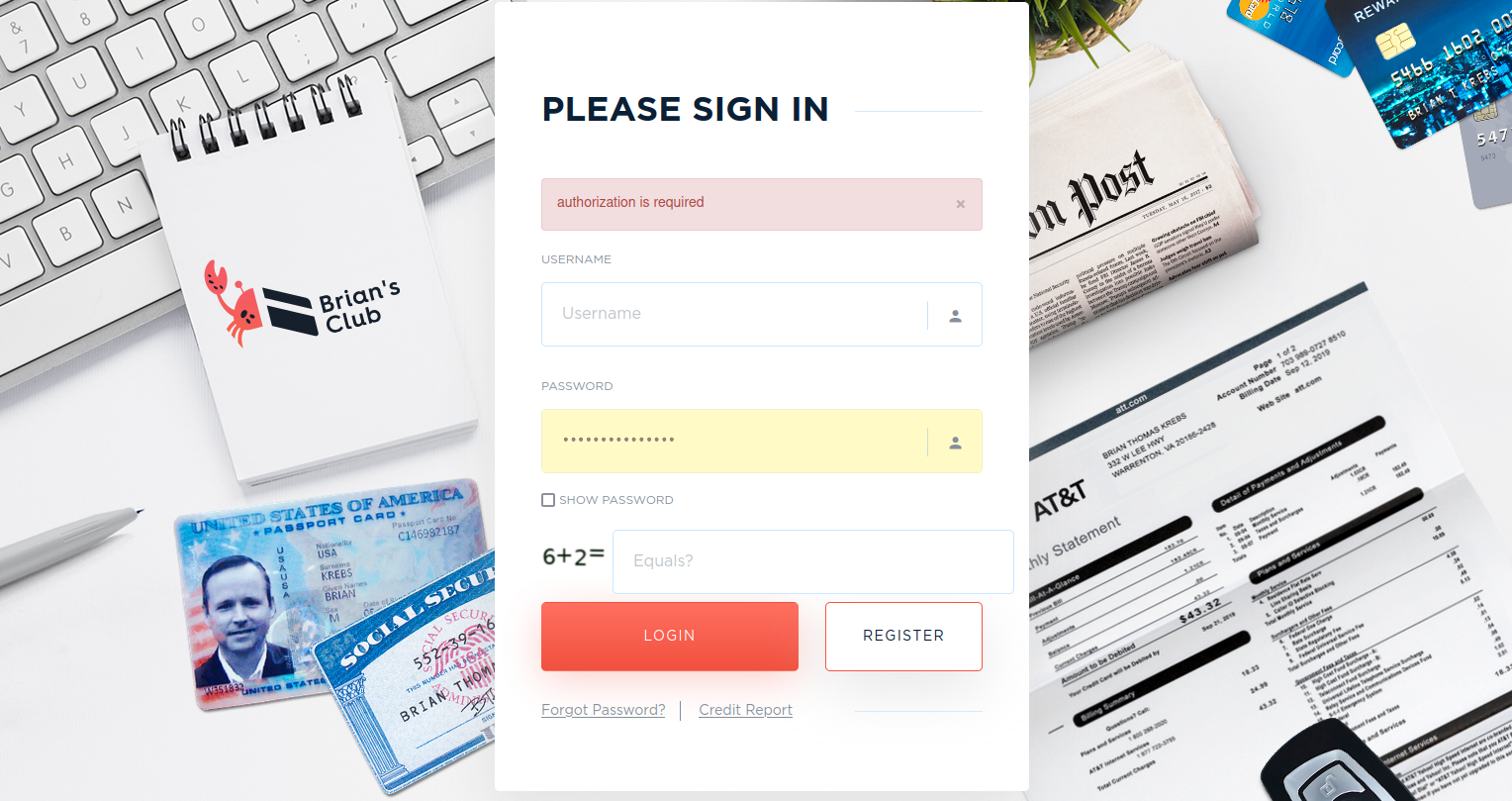
The real BriansClub login page.

Several things stood out in Mitch’s message. For starters, that is not the actual domain for BriansClub. And it’s easy to see why Mitch got snookered: The real BriansClub site is currently not at the top of search results when one queries that shop name at Google.

Also, this greenhorn criminal clearly had bought into BriansClub’s advertising, which uses my name and likeness in a series of ads that run on all the top cybercrime forums. In those ads, a crab with my head on it zigs and zags on the sand. This is all meant to be a big joke: Krebs means “crab” or “cancer” in German, but a “crab” is sometimes used in Russian hacker slang to refer to a “carder,” or a person who regularly engages in street-level credit card fraud. Like Mitch.

In late 2019, BriansClub changed its homepage to include doctored images of my Social Security and passport cards, credit report and mobile phone bill information. That was right after KrebsOnSecurity broke the news that someone had hacked BriansClub and siphoned information on 26 million stolen debit and credit accounts. The hacked BriansClub database had an estimated collective street value of $566 million, and that data was subsequently shared with thousands of financial institutions.

Mitch said he’d just made a deposit of $240 worth of bitcoin at BriansClub[.]com, and was wondering when the funds would be reflected in the balance of his account on the shop.

Playing along, I said I was sorry to hear about his ordeal, and asked Mitch if there were any stolen cards issued by a particular bank or to a specific region that he was seeking.

Mitch didn’t bite, but neither would he be dissuaded that I was at fault for his wayward funds. He shared a picture showing funds he’d sent to the bitcoin address instructed by BriansClub[.]com — 1PLALmM5rrmLTGGVRHHTnB6VnZd3FFwh1Zusing a Bitcoin ATM in Canada.

The real BriansClub uses a dodgy virtual currency exchange service based in St. Petersburg, Russia called PinPays. The company’s website has long featured little more than a brand icon and an instant messenger address to reach the proprietor. The fake BriansClub told Mitch the Bitcoin address he was asked to pay was a PinPays address that would change with each transaction.
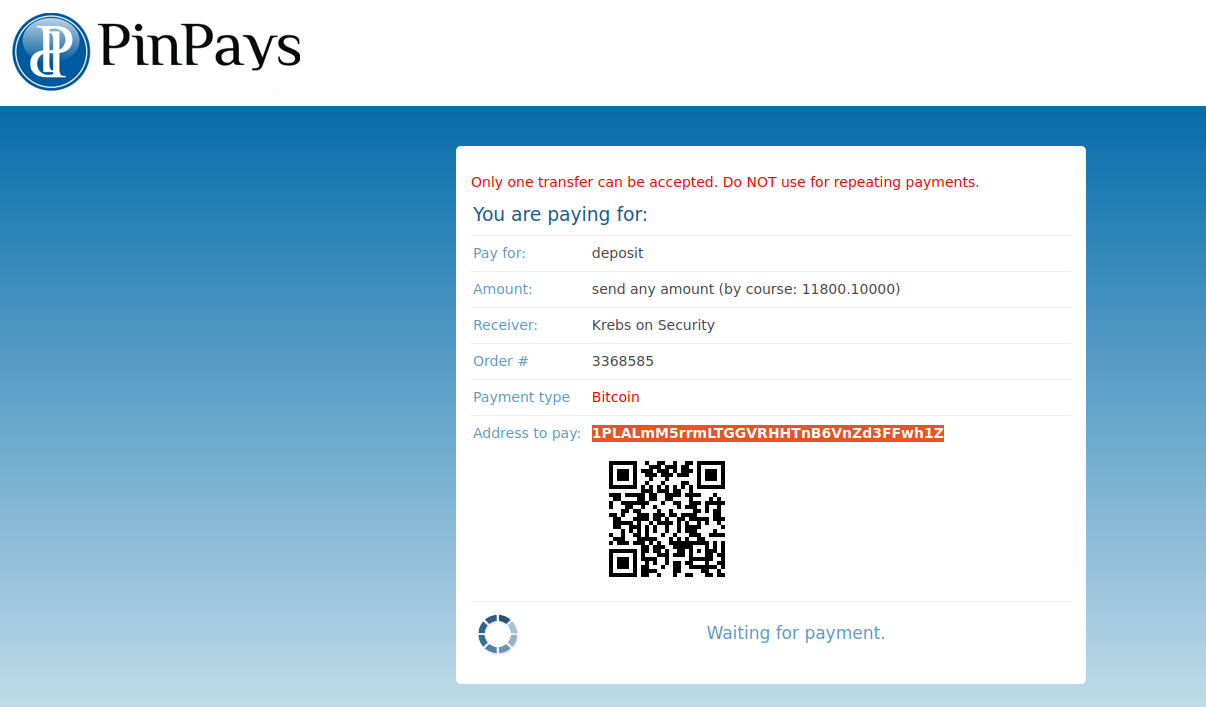
The payment message displayed by the carding site phishing domain BriansClub[.]com.

However, upon registering at the phishing site and clicking to fund my account, I was presented with the exact same Bitcoin address that Mitch said he paid. Also, the site wasn’t using PinPays; it was just claiming to do so to further mimic the real BriansClub.

According to the Blockchain, that Bitcoin address Mitch paid has received more than a thousand payments over the past five months totaling more than USD $40,000 worth of Bitcoin. Most are relatively small payments like Mitch’s.

The screenshot Mitch sent of his deposit.

Unwary scammers like Mitch are a dime a dozen, as are phishing sites that spoof criminal services online. Shortly after it came online as a phishing site last year, BriansClub[.]com was hosted at a company in Moscow with just a handful of other domains phishing popular cybercrime stores, including Jstashbazar[.]com, vclub[.]cards, vclubb[.]com and vclub[.]credit.

Whoever’s behind these sites is making a decent income fleecing clueless crooks. A review of the Bitcoin wallet listed as the payment address for BriansClub[.]org, for example, shows a similar haul: 704 transactions totaling $38,000 in Bitcoin over the past 10 months.

“Wow, thanks for ripping me off,” Mitch wrote, after I’d dozed off for the evening without responding to his increasingly strident emails. “Should have spent the last money on my bills I’m trying to pay off. Should have known you were nothing but a thief.”

Deciding the ruse had gone too far, I confessed to Mitch that I wasn’t really the administrator of BriansClub, and that the person he’d reached out to was an independent journalist who writes about cybercrime. I told him not to feel bad, as more than a thousand people had been similarly duped by the carding shop.

But Mitch did not appear to accept my confession.

“If that’s the case then why is your name all over it including in the window that opens up when you go to make a deposit?,” Mitch demanded, referring to the phishing site.

Clearly, nothing I said was going to deter Mitch at this point. He asked in a follow-up email if a link he included in the message was indeed the “legitimate” BriansClub address. My only reply was that he should maybe consider another line of work before he got ripped off yet again, or the Royal Canadian Mounted Police showed up at his doorstep.

Scammers who fall for fake carding sites can expect to have their accounts taken over at the real shop, which usually means someone spends your balance on stolen cards. But mostly, these imposter carding sites are asking new members to fund their accounts by making deposits in virtual currency like Bitcoin.

In 2018, KrebsOnSecurity examined a huge network of phishing sites masquerading as the top carding stores which all traced back to a web development group in Pakistan that’s apparently been stealing from thieves for years.

As I noted in that piece, creating a network of fake carding sites is the perfect cybercrime. After all, nobody who gets phished or scammed is going to report the crime to the authorities. Nor will anyone help the poor sucker who gets snookered by one of these fake carding sites. Caveat Emptor!

The most one can hope for is that the occasional enterprising phisher is brought to justice. While it may be hard to believe that authorities would go after crooks stealing from one another, in 2017 a Connecticut man pleaded guilty to charges of phishing several criminal dark web markets in a scheme that eventually netted over $365,000 and more than 10,000 stolen user credentials.

And what about the provenance of the phishing domain briansclub[.]com? Looking closer at the original WHOIS registration records for briansclub[.]com via DomainTools (an advertiser on this site), we can see it was registered in November 2015 — several months after the real BriansClub came online. It was registered to a “Brian Billionaire,” a.k.a. Brian O’Connor, an apparently accomplished music deejay, rapper and rap music producer in Florida.

Brian Billionaire.

For several years after it came online, BriansClub[.]com and other domains apparently registered to Mr. Billionaire redirected to his main site — newhotmusic.com, which predates the carding shop BriansClub and also has a members-only section of the site called Brian’s Club.

Mr. Billionaire did not respond to multiple requests for comment, but it looks like his only crime is being a somewhat cringeworthy DJ. DomainTools’ record for briansclub[.]com says the domain was abandoned or dormant for a period in 2019, only to be scooped up again by someone in May 2020 when it became a phishing site spoofing the real BriansClub.

Premium Domain Names – transcom.uk
Transcom ISP – The UK’s Best Business ISP
DoubleCheck any website at doublecheck.uk