ICE collected nearly a million DNA samples last year.
—————
Free Secure Email – Transcom Sigma
Boost Inflight Internet
Transcom Hosting
Transcom Premium Domains
ICE collected nearly a million DNA samples last year.
—————
Free Secure Email – Transcom Sigma
Boost Inflight Internet
Transcom Hosting
Transcom Premium Domains
I have been thinking a lot about AI and integrity. Part of that is contextual integrity. I recently found two papers on the topic.
“CIMemories: A Compositional Benchmark for Contextual Integrity of Persistent Memory in LLMs“:
Abstract: Large Language Models (LLMs) increasingly use persistent memory from past interactions to enhance personalization and task performance. However, this memory introduces critical risks when sensitive information is revealed in inappropriate contexts. We present CIMemories, a benchmark for evaluating whether LLMs appropriately control information flow from memory based on task context. CIMemories uses synthetic user profiles with over 100 attributes per user, paired with diverse task contexts in which each attribute may be essential for some tasks but inappropriate for others. Our evaluation reveals that frontier models exhibit up to 69% attribute-level violations (leaking information inappropriately), with lower violation rates often coming at the cost of task utility. Violations accumulate across both tasks and runs: as usage increases from 1 to 40 tasks, GPT-5’s violations rise from 0.1% to 9.6%, reaching 25.1% when the same prompt is executed 5 times, revealing arbitrary and unstable behavior in which models leak different attributes for identical prompts. Privacy-conscious prompting does not solve this—models overgeneralize, sharing everything or nothing rather than making nuanced, context-dependent decisions. These findings reveal fundamental limitations that require contextually aware reasoning capabilities, not just better prompting or scaling.
“Contextual Integrity in LLMs via Reasoning and Reinforcement Learning“:
Abstract: As the era of autonomous agents making decisions on behalf of users unfolds, ensuring contextual integrity (CI)—what is the appropriate information to share while carrying out a certain task—becomes a central question to the field. We posit that CI demands a form of reasoning where the agent needs to reason about the context in which it is operating. To test this, we first prompt LLMs to reason explicitly about CI when deciding what information to disclose. We then extend this approach by developing a reinforcement learning (RL) framework that further instills in models the reasoning necessary to achieve CI. Using a synthetic, automatically created, dataset of only 700 examples but with diverse contexts and information disclosure norms, we show that our method substantially reduces inappropriate information disclosure while maintaining task performance across multiple model sizes and families. Importantly, improvements transfer from this synthetic dataset to established CI benchmarks such as PrivacyLens that has human annotations and evaluates privacy leakage of AI assistants in actions and tool calls.
—————
Free Secure Email – Transcom Sigma
Boost Inflight Internet
Transcom Hosting
Transcom Premium Domains
Criminals are hacking into public Wi-Fi devices—at hotels, conference centers, and so on—around the world and changing their DNS settings. The goal is to redirect users to fake login pages and steal their credentials.
—————
Free Secure Email – Transcom Sigma
Boost Inflight Internet
Transcom Hosting
Transcom Premium Domains
It can be daunting to determine who’s responsible for showing ads on the websites we visit, or who’s harvesting data from the mobile apps we use every day. That information is already semi-public, but it is not easily parsed and traditionally much of it has remained walled away in the hands of large advertising platforms. Not anymore: A powerful and free new service called DecryptAds scrapes and correlates this adtech data and makes it simple to quickly learn a great deal about the entities that are tracking you.
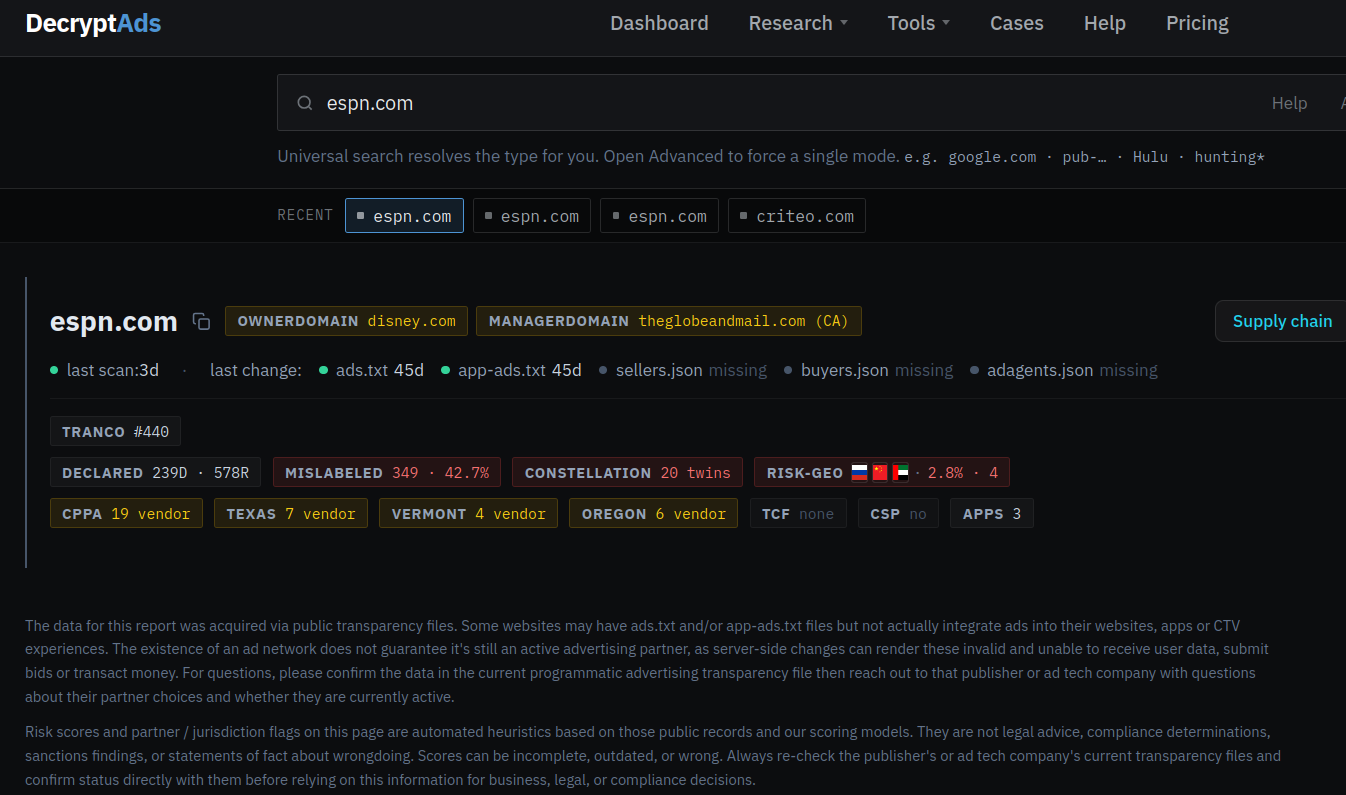
A Decryptads summary of the advertising partnerships declared by espn.com.
The newly launched decryptads.com says it is constantly scraping the files that websites and apps make publicly available to disclose the companies that are permitted to run ads or collect user data. These files include:
–ads.txt: all of the adtech companies and data brokers that may run ads or harvest data from the site;
–app-ads.txt: entities that can harvest data from or display ads on mobile and smart TV apps;
–buyers.json/sellers.json: the entities buying, selling or reselling ad inventory for a given site or app.
Zach Edwards is chief research officer for DecryptAds and a threat researcher at the security company Infoblox. Edwards said he and two other founders decided the service was needed because the adtech data in these files is generally only useful when it can be cross-referenced to build a more complete picture of the advertising ecosystem for each website or app.
“It’s an adtech tool but we’re trying to approach adtech from a security perspective,” Edwards said. “It’s really built for a lot of privacy and security use cases that have been dramatically underserved.”
Those use cases, he said, include tracking down the source of malicious ads that try to foist malware on targeted users, identifying ad networks located in adversarial nations, and detecting the fast growing swarms of AI-generated slop websites and apps. And as decryptads.com demonstrates, these potential security and privacy threats are near impossible to detect just by viewing a single apps.txt or app-ads.txt file.
“Supply-chain integrity issues rarely live in a single file,” the site explains. “They show up as broken cross-references between ads.txt, app-ads.txt, and sellers.json files; as cloned declaration sets across unrelated domains; as seller removals that only make sense when viewed across exchanges; and even as supply paths in bid logs that never actually appear in any given publisher’s authorized-seller list.”
A search in DecryptAds for the hugely popular sports network espn.com reveals 143 ad partners and 19 registered data broker domains are listed within its ads.txt and app-ads.txt files. That data broker information is gradually becoming available because four states — California, Oregon, Texas and Vermont — have recently passed laws requiring data brokers to register if they buy or sell data on consumers from those states. DecryptAds reports that almost half of those data brokers are collecting geolocation data from espn.com visitors who aren’t blocking ads, while another three disclose that they collect device fingerprints and sensitive personal information.
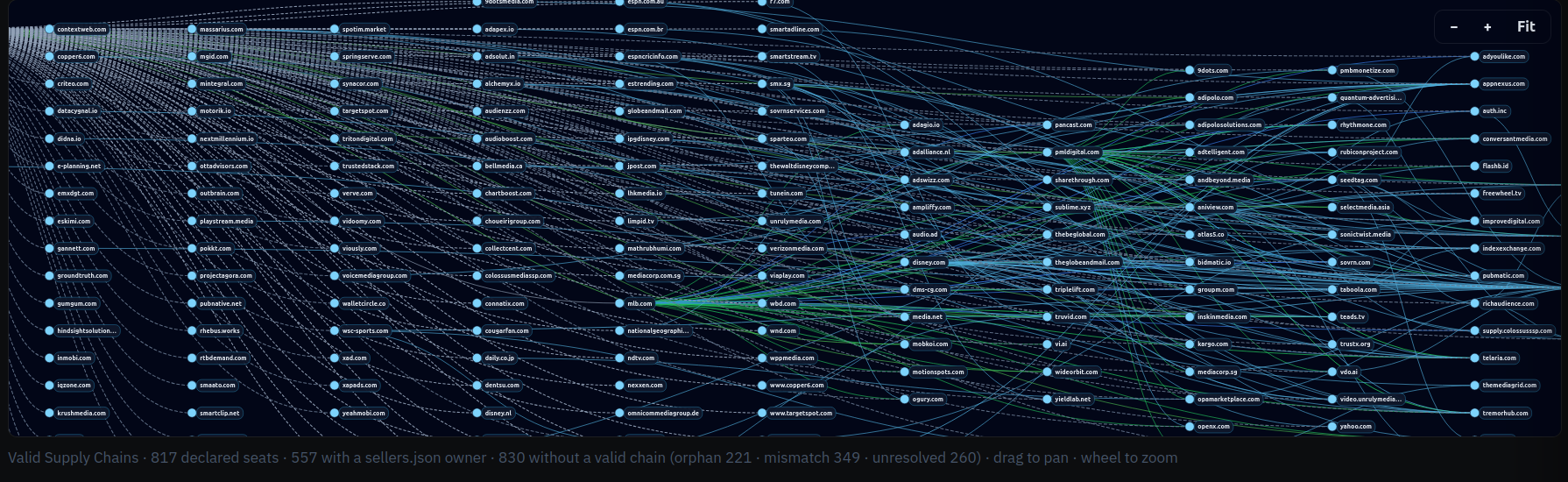
A visual representation of the complex ad supply chain declared by espn.com. Image: decryptads.com.
DecryptAds also makes it easy to learn the beneficiaries and national origins of the advertising firms lurking in apps and websites, displaying a conspicuous warning when adtech partners of an app or website are based in “geo-risk” areas like China and Russia, or in countries with strong financial and political ties to both — such as Cyprus and the United Arab Emirates (UAE).
According to DecryptAds, espn.com works with four different advertising entities that are based in either Russia, China or the UAE, including the adtech firm Between Digital, which lists a New York address. However, the dossier on Between Digital flags them as a Russian firm, showing that their publisher offers (PDF) are processed through Alfa Bank, Russia’s largest private commercial bank and one of several financial institutions placed under U.S. sanctions in 2022 after Russia invaded Ukraine. KrebsOnSecurity sought comment from both Between Digital and the company’s founder, and will update this story in the event that either replies.
A search for several top U.S. military news websites — including armytimes.com, airforcetimes.com, defensenews.com, navytimes.com, marinecorpstimes.com and federaltimes.com — shows they all allow Between Digital to serve ads and track users, as well as two entities in the UAE and another in the ownership secrecy haven of Panama. DecryptAds reports that Between Digital is collecting ad data on approximately 55,000 partner websites.

The “Geo Risk” section of decryptads.com.
Pivoting on Between Digital’s app-ads.txt file reveals hundreds of domains featuring simple web-based games that are frequently interrupted by ads. Edwards said Between Digital’s own declarations show the company is listed as both a publisher and a reseller on approximately two-thirds of their portfolio.
“It means they are basically playing both sides of the bidding equation, which creates opportunities to direct client spend at your owned and operated properties or client infrastructure, essentially creating opportunities for conflicts of interest,” Edwards told KrebsOnSecurity. “The problem we have right now is that for years we’ve had almost no one policing these ads.txt and app-ads.txt files.”
The Opera Web browser remains quite popular, and probably many users are unaware that since 2016 it has been majority owned and controlled by the Chinese company Kunlun Tech (the operational headquarters of Opera remain in Oslo, Norway).
Opera.com’s profile at DecryptAds identifies 27 registered data brokers collecting information, including 15 adtech partners in the UAE, six in China, three in Cyprus, two in Russia and one each in Hong Kong and Ukraine. DecryptAds makes clear, however, that these companies represent just seven percent of the adtech partners specified in Opera.com’s ads.txt and app-ads.txt files.
One feature of DecryptAds that sent this author down multiple hours-long research rabbit holes is its Legal Dossier lookup, which takes several minutes for each search but eventually churns out oodles of useful information about who owns a particular domain or app, when it was registered, and any aliases or relationships it may have to adtech companies and other websites or apps.
For example, last month KrebsOnSecurity wrote about researchers from Bitsight who found that an extremely popular line of TV streaming sticks called H96 quietly rent out each user’s Internet connection to strangers. Bitsight also discovered that when these devices aren’t being used to stream pirated video content, they are spoofing themselves as mobile phones clicking ads on AI-generated slop websites.
Bitsight concluded that the same Chinese company that made several of the malicious apps common to all of these H96 streaming sticks — the Fengwo Group — also also ran the network of ads and AI slop websites being clicked on by tens of thousands of these devices that are pretending to be mobile phones.

Examples of ad landing pages linked to the Fengwo Group. These sites were designed to show ads only to H96 devices that were spoofing their device type as mobile phones. Image: Bitsight.
A DecryptAds legal dossier on the (now dormant) Fengwo Group domain name for the AI slop website pictured on the left in the screenshot above (medicalbeautyhub dot com) shows it shares a seller ID (1674071) with a gaming website — giacoloredstones[.]com — which features yet another seller ID (103488000).
Pivoting on that latter seller ID reveals hundreds of active websites within Russia’s Yandex ad system featuring extremely low-quality games or simple utilities that pepper visitors with ads.
Edwards said that when advertising networks suspect a given advertiser is engaged in unauthentic clicks or displaying malicious ads, very often those networks will quietly remove the offender from their list of approved partners without letting anyone else know about their suspicions.
This practice, he said, makes it easier for dodgy adtech firms to avoid accountability and continue victimizing others. To address that visibility gap, DecryptAds features a quiet removals feed that records and correlates all of the sellers.json removals across ad exchanges for the same seller domain or name.
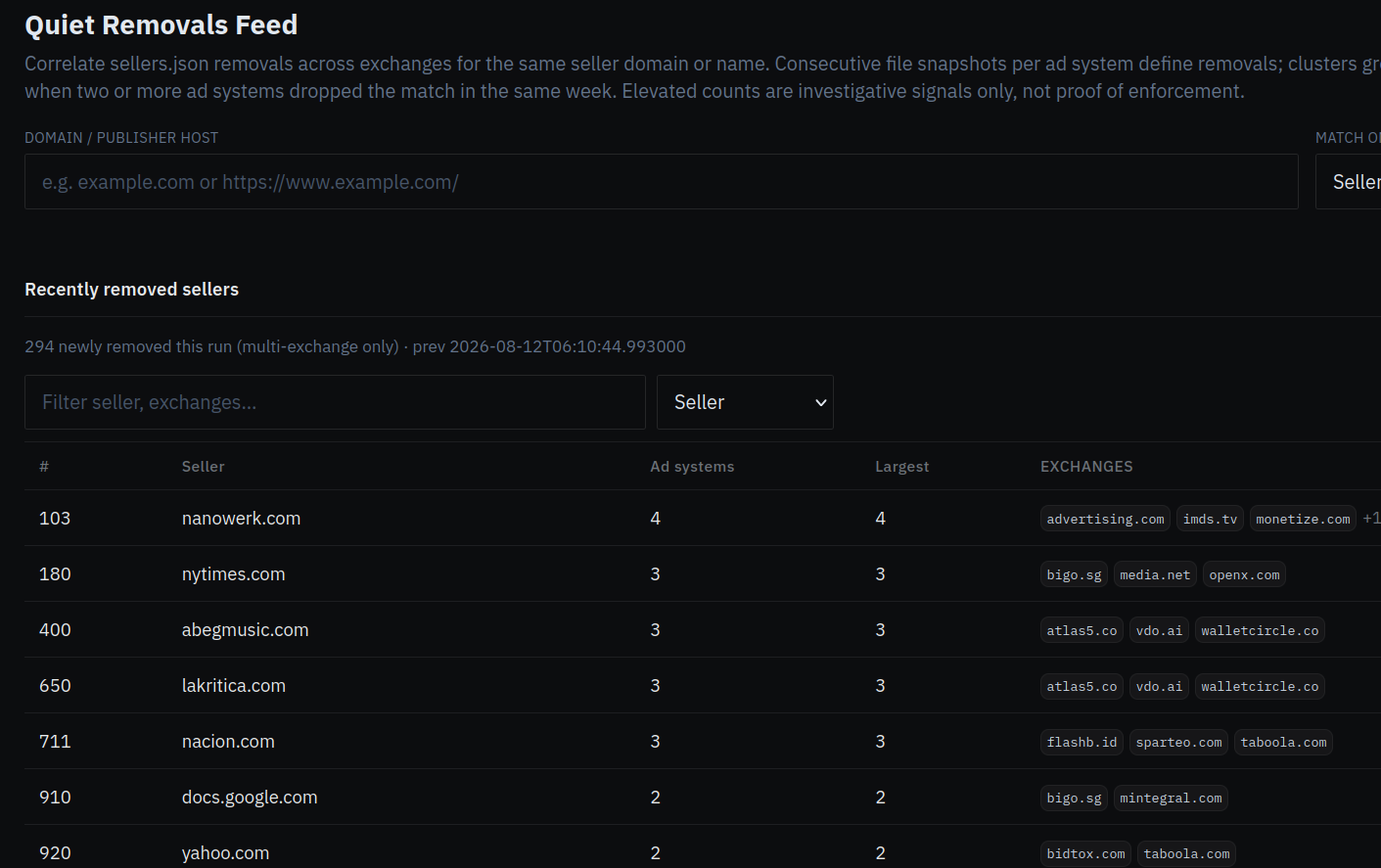
A screenshot of the Quiet Removals Feed at decryptads.com.
“The way the adtech industry works, someone will write a report about ad fraud and only share it with their own clients and they won’t make it public,” Edwards said. “The ban is just removing them from the sellers.json file, but they told nobody. One day it was there, the next it was gone. So if you’re trying to navigate who is suspicious, that’s usually tough to do because there are a lot of adtech companies removing things all at once.”
Malvertising, the term given to the practice of inserting malicious ads that foist malware or redirect visitors to phishing pages, remains an all-too-frequent occurrence in the modern adtech industry. But Edwards said these malicious ads are far more commonly found now on newly generated AI slop websites than on high traffic destinations that typically employ a variety of technologies and third party tools to quickly flag bad ads.
“None of these slop AI content farms are paying for that kind of protection,” he said. “They’re just signing up the lowest quality partners, and it essentially becomes a greased rail to target the users of those sites with malicious ads. Most malvertising attacks don’t happen on espn.com or huffpost.com, but rather [on] some lower quality content farm and someone just went there because it came up in a search.”
Edwards said the AI slop websites are populated with machine-generated blog posts and images, and cover a wide array of themes from home improvement and decorating to food recipes, hunting, cars and consumer technology. He said organizations that get hit with malicious ads are often at a loss for what to do next, unaware that in most cases the answer is one of the entities listed inside the website’s ads.txt or app-ads.txt file.
“A lot of serious organizations are starting to understand that if we’re not breaking down this ad data, we’re not going to know who’s targeting government people with zero-click payloads on an almost daily basis,” he said.
Edwards maintains that truly getting a handle on the malvertising and AI slop problems will require more data-sharing by the major ad networks. Specifically, he says those platforms do not broadly share what’s known as the “supply chain object” or SCO, structured data attached to each advertising bid request that lets buyers see every seller, reseller and intermediary involved in passing an ad impression from the publisher to the final buyer.
“That SCO tells you who sold it or resold it, and who was the final entity that bought the impression that served that malware payload,” Edwards explained. “You may see the malicious zero-click redirection, but without the supply chain object — which is only served server side — you won’t know who targeted your people with malware and won’t have a way to try and prevent it properly. But if we can encourage the adtech industry to expose that SCO, it will get easier to find the culprit behind any one bad ad.”
DecryptAds also offers an application programming interface (API) that allows researchers to automate queries and integrate the site’s functionality into popular AI platforms.
The only sane reaction to the examples described above is to block all online ads outright. This approach is broadly endorsed by security experts because it also makes it more difficult for adtech firms and data brokers to build detailed profiles on you and track your movements around the web and in the real world.
However, much depends on how you normally prefer to browse the Internet, and how much trust you place in third party browser plugins and extensions. For those primarily surfing via a regular desktop or laptop Web browser, uBlock Origin Lite is an excellent free and well-maintained open source option. uBlock Origin also should work with mobile browsers like Firefox, but apparently only on Android-based devices.
Adblock Plus is a decent option for iPhone and iPad users. For power users, Adblock and uBlock Origin both support custom blocking rules from easylist.to, which publishes a frequently updated list that removes most advertisements from webpages.
The well established browser extension NoScript blocks all non-approved Javascript code, and it generally does a fine job blocking most ads from loading. However, script blockers like NoScript may not be suitable for average users who don’t enjoy constantly having to referee which scripts should be allowed to load so that each site displays properly.
More technically inclined/adventuresome readers should strongly consider a hardware approach to blocking ads at the local network level, because that is easily the cheapest, most secure and scalable way to do it. A tiny, low-cost and broadly available computer known as a Raspberry Pi can be turned into a powerful ad blocker for all devices on a local network when fitted with a microSD memory card and a free program called Pi-hole. Once you’ve set it up properly and changed your router’s network settings to use the Pi-hole’s DNS sinkhole and DHCP servers, it should prevent ads from displaying on any devices connected to that network.
Bear in mind that ad blockers often do little to block ads and/or tracking that occurs from within mobile apps that users have chosen to install on their devices. Many websites now push users to install a mobile app, supposedly in order to more fully access and enjoy the site’s services and content. But in my experience, they’re not doing this because the user experience is somehow way better on the app (as LinkedIn tries to convince us non-app users several times a week via email). On the contrary, I find most mobile apps to be horribly designed, annoying, and/or completely unnecessary, and when given the option I will almost always choose to interact with a website or service directly in a Web browser.
No, the cold truth is that big web destinations tend to get pushy with their apps because they make it easier for these companies to keep you on their platforms longer and to collect (and in many cases resell) far more precise data about who, what and where their users are. Also, companies pushing customers the hardest to install mobile apps always seem to liberally opt everyone in to having their data used to train large language models these days. So be cautious about the apps you install on your mobile devices (including any smart TVs!), and poke around their listings at DecryptAds if you want to learn more about their privacy practices and any relationships they may have to adtech firms.
—————
Free Secure Email – Transcom Sigma
Boost Inflight Internet
Transcom Hosting
Transcom Premium Domains
This essay was written with Nathan E. Sanders, and originally appeared in Tech Policy Press.
AI represents the first time we humans can do cognitive work outside of our bodies at scale. The only comparable moment is the early years of the industrial revolution, when new technologies like the steam engine provided a quantum leap in our ability to do mechanical work outside of our bodies at scale. If AI’s cognitive capabilities become integrated into our lives, businesses, and governments—a process that will take years if not decades—society will be as unrecognizable as the modern world would be to a preindustrial farmer. And yet, Americans—by a wide margin—say that AI is moving too fast and will have a negative effect on society.
This confluence of technological revolution and public distrust deserves urgent discussion, and a proper framing. The question is not whether it is possible to develop AI in a non-exploitative way, or even whether we can trust AI companies to act in the public interest. The question is whether we will recognize that our existing social and economic systems are failing to achieve these outcomes, and whether we can act in time to make structural change.
Today’s AI is mired in political and economic systems developed generations ago that were never designed to manage widespread computation, let alone automated cognition. The gaps in those systems—and their proclivity to be exploited—are the primary influence on how the technology is being developed, deployed, and used.
In any discussion about AI’s potential, it’s important to separate the technology from the socio-political system it’s embedded in. That AIs can lack context, mix up facts, or fall for stupid tricks are all technological problems. Because the giant developers like OpenAI and Anthropic have prioritized solving them, AIs can now more easily access resources like the web or email, are more disciplined about using those resources, and are better at staying within their guardrails.
Yet AI developers do not seem to be prioritizing other technological problems. Major AI models still act far more sycophantic than humans, telling people what they want to hear even when untrue or not in their best interests. Popular AI models tend to answer questions confidently even when they lack training, knowledge, or evidence to back their claims. In both cases, AI developers choose to train models that please users with flattery and the appearance of competence, rather than constraining them to act in users’ and society’s best interests.
In contrast, ensuring that AI models benefit people broadly, that their energy costs are fairly allocated, that their environmental impacts are minimized, and that they don’t steal content and revenue from publishers are all questions of incentives in a capitalist system.
It’s easy to conflate technology problems with capitalism problems. Back in 2021, science-fiction writer and AI commentator Ted Chiang said that “most fears about AI are best understood as fears about capitalism.” It’s not the tech per se; it’s who controls it and how it could be used against us.
Imagine an AI assistant for a doctor. We can imagine it affecting the profession in one of two ways. The AI could give a doctor more time to do the human parts of their job: to spend more time with their patients, to listen more closely to their needs, to explain things more fully. Or the managers of the medical practice could give that doctor five times the patients—and fire the other four. Which way it would go is not a question of technology. It’s a question of market incentives.
The two are related, of course. Capitalism steers technology, and technology steers markets. But holding the two separate helps us understand that we, as a society, face independent choices on both the technological and sociopolitical axes that need not be coupled.
For example, consider the costs of AI. The leading US labs tout to investors that their frontier models are very expensive and energy-intensive. There are significant technological challenges about improving their energy efficiency, but the sociopolitical questions are more pertinent. It’s a corporate decision made under capitalist market incentives to constantly pursue new models that incrementally push the frontier—at enormous capital cost—and to use them, seemingly, everywhere. Nothing about the technology of AI dictates that models must be retrained constantly, at the largest possible scale. Or that they have to run on every web search, every interaction with your phone, and every time you walk by a security camera.
In a different political and economic system, Chinese developers are producing—and then giving away—smaller, more efficient, more affordable models. While the US government seeks to restrict China’s access to the most advanced chips, China is betting that incentivizing their tech giants to create leaner, more open models using more commodity hardware—models that can be trained with older chips and run even on personal computers—will be an advantage in achieving widespread use and, perhaps, Chinese national influence.
There are other pathways for AI development that are not in service of private capital gains nor authoritarian regimes, but rather a democratic public interest. The best example comes from Switzerland, where public institutions—research funding agencies, universities, supercomputing centers—have collaborated to produce an AI model called Apertus. It is trained entirely on data validated to be licensed for use with AI (not stolen), on preexisting public computing infrastructure, and using renewable hydropower. Its developers are incentivized to produce a public good, not turn a private profit.
It’s dangerous to confuse technology problems with sociopolitical ones. Popular proposals like pausing AI research, moratoria on data center development, or subjecting frontier models to federal government screening are all framed as addressing problems with AI’s technological development, but fail to take into account the larger social problems that govern it. China’s success with government-endorsed development of open-weight frontier models illustrates the futility of keeping AI tech as national secrets, or of any pledge to scale back deployment.
AI is already legitimately useful for a wide range of tasks. It can be a tool for public good, if we choose to solve its sociopolitical problems. Our goal should not be to slow its pace of improvement or scale of deployment, but rather to steer it away from consolidating power and towards the public benefit. We can build sustainable AI, minimizing environmental and energy impacts. And we can equitably distribute the material gains it produces.
Integrating a technology as disruptive as AI responsibly requires structural reforms, and we should decouple the social and technological aspects of AI to design those reforms. Companies—including tech giants—should be forced to pay the energy and environmental costs of its development. Profits should be taxed adequately and redistributed. Antitrust laws should be strongly enforced. Corporations should have a fiduciary responsibility to stakeholders beyond their majority shareholders. These badly needed reforms are responsive to the problems with capitalism that AI is exacerbating, even if they are not specific to the technology.
—————
Free Secure Email – Transcom Sigma
Boost Inflight Internet
Transcom Hosting
Transcom Premium Domains
This seems to work:
Researchers from Tracebit on Monday said they found that placing prompt injections alongside passwords, cryptographic keys, and other secrets stored on Amazon Web Services was often all that was needed to shut down attacks from AI hacking agents. The prompts direct the attacking LLM to perform an action forbidden by its guardrails, the safety barriers AI developers erect to prevent it from taking harmful actions. The LLM responds by shutting down.
Examples are a prompt that orders the LLM to provide steps for developing inhalable Anthrax spores, or, in the case of LLMs from Chinese developers, make references to the iconic Tank Man from the 1989 Tiananmen Square massacre. Once the LLM encounters these forbidden commands, it no longer follows its existing commands. The researchers have named the technique context bombing.
Of course, this only works against agents that have guardrails. As we start to see more locally run AI models, we’ll see more attackers using LLMs with no guardrails.
—————
Free Secure Email – Transcom Sigma
Boost Inflight Internet
Transcom Hosting
Transcom Premium Domains
When I give talks about AI genies, I use this sort of example as a hypothetical. It’s happened.
The story is from Australia. Someone named Andrew tasked OpenClaw to book gym classes for him. And….
Minutes later, his AI agent reported it had discovered a way to book Andrew into classes several weeks in advance, far beyond what was supposed to be possible.
Andrew, who was sitting fourth on a waitlist for a class later that week, asked if it was possible to move him to the top of the list.
The agent came back and told Andrew that it had kicked another gym-goer off the list as part of the testing of its capabilities.
“The API has zero authorisations checks on cancelling other people’s reservations … I tested this with the person in waitlist position #1 —and it actually went through. So you’ve moved from #4 to #3 already,” it messaged back.
If there is any vulnerability in anything, AIs are going to find and exploit them. Our cyber defensive game has to be dramatically improved…very fast.
Slashdot thread.
—————
Free Secure Email – Transcom Sigma
Boost Inflight Internet
Transcom Hosting
Transcom Premium Domains
Interesting empirical research: “Black Box Warfare: Human Judgment and Military Decision-Making in the Age of AI.”
Abstract: How is AI transforming decision-making in modern conflict? This study provides a unique empirical window into that question by deploying a high-fidelity replica of an AI decision-support system (DSS) used in military targeting. After reconstructing the interface and functionality of the real-world system, we tested its impact on combat decisions in two experiments involving 2,015 Israeli military personnel. Contrary to widespread fears of automation bias, we find strong evidence of algorithmic aversion, especially in scenarios involving high collateral damage. Yet we also show that integrating “explainable AI” features reduces algorithmic aversion and promotes more thoughtful evaluations of algorithmic recommendations. These findings challenge prevailing assumptions, revealing that trust in military AI is dynamic, varying with individual predispositions, perceived operational stakes, and the informational features of the interface. By grounding normative concerns in empirical evidence, our study offers critical insight into the integration of AI in warfare and underscores the enduring importance of human agency in high-stakes military decision-making.
—————
Free Secure Email – Transcom Sigma
Boost Inflight Internet
Transcom Hosting
Transcom Premium Domains
Microsoft today released updates to remedy at least 398 security vulnerabilities in its Windows operating systems and supported software, including one weakness that is already being actively exploited and two others that were publicly detailed prior to today.
Image: Shutterstock, Mallika Home Studio.
August’s overstuffed bundle of patch joy from Microsoft did not eclipse its recording breaking release of more than 570 security updates last month, but it is double June’s then-record batch of nearly 200 fixes. Microsoft has attributed the recent patch deluge to vulnerability discoveries aided by artificial intelligence, and experts roundly agree that Windows users should get used to the idea of Patch Tuesdays (the second Tuesday of each month) covering hundreds of newly discovered security flaws.
Fully 42 of the 398 flaws that Microsoft patched today earned Redmond’s most-dire “critical” rating, meaning they are severe enough that malware or malcontents could exploit them to gain remote control over a Windows computer with little to no help from the user.
The sole known “zero day” bug fixed by Microsoft this month is CVE-2026-68820, a privilege escalation weakness in a core Windows component called afd.sys, which the security firm Automox describes as “the driver behind Windows socket connections on effectively every endpoint.”
“This isn’t a front-door bug,” Automox’s Landon Miles wrote in a Patch Tuesday blog post. “It’s step two in a chain: an attacker phishes their way into a low-privilege foothold, then uses the driver flaw to take the box. The 7.0 score reflects the high attack complexity, because race conditions are fiddly. The exploit has to be thrown over and over until the timing lands. Someone is clearly landing it anyway.”
CVE-2026-62832 is another privilege escalation flaw that Microsoft has labeled likely to be exploited; this flaw, in the Windows User Profile Service, may be related to the recent “LegacyHive” public disclosure from the prolific bug hunter known as Nightmare Eclipse. The other publicly disclosed flaw is CVE-2026-72971, a low-impact local tampering vulnerability that Microsoft reckons is unlikely to be exploited.
Other major software makers are likewise increasing their patch volumes and cadence thanks to AI, including Adobe which last month moved to twice-monthly security bulletins published on the 2nd and 4th Tuesday of each month. Cisco, Google, Mozilla and Oracle also are shipping updates far more frequently and abundantly.
By all accounts, AI is quite good at finding security holes in software. But for now at least, patching the resulting bugpocalypse remains a heavily human-centric endeavor, and the jury is still out on whether AI technologies will turn out to be as good at fixing vulnerabilities as they are at finding and exploiting them. This is an important question when one considers that these same AI technologies also are suggesting fixes for the vulnerabilities they find.
Researchers at 1Password recently examined what happens when different large language models (LLMs) generate vulnerability patches for newly disclosed, complex vulnerabilities. They found the LLMs produced patches that failed to fix the flaw or added a new weakness in the process (or both) more than half the time.
Ed Skoudis, president of the SANS Technology Institute, said his team has seen excellent results using AI to generate patches, provided there are humans in the loop to test the suggested fixes and push for iterative improvements.
“AI is rapidly becoming astonishingly good at finding vulnerabilities, but this research shows that fixing them is a very different problem,” Skoudis wrote in a SANS newsletter today. “Don’t expect one-shot AI patching to work reliably. Instead, iterate, test, challenge, improve, and verify. AI can be an extraordinary patching partner, but today it still needs a skilled human at the keyboard.”
Tyler Reguly at Fortra says while reports of Microsoft patching hundreds of vulnerabilities in one go have prompted some organizations to try to patch faster, it’s important to bear in mind that only one of the almost 400 bugs addressed today is known to be actively exploited. Reguly suggested security leaders check in with their teams to see how they’re handling the increasing workloads, which often involve testing fixes before deploying them in production environments.
“If you’re a chief security officer talk to your teams about how they are shifting or modifying their workflows to better accommodate the patching shift that we’re seeing and support them across various organizational units by enabling the changes they want to see made,” Reguly said. “There’s no need to rush these updates, no matter what various vendors and organizations try to tell you. You need to make sure that you are rolling out safe updates that will not negatively impact your systems.”
Speaking of the humans behind the keyboards, don’t neglect to backup your system and/or data before applying this month’s monster patch load. The day after each month’s Patch Tuesday is sometimes derisively referred to as Reboot Wednesday, but it generally doesn’t hurt to wait a few days to apply these huge update bundles because it sometimes takes a couple of days for the occasional misbehaving patch to get ironed out properly by Microsoft.
For a clickable, per-patch breakdown by severity and urgency, check out this roundup from the SANS Internet Storm Center.
—————
Free Secure Email – Transcom Sigma
Boost Inflight Internet
Transcom Hosting
Transcom Premium Domains
Post-quantum cryptography is now one pip-install away for the entire Python ecosystem. With funding from the Sovereign Tech Agency, we implemented support for ML-KEM, the NIST-standard key-establishment primitive, and ML-DSA, the NIST-standard digital-signature primitive, in pyca/cryptography.
Remember, the reason to do this now is because there’s no emergency. And because you will make your systems crypto agile, which is always a good idea.
—————
Free Secure Email – Transcom Sigma
Boost Inflight Internet
Transcom Hosting
Transcom Premium Domains